


Updated on
October 5, 2026
Computational Thinking: 4 Skills and Classroom Examples
Computational thinking explained through decomposition, pattern recognition, abstraction and algorithms, with practical classroom examples across subjects.


Updated on
October 5, 2026
Computational thinking explained through decomposition, pattern recognition, abstraction and algorithms, with practical classroom examples across subjects.
Computational thinking is a way to solve problems with ideas from computer science. Break a task into small parts. Look for patterns and keep the details that matter.
Write clear steps, then test them and fix any errors. You can work on paper, with objects or with code. The aim is a plan that someone else can follow and check.
On this page
Seymour Papert explored learning with computers in Mindstorms, first published in 1980. Learners could build and test ideas through programming. Jeannette Wing later brought computational thinking to a wider audience in her 2006 essay in Communications of the ACM (Association for Computing Machinery).
Wing's claim was broad: ideas from computer science could help people solve problems and design systems. Her essay set out a vision. Later studies examined what learners gained from specific tasks and lessons.
| Date | Contribution | How to read it |
|---|---|---|
| 1980 | Papert: Mindstorms links programming with learning through making. | A book about learning, computers and powerful ideas. |
| 2006 | Wing: an essay argues for wider use of computing ideas. | A statement of a vision, rather than a classroom trial. |
| 2012 | Brennan and Resnick study concepts, practices and perspectives in Scratch. | A framework for examining what young designers learn. |
Wing (2006) used examples from daily life to make her case. Packing what you need for the day and retracing your steps after losing something show how a task can be planned or searched. Read her original essay alongside the worked examples below.
Lei et al. (2020) found a link between computational thinking and academic achievement across 34 studies. A link shows that two measures vary together. Testing whether one causes the other needs a different kind of evidence.
Digital literacy concerns how people use and judge digital tools. Computational thinking focuses on how a problem is framed and solved. The two can work together when a learner chooses a tool for a clear purpose.
Computational thinking can help with tasks in software, data analysis, science, engineering and logistics. A developer splits a system into parts. A researcher looks for patterns in measurements. A planner writes rules for allocating deliveries.
In each case, the useful skill depends on the task. Knowledge of the subject helps people choose which details to keep and whether the answer makes sense. A clear method supports that judgement.
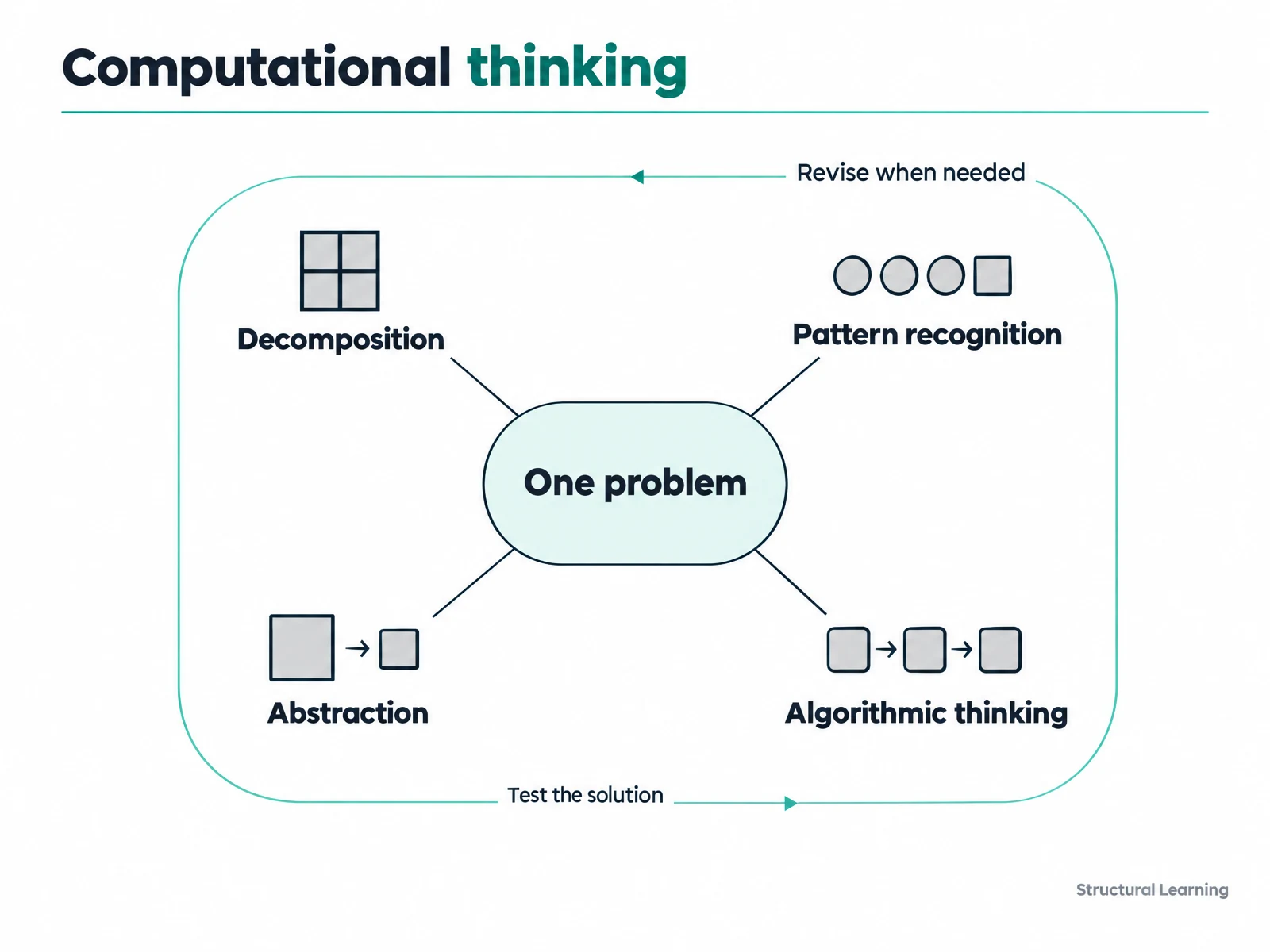
The four pillars are decomposition, pattern recognition, abstraction and algorithmic thinking. They offer a common way to organise the skills taught in computing. Wing's 2006 essay described a broader set of ideas. This four-part model is a teaching guide, rather than a sequence every task must follow.
| Pillar | What it does | Example in computing | Example in other subjects |
|---|---|---|---|
| Decomposition | Split a large task into smaller parts. | Split a computer program into functions, each with one job. | Writing: plan the introduction, main paragraphs and conclusion. Maths: split a word problem into steps. |
| Pattern recognition | Find features that repeat or match. | Spot repeated code that could become a function. | Science: find a trend in data. History: compare themes across events. |
| Abstraction | Keep the details needed for the task. | Use an application programming interface (API) to request data through a set of rules. | Art: use simple shapes to show an object. Geography: keep only the map features needed for a route. |
| Algorithmic thinking | Write clear steps that reach a goal. | Plan steps in pseudocode, which describes code in plain words, or a flowchart. | Cooking: follow a recipe. Maths: follow the order of operations. |
A task may draw on several pillars at once. Planning an animation means splitting scenes, spotting repeated actions and choosing what to show. You then write steps and test whether they produce the scene you intended.
The four pillars are a later teaching summary, not Wing's own list. Wing (2006) argued more broadly that computational thinking means solving problems, designing systems and understanding human behaviour by drawing on ideas from computer science. School materials such as BBC Bitesize later grouped those ideas into decomposition, pattern recognition, abstraction and algorithms.
For revision, link each pillar to a clear action in the question. Look for what was split, matched, kept or put in order. The subject and curriculum provide the context for that action.
A computational thinking diagram connects a problem to its smaller parts, useful patterns, relevant details and planned steps. Testing the result can send you back to any part, so the links work both ways.
The problem: find a route from home to school.
Test the route. If it fails, revise the parts, patterns, details or directions that caused the error.
Wing (2006) described using decomposition to tackle a large task. Learners separate the problem into smaller parts. Each part needs a clear job, so the parts can be joined into a solution.
Breaking a task down makes its parts easier to see and plan. Work on one part, then check how it connects to the whole. The value lies in choosing parts that can be solved and joined into a useful answer.
Decomposition gives an essay plan smaller parts to work on. Choose a topic, gather information, outline the argument and write the paragraphs. Check what each part contributes to the whole essay. Return to the plan and the wording when editing.
Decomposition in maths means breaking down problems. Learners identify given information and what they must find. They choose operations and solve each step (Polya, 1945). This approach supports systematic thinking and avoids overwhelming learners.
Pattern recognition means spotting similarities in data. Look for a feature that repeats or a link between cases. Then check whether the pattern fits another case before using it to plan a solution.
Pattern recognition helps learners in many subjects. In maths, learners see patterns in number sequences. In science, learners look for regularities in results, such as a reaction that speeds up as the temperature rises. In history, they compare causes across periods, such as the part taxation played in several revolutions.
A useful pattern points towards a method you might reuse. Check that the new problem shares the features that made the earlier method work. A similar surface detail can hide a different problem. For a comparison, read about schema theory and information processing theory.
Help learners compare new problems with familiar ones. A sorting activity can make the similarities and differences visible. Ask what rule the learner used to group the information. Discuss whether that rule still works for a new example.
Abstraction helps learners focus on key information and ignore irrelevant details. This skill lets learners find core problem elements. They can use simple models showing essential features (Brennan & Resnick, 2012).
An abstraction is a simple model built for a purpose. A fraction chart keeps the shares and the whole visible. A route map keeps stations and links visible. Check whether the model keeps the detail that your question needs.
In science, use a simple model to show the main parts of a complex system. Maps in geography are abstractions, displaying key information (Boardman, 1983). Learners focus on specifics and ignore extra details (Uttal, 2000).
Ask learners which information they need for the question. Use models and diagrams to show complex ideas (Bruner, 1966). Invite learners to explain the model in their own words. Check that the explanation includes the details needed for the task.
An algorithm is a clear set of steps for a task. A person can follow the steps, or a computer can run code based on them. For a useful algorithm, say what information it starts with and what result it should produce.
Algorithms are used in computer programming and in daily tasks. Cooking recipes act as algorithms. Long division uses algorithmic steps. Learners follow an ordered set of steps when getting dressed.
Algorithms assist learners with logical thinking and methodical problem-solving. Creating algorithms builds planning and sequencing skills. This helps learners facing organisational challenges . Algorithms give learners clear and structured ways to learn.
Ask learners to write instructions for a task, then draw a flowchart of the steps. Break a complex procedure into parts that can be checked separately. Use metacognition, or awareness of your own thinking, to explain a choice and review the result.
Debugging means finding and fixing an error. First notice that the result differs from the goal. Then test the steps to locate the cause, make a change and try again. Debugging supports work with the four pillars, and wider frameworks also include practices such as testing and evaluation.
A Year 3 learner who swaps an unclear sandwich instruction for a precise one is debugging. A Year 7 learner who finds an error at line four of a maths proof is doing the same kind of check. In both cases, explain the cause and test the correction.
Computational thinking examples include planning a meal, spotting a repeating timetable, choosing details for a route map and writing instructions for a game. In each case, identify the problem and explain how the chosen skill helps solve it.
| Pillar | Problem | Worked solution |
|---|---|---|
| Decomposition | Prepare a pasta meal. | Split the task into preparing the sauce, cooking the pasta and setting the table. Each part has a clear job and can be planned separately. |
| Pattern recognition | Bus arrivals are 08:10, 08:20 and 08:30. | Spot a ten-minute gap between arrivals. If the same pattern continues, predict 08:40 and check it against the next recorded arrival. |
| Abstraction | Choose a route from home to school. | Keep roads, junctions and travel times. Leave out roof colours because they do not affect this route choice. |
| Algorithmic thinking | Give directions through a grid. | Write: move forward two squares, turn right, move forward one square, then stop. Trace the steps to check that they reach the goal. |
Planning a route to school uses computational thinking when you split the journey, compare routes, keep relevant travel details and write directions. Testing those directions checks that another person can follow the solution.
For example, a map shows two routes: one takes 12 minutes and one takes 18. If arriving on time is the goal, keep those times and the relevant junctions. Choose the 12-minute route, write the turns and trace them on the map.
A clear exam answer names the skill, points to the action in the question and explains why it fits. Use details from the scenario so that your answer shows the thinking behind the label.
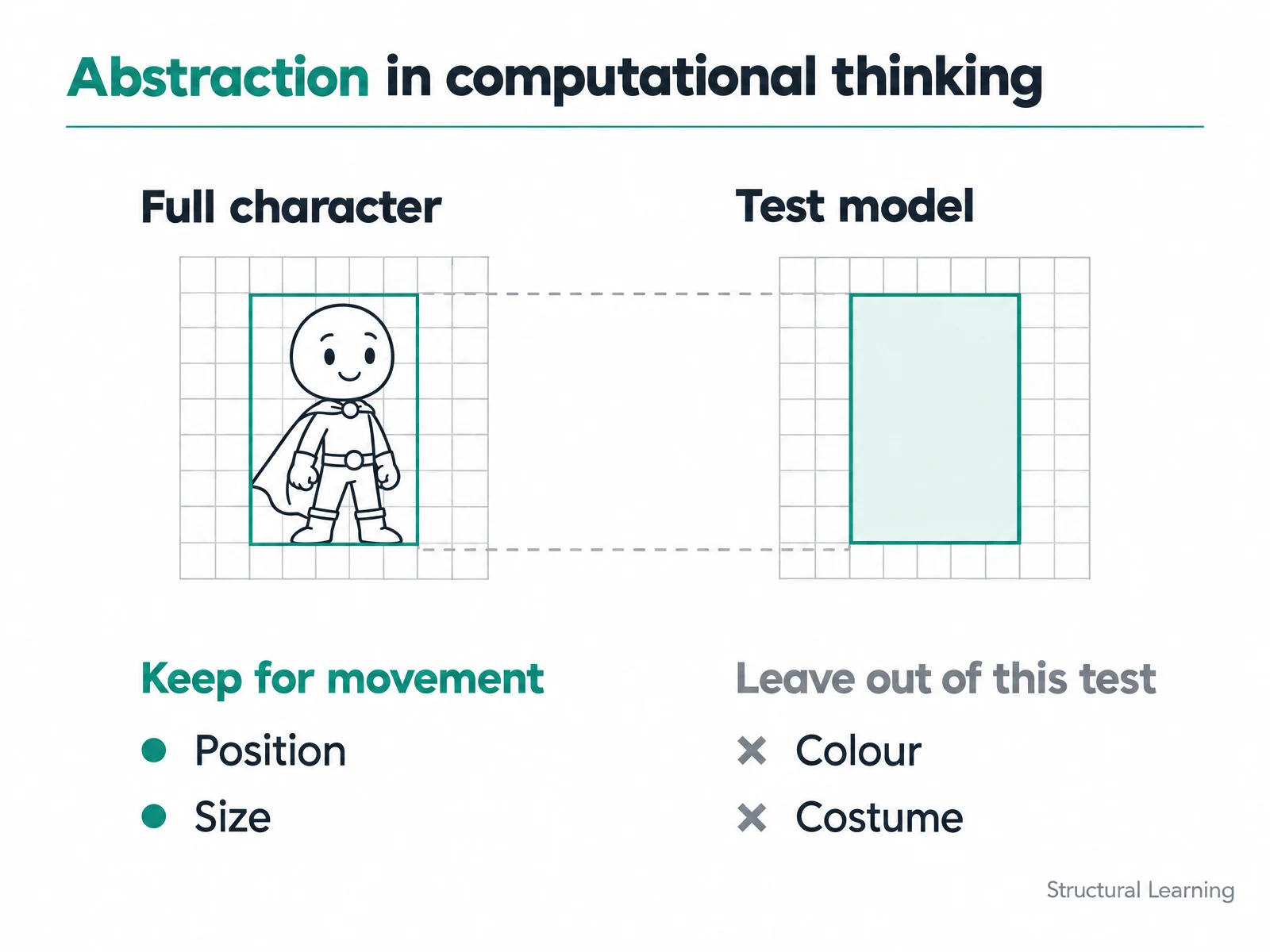
Question: A graphics artist uses a simple rectangle to represent a game character while testing movement. Which pillar is this, and why? Worked answer: Abstraction. The artist keeps size and position because they affect movement. Colour and costume can be left out of this test.
Computational thinking is an approach to framing and solving problems with ideas from computing. Computer science is the field that studies computation and computer systems. Programming puts a planned solution into code that a computer can run.
| Term | Focus | Example |
|---|---|---|
| Computational thinking | Plan, represent and test a solution. | Choose a way to sort a set of names. |
| Computer science | Study computation, algorithms and computer systems. | Compare how different sorting methods work. |
| Programming | Express a solution in a coding language. | Write and test the chosen sorting method in Python. |
Algorithmic thinking is a related term, though it names only the part concerned with clear steps. Computational problem-solving is another close phrase. Computational thinking also includes how a problem is split up and represented.
When revising, keep the terms distinct. Decomposition names splitting a task, while abstraction names choosing the details needed for a purpose. Use the term that describes the action in the question.
At General Certificate of Secondary Education (GCSE) level, computational thinking helps you split a problem, choose key details and plan clear steps to solve it. You also trace those steps, check the result and fix errors.
Cambridge OCR (an exam board) lists three principles in its J277 course: abstraction, decomposition and algorithmic thinking. These sit in its second exam paper. That paper covers computational thinking, algorithms and programming. Pattern recognition is useful in the common four-pillar model. Use your own board's list to plan your revision.
When a question asks you to explain a skill, show what it does in the given task. For a maze, say how you split the route or choose the details to keep. When it asks you to trace steps, work through them in order and record the result.
England's National Curriculum for Computing builds these skills over the key stages. Early tasks use short sets of steps. Later work includes models and choices between ways to solve a problem. The table shows examples of this growth in thinking.
| Key stage | What the curriculum develops | Example task |
|---|---|---|
| Key stage 1 | Understand algorithms, create and debug simple programs, predict what they do. | Predict where a short sequence of moves will end. |
| Key stage 2 | Split problems into parts and use sequence, choices and repetition in programs. | Break a game into jobs and test a repeated action. |
| Key stage 3 | Use models, compare algorithms and use at least one text-based programming language. | Compare two sorting methods using the same set of names. |
| Key stage 4 | Develop problem-solving, design and computational thinking skills. | Design and test a solution against a clear set of requirements. |
See the Department for Education computing programmes of study for the full requirements in England. GCSE courses build on this work. The table covers the parts that relate to the thinking skills explained here.
The main debates concern what the term includes and whether skills transfer to new subjects. If every kind of problem-solving is called computational thinking, the label adds little. A useful account names the computing idea, the task and the evidence of learning.
Transfer means using a skill in a new setting. Success in a coding task does not prove that the learner will solve an unfamiliar maths or history problem better. Those outcomes need their own measures. Subject knowledge still helps the learner judge a solution.
Zhang et al. (2025) reviewed 33 research syntheses and found uneven quality across them. Positive results should be read alongside the tasks, teaching methods and tests used. That supports a careful claim about particular activities, rather than a promise of general gains.
A further limit is the fit of the model. A timetable needs clear rules, while a dispute or an artwork also calls for human judgement. Use a structured method where it clarifies a task, and keep room for meaning, values and context.
Keep the task tied to the idea being taught. Start with a familiar problem, ask learners to explain their choices and test the result. The same approach can support work in more than one subject.
Year 7, computing, route directions. Give pairs a paper grid with a start and a goal. Ask one learner to write moves and the other to trace them exactly, then revise any step that sends the route off course.
Look for: learners name the faulty step, explain its effect and show that their corrected route reaches the goal.
This illustrative example shows a Year 7 computing task in the secondary phase. Use the grid from the planning sheet below. Trace each move before reading the completed answer.
Unplugged activities teach computational thinking off-screen. Year 1 learners can order objects by height and describe their sorting rule. Year 4 learners can write treasure-hunt directions for a partner to test. These tasks practise clear steps and debugging.
Binary birthday cards show how numbers can be built from place values of 1, 2, 4, 8 and 16. Here binary means using two digits, zero and one. Link the task to curriculum content so that learners can explain the idea behind the game.
Scratch is a visual programming tool from the Massachusetts Institute of Technology (MIT). Learners join blocks to build code and test its logic. For example, making an animation involves splitting scenes, arranging actions and debugging the result (Brennan & Resnick, 2012).
For a Year 4 water-cycle animation, split the model into evaporation, condensation and rainfall. Ask learners to explain the order before they choose blocks. A later move to text-based coding should build on their understanding of the same logic. Here is how these tasks look in real classrooms this term.
Four short posts from classrooms: Scratch selection, a micro:bit sensor and two unplugged tasks.
Year 5 computing - This week children continued their work on selection and programmed their own true and false conditions on Scratch.
The measuring motion using the microbit built in accelerometer session with my three Year 5 classes was exceptionally engaging.
Today, students tackled an unplugged coding challenge with Flurb, using sequencing, logic, & problem-solving to help their fuzzy friend find his way!
doing some unplugged coding of a treasure map and using the engineering design process to make a freestanding flagpole
In English, break an essay into sections and plan what each part must do. In science, compare a data set and state the pattern found. In maths, write the steps for a calculation and test a case. Ask learners to explain the action as well as name the pillar.
A learner who names a pillar without giving an example needs a smaller prompt: show the part you split or the detail you kept. If the plan misses a step, trace it together. If the result is correct, ask what would happen when one input changes.
Use short tasks before larger projects. A history comparison can reveal a recurring theme, while a geography map can show abstraction. Ask what the comparison or model keeps and what it leaves out. This checks the reasoning behind the response.
Computational thinking can be assessed through a finished solution, the steps used to build it and an explanation of choices or fixes. A short discussion helps reveal whether the learner understands why the method works.
Brennan and Resnick (2012) examine concepts, practices and perspectives through Scratch projects. Their assessment approaches include project analysis, interviews about the work and design tasks. A practical check is to ask learners to explain one choice and one change.
| Learner signal | What it shows | Next teaching move |
|---|---|---|
| Names parts but misses a needed job | The breakdown is incomplete. | Ask which part produces each needed result. |
| Keeps every detail in the model | The purpose of the model needs to be clearer. | Change one detail and ask whether it affects the answer. |
| Gives steps that another learner can follow | The instructions are clear for this case. | Try a different input and compare the result. |
| Fixes an error and explains the cause | The learner can test and refine the solution. | Ask for a second case that checks the same fix. |
Prompt engineering means writing and refining instructions for an artificial intelligence (AI) tool. It can draw on decomposition and abstraction when a learner states a task and chooses useful details. The response then needs checking against the goal.
For example, specify a topic, a year group and the kind of question wanted. Compare the output with those requirements and revise an unclear instruction. This shows how a planned task can be refined, alongside the other examples in this section.
Use this quick reference after working through an example. Match the action to the pillar, then explain it with details from the task. You can print this section or use it as a revision checklist.
After choosing a method, test a case and explain any correction. A strong answer connects the skill to a specific action. Use the questions and quiz below to check that link.
For a new problem, ask which of these actions will help and why. Choose the details needed for the task, try the steps and compare the result with the goal. Practise those actions with the Year 7 computing worksheet: plan, test, explain below, then write how you checked your route.
Computational thinking: plan, test, explain. Plan a route.
Move from Home to School on the grid. Use up, down, left and right moves. Stay inside the grid and avoid blocked squares. The grid is 5 by 5, with columns 1 to 5 from left to right and rows 1 to 5 from top to bottom.
Home is at row 1, column 1. School is at row 5, column 5. Blocked squares are at row 2 column 2, row 3 column 2 and row 3 column 3.
Split: what smaller parts can you split the journey into? Spot: which moves or shapes repeat in your route? Keep: which map details do you need to plan the route? What can you leave out?
Order: write clear directions that another learner can follow. Test: ask a partner to trace your directions exactly. Where did the route go wrong? Change that step and test again.
Explain: name one pillar you used. Point to an action in your work and explain why it fits. Each prompt has blank writing space.
Check your thinking. My directions reach School and avoid blocked squares. I can explain a choice and a correction.
Computational thinking questions ask you to recognise a skill and explain its use in a scenario. Try each question before opening the answer. Then compare your reason with the worked explanation, as well as checking the pillar name.
Decomposition. The planner breaks the event into smaller jobs. Each job can be planned separately, then joined with the others.
Pattern recognition. The same time appears across the days. That repeated feature helps you describe the timetable.
Abstraction. The map keeps the details needed for the route. Building colours can be left out because they do not affect this task.
Algorithmic thinking. The moves form a clear sequence of instructions. Trace them to test that they reach the goal.
In primary and secondary education, computational thinking helps learners break a task into parts, choose useful details and plan clear steps that can be tested. The task can use paper, objects or code, depending on the skill being taught.
Computational thinking gives learners ways to plan a task, represent useful details and check a solution. The practical benefit is a clearer explanation of how an answer was reached. Research reports gains on specific taught skills and tests.
In English, decomposition can help learners plan the sections of an essay. In science, pattern recognition helps them describe trends in data. In physical education (PE), ordered instructions can set out a movement sequence. Ask learners to explain how the chosen skill helps with the task.
One frequent error is assuming that these skills can only be taught through coding or computer science lessons. Some practitioners also move too quickly to digital tools before learners have had enough time to practise the logic using physical resources. It is also a mistake to treat the four pillars as separate entities rather than an integrated thinking process.
Research finds benefits from several taught approaches, including programming and unplugged activities. Li et al. (2022) found both approaches useful. The result depends on the task, the teaching and the way progress is measured.
Kirschner (2002) found that breaking tasks down reduces how much learners need to think about at once. Visual aids help learners with communication difficulties predict what comes next. Parsons & Cobb (2011) discovered clear steps ease anxiety by giving structure.
Mindstorms by Seymour Papert is a starting point for the history of learning through programming. Computational Thinking Education, edited by Siu-Cheung Kong and Harold Abelson, offers a later collection of research and approaches to education.
Jeannette Wing's 2006 computational thinking essay is available as a three-page PDF from Carnegie Mellon University. It explains her argument for a skill that people can use across fields, with everyday examples.
Read Wing's Computational Thinking essay (PDF). For a short revision aid, print the quick reference above and add one worked example of your own. Use the essay when you need the original argument.
Begin with Wing's original essay for the broad argument. Read Papert for the earlier learning vision, then use reviews and studies to examine what was taught and tested. The books and references below offer different ways into the topic. For a wider comparison, see our overview of learning theories.
These steps describe a useful cycle, rather than a fixed order for every problem. A failed test may send you back to the details or the plan. The four pillars can help at more than one point in this cycle.
Break down a complex problem into smaller, manageable steps. Choose a scenario, then sort the sub-tasks into the correct order.
Use these readings to compare the question asked, the task used and the way learning was checked. Take notes on the age group and subject before judging whether the findings fit another setting. This keeps the claim tied to the study.
Programming tasks can make a learner's plan visible through code and its output. A review can bring together different ways of teaching those tasks. Compare the goal, the activity and the measure used in each study.
Tikva & Tambouris (2021)
When reading about a programming model, ask how it treats planning, testing and revision. Then compare those practices with the four-pillar guide used here. The frameworks may group the same actions in different ways.
Maths tasks can involve looking for a pattern or expressing a rule as steps. A lesson should make clear which maths idea is being studied. Compare the mathematical reasoning with the computing skill being practised.
Ye et al. (2023)
For example, a primary maths task might ask learners to extend a number pattern. A secondary task might ask them to write a rule for a function. In each case, identify the maths content as well as the method used.
Computational Thinking in K-12 Education: An Insight Through Meta-Analysis. Merino-Armero et al. (2022; first published online in 2021)
The linked paper examines computational thinking interventions in school education. Read its programming results alongside Chen et al. (2023) on unplugged activities. The approaches and measures used shape what can be compared.
Projects can give learners a reason to plan, build and test a solution. A finished product shows one part of the work. The choices and revisions made during the task give further evidence of the thinking involved.
Montiel & Gomez Zermeño (2021)
Compare a short structured task with an open project. The first can make a particular action easier to see, while the second involves more choices about the plan. Ask which kind of work the evidence describes.
Programming studies often measure how learners plan and test code. Compare the teaching method with the skill measured. A gain on one test gives evidence about that outcome.
Xu, Wang & Wang (2022)
For a coding study, record how the task was taught and whether learners worked alone or together. Look at how the test measured progress. Those details help you compare the findings with another task.


![Restorative Justice in Schools: A Complete Guide [2026]](https://cdn.prod.website-files.com/5b69a01ba2e409501de055d1/69d10d1b8439e584054873c1_69d10d186a5477665840c608_restorative-justice-in-schools-classroom-teaching.webp)