Updated on
September 9, 2026
Topmarks Games: Fluency & Engagement, Not a Replacement
How to use Topmarks to build fluency and maintain engagement. Understand when games help learning (retrieval practice) and when they don't (conceptual gaps).

Updated on
September 9, 2026
How to use Topmarks to build fluency and maintain engagement. Understand when games help learning (retrieval practice) and when they don't (conceptual gaps).
What is Topmarks?
Topmarks is a free website offering educational games and interactive resources for primary teachers and parents, especially strong for quick maths and phonics practice. For teachers, it is best used for short bursts of fluency practice and engagement, a supplement that sharpens recall, rather than a complete teaching scheme.
Topmarks is still one of the best sources of free educational games for primary teachers in 2026, especially for quick maths and phonics practise. In this review, we look at the Topmarks games that are most worth using today, what the platform does well, and where it can feel a little dated.
You will also find practical ways to use favourites like Hit the Button and Daily 10 for starters, interventions, and independent learning. If you want to know whether Topmarks still deserves a place in your classroom toolkit, keep reading.
Quick answer: Top Marks is a free UK-based learning site offering over 400 educational games for ages 3 to 14, covering maths, literacy, and cross-curricular topics. It requires no login and works on classroom whiteboards and learner tablets , making it a go-to for primary teachers planning starter activities, home learning, and quick revision sessions.
A Year 4 teacher uses Hit the Button for a five-minute starter, but the learning does not stop when the timer ends. Learners practise the 7 and 8 times tables, write down one fact that slowed them down, and explain the strategy they used. That short discussion matters because fluency is not only speed; it is accurate, efficient and flexible use of number facts.
Topmarks is useful because it is quick, familiar and free on the web. It is also limited. The best teachers treat it as one part of a lesson sequence: model the strategy first, use the game for focused retrieval, then move back to mini-whiteboards, manipulatives or written reasoning so learners can transfer the skill.
Topmarks is a free educational website providing interactive games and resources for primary-aged children. Founded in 1998, it has become one of the most popular educational websites in the UK, visited by millions of teachers, parents, and children each year. The site is supported by advertising, which allows all content to remain free.
Topmarks offers free access to all games and resources, unlike paid platforms. This benefits schools with budget limits and families supporting home learning. Researchers like Hodgen and Wiliam (2006) explore the impact of free resources.
The games link to year groups and learning outcomes. This supports the school curriculum. Teachers can find resources that match their lessons. This helps to strengthen learner knowledge (Rosenshine, 2012). Numeracy games build skills from Reception counting to Year 6 problem-solving. This structured design aids teaching. It does more than just fill time (Rosenshine, 2012).
Topmarks helps busy teachers manage classrooms. Games load fast on school devices and need little tech help. Learners access games without accounts, saving time. Intuitive design lets learners choose activities themselves. Teachers then support individual learners (Vygotsky, 1978). Adjustable levels let teachers differentiate (Tomlinson, 2001) and keep learners engaged (Deci & Ryan, 2000).
Topmarks is completely free for schools, teachers, parents, and children with no subscription fees or hidden costs. All games and resources are accessible without payment because the site is funded through advertising. There are no premium tiers or paid upgrades required to access any educational content.
| School Use | FREE | All games and resources |
| Home Use | FREE | All games and resources |
| Interactive Whiteboard | FREE | All games designed for IWB use |
Topmarks is genuinely, completely free. There are no premium tiers, no paid upgrades, and no school subscriptions required. The site is funded through advertising, which means users may see adverts, but all educational content is freely accessible.
Maths games are a key site strength, covering numbers to fractions and problem-solving. Games are organised by topic and age for easy learning objective alignment. "Hit the Button" and "Daily10" are popular, alongside place value games. The platform supports lesson planning for learners of varying abilities.
Literacy games cover phonics, spelling, grammar, and punctuation. These resources help to build reading skills. Spelling games are also available. Phonics games often match systematic synthetic phonics methods (Johnston & Watson, 2005).
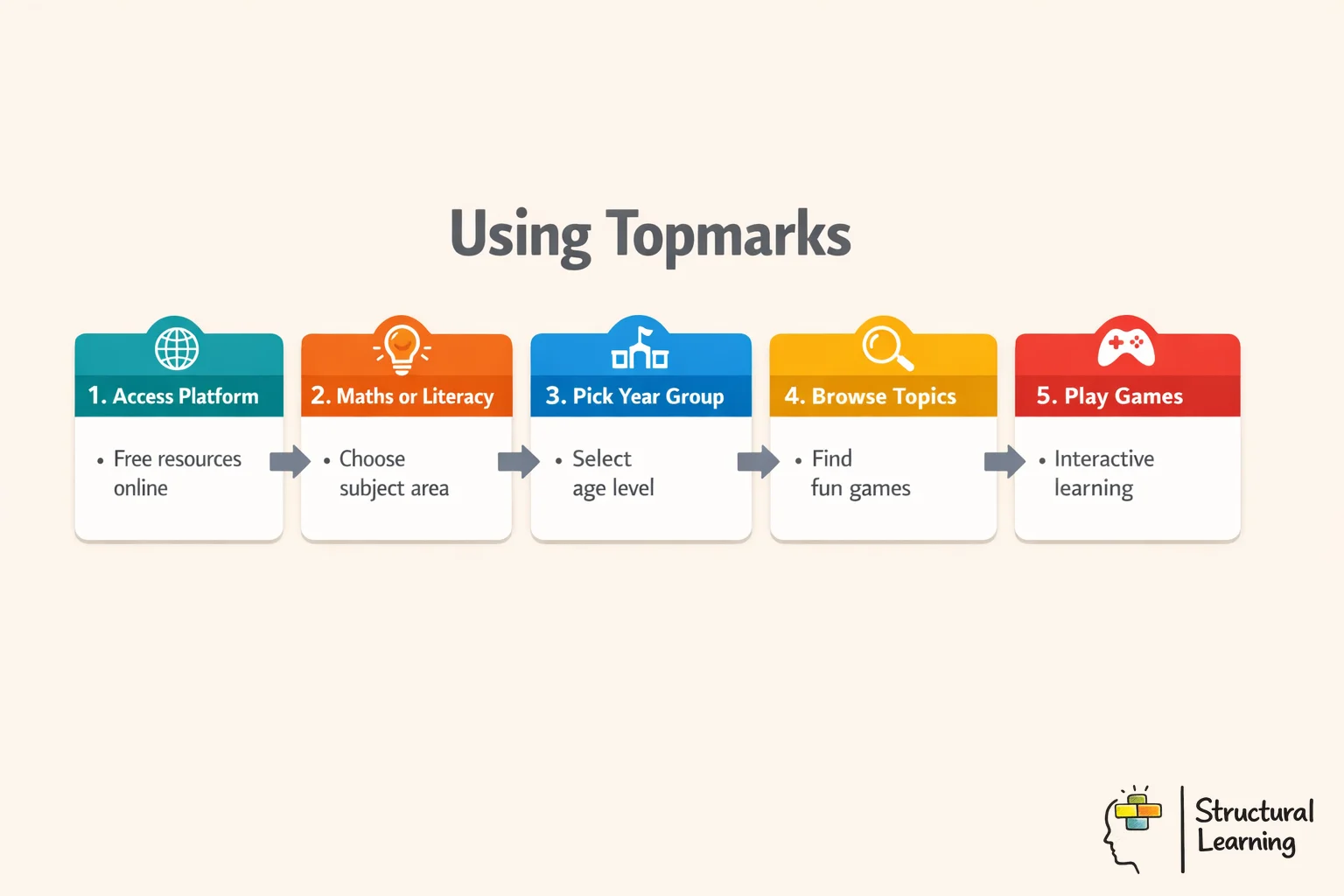
Topmarks has science, geography, and history games, but maths and English are stronger. The site links to good educational content from other sources. This is in addition to its own games.
Using Topmarks in class involves selecting suitable games that support specific lesson aims. Preview games and show learners how to play on the board. Integrate the games into lesson plans. Regular game use boosts learner engagement and reinforces learning.
Topmarks games suit whole-class use on interactive whiteboards. Teachers use them for starters or mental maths. The visual style engages learners and they collaboratively solve problems (Topmarks, various dates).
Topmarks helps learners practise independently on computers or tablets. Games give immediate feedback, so learners learn from errors. This lets teachers support groups as learners build self-regulation.
Teachers can recommend specific Topmarks games for home practise. Since no accounts or passwords are required, access is straightforward for families. This supports learning continuity between school and home without creating access barriers.
You can boost learner outcomes with Topmarks by using focused games often. This regular use strengthens success across key subjects. Teachers get better results by picking the right games and tracking progress. This approach supports the curriculum. Regular use boosts both maths and literacy skills.
Topmarks games boost learner outcomes when teachers plan lessons around them. These games support learners with special needs and allow for differentiated learning. Motivation increases through game-based learning with Topmarks.
Teachers choose Topmarks when they need a fast, low-barrier activity that supports a clear lesson aim. It works best as a short retrieval task, modelled whole-class game, homework prompt or intervention warm-up. It should not replace explanation, feedback or written reasoning.
Topmarks offers many great benefits. However, teachers must also think about some possible drawbacks.
Games by key stage and age group are digital activities selected to match learners' developmental stages and curriculum expectations. Simple counting games aid Reception and Year 1 learners with numeracy and literacy. Years 2-3 enjoy complex games that develop problem-solving (Piaget, 1936; Vygotsky, 1978). These games build skills in addition, phonics, and abstract thought.
These games stretch thinking for learners in Years 4 to 6. Useful activities cover multiplication, division, fractions, and literacy. John Sweller's cognitive load theory shows that play stops mental overload. Sweller also states that breaking down information helps learners to remember more.
Game complexity should match learner needs, not just year groups. Introduce games during guided practice; you can check understanding. This ensures games improve teaching and make learning meaningful. Games support curriculum goals for all ability levels.
National Curriculum fit refers to how well Topmarks games align with statutory maths and English learning expectations. This helps teachers trust the activities meet learning needs. The games build learner skills, from number work (Year 1) to algebra (Year 6). English games cover phonics, grammar and reading.
Games link to curriculum goals and help with lesson plans. Maths games use the concrete, pictorial and abstract approach. Literacy games support systematic synthetic phonics. This link boosts learning well beyond simple fun.
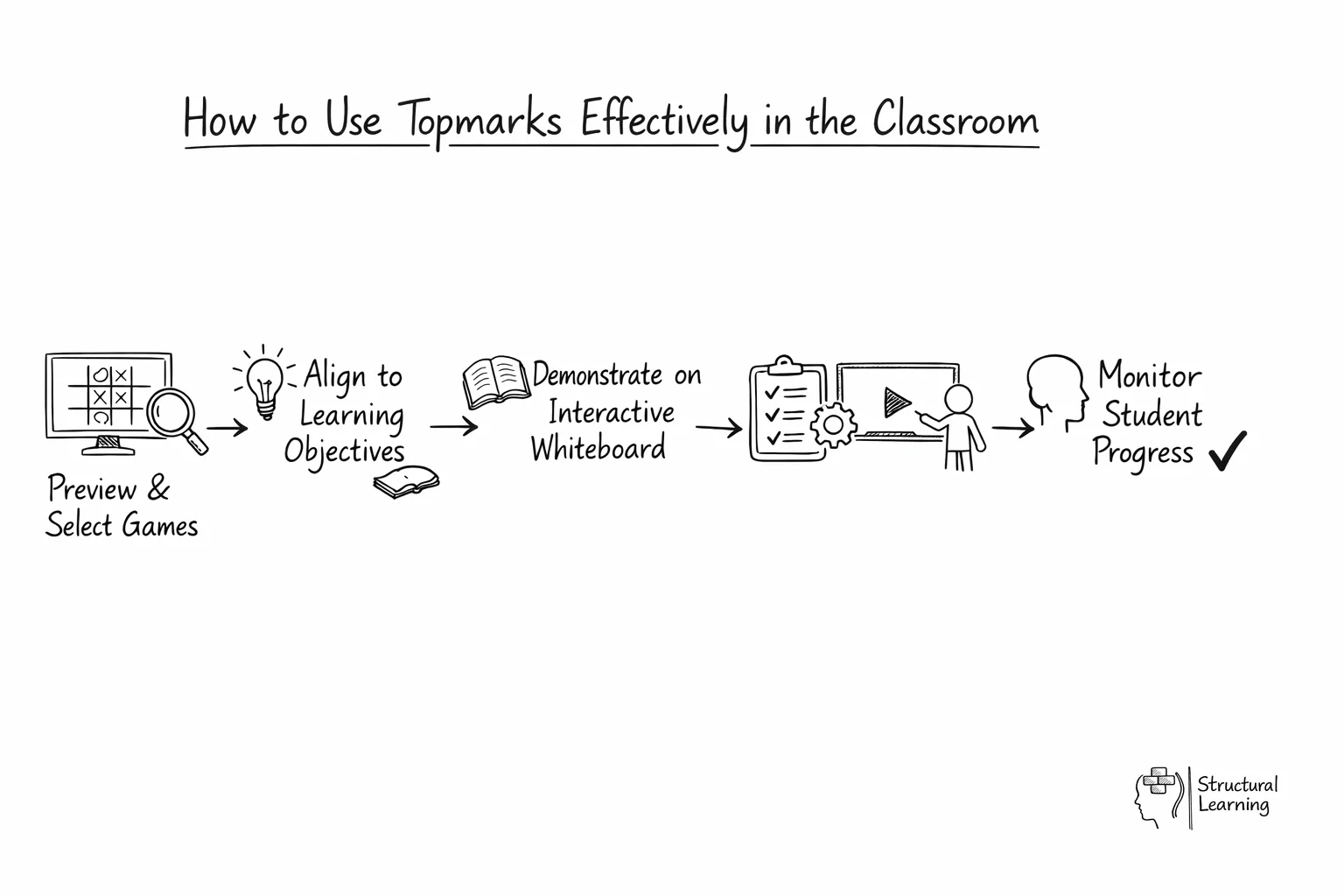
Gee (2008) says games assess learners and provide support. Wiggins & McTighe (2005) show curriculum links let teachers differentiate. Prensky (2001) says this covers requirements with digital learning.
Teachers can assess learner progress through simple observations and records. This helps monitor learning during game-based activities. Regular checks let you spot gaps while keeping the games fun. Wiliam's (formative assessment) research shows that frequent, low-pressure checks are vital. This makes game-based platforms great for ongoing assessment.
Before games, set clear goals for learning. Track progress with easy systems that note skills and interest. Watch how learners solve problems, keep trying, and work together.
Keep short notes on each learner's progress every week, highlighting strengths and needs. Use checklists or scales to track skills; keep paperwork light. Brief chats after games help learners reflect, improving self-awareness (Vygotsky, 1978) and understanding (Piaget, 1936).
Topmarks is a free educational site for UK primary schools. It supports maths and literacy learning linked to the curriculum. Teachers can use Topmarks to track results and improve learner progress. The site includes adverts, but it remains a helpful resource.
Topmarks is free and matches the curriculum, making it useful for primary learners. Schools gain access to many resources at no cost. Teachers should check adverts and content quality. It supports learning in maths and literacy.
The transfer gap appears when a learner scores well online but freezes on a paper problem. Plan the bridge deliberately. Use one short game, then put the same number fact inside a bar model, missing-number sentence or word problem.
For example, after practising 7 and 8 times tables, ask: "A school buys 8 packs of 7 pencils. How many pencils is that, and how do you know?" This checks whether recall has become usable maths knowledge, not only screen speed.
Fast answers are only one part of mathematical fluency. The SERP comparison showed that competitors explain fluency as accuracy, efficiency and flexibility, while this article was too focused on speed. Use Topmarks to strengthen recall, but ask learners to show more than a quick click.
After a round of Hit the Button, ask three checks. Was the answer accurate? Was the strategy efficient? Could the learner solve the same fact another way? A child who knows 8 x 7 as 56 should also connect it to 7 x 8, 56 divided by 8, double 28, or 8 x 5 plus 8 x 2.
Automaticity with multiplication facts is the rapid, effortless recall learners need to meet the pace of the Year 4 MTC. The MTC is a statutory assessment in England, with 25 on-screen questions and six seconds per item, so MTC preparation has to train rapid recall rather than slow derivation (Standards and Testing Agency, 2024). This is not about teaching test tricks. It is about securing times tables fluency so learners can retrieve facts up to 12 x 12 without hesitation.
That matters because working memory is limited. A child may still have to count on for 6 x 7. This takes up too much attention. Less focus is left for the next step in a maths problem. Primary school studies show a clear link between maths success and working memory. This explains why quick maths recall is vital in everyday teaching (Zhang, Tolmie and Gordon, 2022).
Used carefully, Topmarks Hit the Button works best as a short, focused routine rather than a spare-filler game. A teacher may spend four minutes after registration on mixed 6, 7, 8 and 9 facts, say, “Answer quickly, then note the ones that still made you think,” and ask learners to record three sticky facts on mini whiteboards.
One learner writes 7 x 8 = 56 straight away, another circles 8 x 7 as a fact that still needs work, and the teacher uses that information to plan a same-day intervention group.
Research supports this kind of brief, repeated practice. Studies on times tables show that structured sessions improve quick recall. Teaching strategies with timed practice beats drills alone for many learners (Woodward, 2006; Wong and Evans, 2007). For busy teachers, the practical point is simple. Keep Hit the Button sessions brief. Track where learners hesitate. Use the game to build quick recall. This frees up working memory for harder maths tasks.
Topmarks is the UK's most widely used free interactive resource library for primary schools. But it's not the only tool available, and different platforms serve different purposes. This comparison helps you decide whether Topmarks alone is sufficient or if pairing it with other tools makes sense.
The ideal primary maths toolkit includes three layers: (1) conceptual teaching (hands-on or video), (2) fluency practise (games or drills), and (3) consolidation (quizzes or worksheets). Topmarks primarily offers layer 2; other tools fill layers 1 and 3.
| Platform | Price | Subject Coverage | Age Range | Best For | Interactive Elements |
|---|---|---|---|---|---|
| Topmarks | Free | Maths, English, science, computing, literacy | EYFS-Y6 (some Y7) | Daily fluency practise; interactive whiteboard | Games, drag-and-drop, sorting activities |
| Mathsframe | Free resources; paid licences from £10/year for single users and £50/year for whole schools | Maths only (200+ games) | EYFS-Y6 | Structured maths progression; curated games by topic | Games with visual feedback (fractions, geometry) |
| BBC Bitesize | Free | Maths, English, science, humanities, PE, PSHE | KS1-KS4 (secondary focus) | Explanatory videos; quizzes; exam revision | Videos, quizzes, interactive diagrams |
| Purple Mash | £100-£300/year | Maths, English, computing, cross-curricular | EYFS-Y6 | Structured learning sequences; creative tools (painting, coding) | Games, drawing tools, coding, quizzes |
| PhET Simulations | Free | Maths, science (physics, chemistry, biology) | Y2-KS4 (secondary focus) | Exploratory learning; visualising abstract concepts | Interactive simulations (manipulate variables, see results) |
Topmarks offers over 200 quick games for fluency practise. The platform covers maths, phonics, English, and science. Games load fast, needing no setup. However, there's no progression or data tracking. Use it for 5-10 minute whiteboard activities.
Mathsframe is more structured. Its 200+ games are curated by topic (place value, fractions, geometry, etc.), making it easy to find exactly what you need for your current unit. Premium version includes learner accounts and progress tracking. Limitation: maths-only; no English, science, or computing. Best fit: schools prioritising systematic maths teaching with some data tracking.
BBC Bitesize shifts focus from games to explanation. Videos walk learners through concepts step-by-step; quizzes test understanding. Excellent for home learning or independent revision. Limitation: designed more for KS3-KS4; primary coverage is lighter. Topmarks games are better for KS1-KS2 fluency practise.
Purple Mash is a premium alternative to Topmarks with more scaffolding. Learning sequences guide you through a unit (e.g., "Fractions": lesson plan + game + quiz + creative task). It also includes creative tools (painting, coding), which Topmarks lacks. Cost (~£100-£300/year) is the trade-off. Best fit: schools wanting structured sequences plus creative tools.
PhET Simulations help learners understand ideas through active exploration. Learners can change variables to see cause and effect. For example, they can explore gravity and flight paths. These tools are great for science. However, they are used less often in primary maths. Simulations best support discovery learning in secondary school STEM subjects (Finkelstein et al., 2005).
Long-tail search intent often comes from teachers looking for a specific Topmarks game. Add variety by matching the task to the misconception. Coconut Multiples helps learners spot multiples. Mental Maths Train supports arithmetic vocabulary. Times-table games support recall. Fraction-wall and place-value activities help when learners need a visual model.
Do not choose a game because it is popular. Choose it because it matches the exact error pattern in books, whiteboard responses or an exit ticket. This keeps Topmarks as a teaching tool rather than a reward screen.
Age mapping should connect each game to the next piece of teaching. EYFS and KS1 games should build number sense and language. KS2 games should strengthen recall, facts and procedures before learners use the same ideas in reasoning tasks.
Topmarks is a resource bank, not a curriculum, though games match key stage objectives. This section shows how to use Topmarks resources strategically. It maps resources to curriculum areas.
The curriculum focuses on subitising. This means recognising amounts without counting. Learners also count to 10 and learn addition through play.
Topmarks resources that support this:
Teaching tip: Use these games on an interactive whiteboard during whole-class carpet time (10 minutes, 2-3 times per week). Ask learners to predict before revealing the answer: "How many spots will appear?" This develops confidence and mental maths thinking.
Curriculum focus: Number bonds to 10 and 20, addition and subtraction within 10, skip counting (by 2s, 5s, 10s).
Key Topmarks games:
Usage pattern: 5-10 minutes per day, linked to your teaching focus. If you're teaching "number bonds to 10," use "Number Bonds" Topmarks game immediately after direct teaching (same day). Spacing practise over 3-4 weeks builds automaticity (Dunlosky et al., 2013).
Y3 focus: Times tables (2x, 5x, 10x), place value (hundreds, tens, ones), early fractions (halves, quarters).
Key Topmarks games:
Y4 focus: Extending times tables (3x, 4x, 6x, 7x, 8x, 9x), more complex place value, decimal introduction.
Key Topmarks games:
In Year 5, learners focus on mastering all times tables. They also study equal fractions and addition. Finally, teachers introduce the concept of percentages.
Key Topmarks games:
Year 6 lessons focus on mastering past topics. Learners also study early ratio. They practise problem-solving and reasoning.
Key Topmarks games:
Topmarks fits into a structured lesson sequence:
The Topmarks game in step 2 consolidates the concept introduced in step 1. Without the prior teaching, the game is just button-clicking; with it, the game deepens understanding.
English/Phonics: "Phonics Bloom," "Tricky Words," "Digraph Dash", All aligned to Letters and Sounds phases (Y1-Y2).
These support thinking skills and encourage learners to ask questions. They integrate with literacy (reading texts). Such integration has been proven to help understanding (Marzano, 2004). Teaching these skills supports overall learning outcomes (Hattie, 2008). Research by Wiggins and McTighe (2005) shows this approach builds deeper knowledge.
In computing, learners use Beebots simulations for early sequencing. They also play Block Coding games. This introduces them to computational thinking.
Geography: "Compass Directions," "Ordnance Survey Map Skills", Support map work.
Like maths, non-maths Topmarks games should follow direct teaching, not replace it.
Short routines work better than long, unfocused game time. For KS1, use number bonds, doubles and halves. For lower KS2, use multiplication and division facts. For upper KS2, use square numbers, mixed facts and quick written transfer.
A simple routine is: one minute of modelling, three minutes of play, one minute of reflection. Learners record one sticky fact and one strategy. The teacher then chooses whether to reteach, pair learners for practice, or move to a harder reasoning example.
Hit the Button is a fast-paced number fact game that builds fluency across Key Stage 1 and Key Stage 2. The format is simple, the feedback is immediate, and the pace keeps learners alert without needing much explanation. In classroom terms, it works best as a short burst before learners move into written calculations or problem solving. That fits well with retrieval practice, and with Rosenshine's view that effective lessons begin with brief review of prior learning.
One useful strategy is a five minute starter where learners play one round, record their score, then repeat the same set after a quick teacher model of the facts that caused difficulty. This turns a game into a clear cycle of attempt, feedback and improvement. Another strong use is in intervention groups, where learners revisit the same mode across the week and track progress on times tables, number bonds or division facts. Because the scores are visible straight away, teachers can spot gaps quickly without adding to marking.
Daily 10 is another standout resource, but it serves a slightly different purpose. Where Hit the Button is strongest for rapid recall, Daily 10 gives teachers more control over level, timing and question type, which makes it useful for mixed attainment classes and light-touch assessment. A practical routine is to run a Daily 10 on place value or measures, then ask learners to explain one answer using sentence stems such as "I know this because". That small discussion step helps move learners from speed alone to mathematical language and reasoning.
Other featured Topmarks games, especially phonics, shape and money activities, are most effective when they are tightly matched to the lesson objective. Cognitive load theory is relevant here, because the clean layout and single focus can reduce distraction for younger learners and for learners who need more structured rehearsal. Used carefully, these resources are not just fillers for spare minutes. They can support independent practice, sharpen whole class review, and build confidence before learners tackle more demanding tasks.
Topmarks works across common classroom devices, but access still needs planning. Check sound, adverts, touch accuracy, visual load and internet reliability before a lesson. For learners with SEND, remove avoidable timer pressure and preview the game layout first.
Topmarks works well on many devices. You can use it on interactive whiteboards, tablets, Chromebooks, and computers. We offer advice on using Topmarks in different settings.
Setup: Open Topmarks in a web browser (any: Chrome, Edge, Firefox). Navigate to the game. Connect your whiteboard to the projector/display.
Best practices:
Pros: Large screen; whole-class engagement; easy to demonstrate.
Cons: Only one learner uses the input device at a time. Less active participation for individual learners.
Game selection: Most Topmarks games work on tablets. Exceptions are a few older Flash-based games (rare). Prioritise HTML5 games, which load instantly on tablets.
Setup:
Best practices for learner use:
Pros: Portable; individual/pair use; instant feedback.
Cons: Requires tablet provision; small screen (difficult for learners with visual impairment).
Ideal for: Schools investing in 1:1 or shared Chromebook carts. Topmarks is fully compatible with Chrome OS.
Setup:
Best practices:
Pros: Low cost (~£150-£250 per device); cloud-based (no installation); easy to manage at scale.
There are some downsides. Activities rely on a Wi-Fi connection. The screen is smaller than an interactive whiteboard. Learners also need basic digital skills.
Use this approach in older primary schools with fixed computer suites. It also works well for secondary transition computing lessons.
Setup: Standard Windows or Mac machine. Topmarks runs in any modern browser.
Best practices:
Pros: Mice are more precise than touchscreens for some learners; traditional setup most teachers are familiar with.
Cons: Fixed location; outdated; less portable than tablets or Chromebooks.
Topmarks is free and accessible from home. When setting homework, send parents a link:
Pros: Free; no barriers to home access; engaging format appeals to families reluctant to use worksheets.
There are some drawbacks. Activities rely on devices and broadband, which some families lack. Also, support from parents can vary.
Screen reader compatible: Most Topmarks games meet WCAG 2.1 AA standards. Learners with visual impairment can navigate using screen readers (NVDA, JAWS).
Keyboard access lets all use buttons. Learners with motor issues can join in. Those who prefer keyboards find it helpful.
High contrast mode: Learners can enable high contrast in browser settings for better visibility. Topmarks games render well in high contrast mode.
Mobile-responsive: Games resize to fit small screens (phones). Not ideal for teaching, but useful if a learner only has access to a phone at home.
Game won't load: Clear your browser cache (Ctrl+Shift+Delete). Refresh the page. If it persists, the game may be using Flash (deprecated). Try a newer game.
Audio isn't working: Check volume is turned up. Check speakers/headphones are plugged in. Try unmuting browser audio (some browsers have per-tab mute controls).
Interactive whiteboards need recalibration via settings if touch fails. Clean tablet screens and retry; some games are sensitive to touch.
Lag or slowness: Close unnecessary browser tabs. Topmarks is lightweight, but running 10 other websites drains resources. Check your internet speed (ideally >10 Mbps for smooth play).
A common misconception among teachers is that Topmarks games are exclusively online and require a constant internet connection to function. However, many of the platform's HTML5-based educational games can be configured for offline access, allowing learners to engage in valuable practise without an active internet connection. This capability is highly advantageous for schools with inconsistent Wi-Fi, for supporting home learning in areas with limited broadband, or for ensuring continuity during internet outages.
Teachers can enable offline access by using features available in modern web browsers. For example, on devices using Chrome or Edge, specific game pages can often be "installed" as a Progressive Web App (PWA) or added to the home screen, which prompts the browser to cache essential files locally. This process allows the game to launch directly from an icon, often functioning without an internet connection once the initial caching is complete.
It is important to clarify that Topmarks does not provide traditional, downloadable Topmarks Apps through app stores like Google Play or Apple App Store. Instead, their website is meticulously designed using responsive web technologies, ensuring that all games are fully functional and visually adaptable across a wide range of devices, including desktop computers, tablets, and smartphones, directly within a web browser.
Adding a shortcut to a specific game page onto a device's home screen creates an app-like experience, launching the game in a full-screen view without the typical browser interface elements.
Consider a primary teacher planning a small group intervention for Year 4 learners struggling with multiplication facts. Before the session, the teacher could open "Hit the Button" on several school iPads, use the browser's "Add to Home Screen" function, and ensure the game's resources are cached. This preparation means that during the intervention, learners can practise their times tables and number bonds independently, even if the school's internet connection becomes unstable, ensuring uninterrupted learning time.
Providing flexible access to educational resources, including the important ability to work offline, significantly supports diverse learning environments and caters to varying learner needs. This adaptability ensures that learning opportunities are not solely dependent on external infrastructure, thereby promoting greater equity in access to educational tools (Roschelle et al., 2010). Such strategic use of technology aligns with pedagogical principles that advocate for removing barriers to engagement and participation for all learners.
Teachers should always conduct a preliminary test of specific games to confirm their offline access functionality, as some games with active content or external dependencies may not cache completely. Prioritise widely used, self-contained practise games such as "Daily 10" for mental maths or "Place Value Basketball" for number understanding, as these generally perform robustly when cached. This proactive approach ensures that technology reliably supports instructional goals rather than introducing unforeseen technical challenges during lessons.
Many teachers hold the perception that free online educational resources, such as Topmarks, lack sophisticated data collection or progress monitoring capabilities. This view often arises from comparisons with premium, subscription-based platforms that integrate comprehensive learning management systems. However, Topmarks, particularly through its dedicated application system, offers useful features for tracking learner engagement and attainment.
While Topmarks does not provide a centralised, cloud-based system to track every learner's progress across multiple devices, its individual game applications frequently store local results histories. These local histories allow learners to review their own performance over time within a specific game. For instance, in popular games like 'Hit the Button', learners can often view their previous high scores or recent attempts, providing immediate, self-directed feedback on their practise.
Many Topmarks games also incorporate high score tables, which function as a simple form of player profiles. These tables, typically stored locally on the device, enable learners to record their names alongside their best scores for particular activities. This feature encourages self-improvement and can build a sense of friendly competition within a single classroom or individual learning session.
Teachers can effectively use these local progress tracking capabilities for formative assessment and to motivate learners. For example, a teacher can ask learners to screenshot their high scores from a 'Daily 10' session on a tablet and share them, or to record their best times for a specific challenge on a classroom whiteboard. This provides a tangible, immediate record of individual effort and progress for subsequent discussion.
The simple player profiles, often just a name linked to a score, can be used to support personal goal setting. A learner may aim to surpass their own previous high score in a multiplication game, thereby demonstrating metacognitive awareness of their learning (Dunlosky et al., 2013). This self-directed goal setting can significantly increase intrinsic motivation for repetitive skill practise.
Beyond the recorded scores, teachers can use the presence of these features to guide their observations of learner learning. Watching learners interact with their own score histories or striving for a new high score offers valuable insight into their persistence and developing understanding. This informal assessment complements the data provided by the game itself, offering a more complete picture of a learner's engagement.
It is important to recognise that this progress tracking is typically device-specific and not aggregated across an entire class or school. Therefore, teachers should integrate these features into a broader assessment strategy, using them as prompts for discussion rather than as definitive measures of attainment. A teacher can ask, "Look at your score history for the fractions game. What do you notice about your accuracy over the last three attempts, and what could you try next time?"
Despite not being a comprehensive learning management system, the local progress tracking and player profiles embedded within Topmarks games offer valuable pedagogical tools. They support immediate feedback, encourage self-assessment, and provide learners with a sense of achievement. When used thoughtfully, these features contribute positively to the learning experience, particularly for foundational skill practise in primary education.
Virtual manipulatives are digital representations of physical objects that learners can interact with to explore mathematical concepts. Topmarks offers a range of these tools, including Ten Frames, Rekenreks, and Dienes blocks, which are invaluable for developing conceptual understanding. These digital resources allow learners to engage with abstract ideas in a concrete and pictorial manner, supporting the Concrete-Pictorial-Abstract (CPA) approach.
The Ten Frames on Topmarks provide a clear visual model for numbers up to ten and twenty, aiding in the development of number sense and basic arithmetic. Teachers can use these to help learners visualise number bonds, addition, and subtraction strategies. For instance, a teacher may project a Ten Frame activity and ask learners to show "8 + 6" by filling two frames, observing how they complete the first frame before adding to the second.
Topmarks' virtual Rekenrek is another powerful tool for building number sense, particularly for understanding numbers in relation to five and ten. This arithmetic rack allows learners to slide beads to represent quantities and operations, building subitising skills and mental maths strategies. A teacher could instruct learners to use the Rekenrek to demonstrate "12 take away 5," observing how they group and subtract beads to arrive at the solution.
The digital Dienes blocks, also known as base ten blocks, are important for teaching place value, regrouping, and operations with multi-digit numbers. These virtual blocks allow learners to manipulate ones, tens, hundreds, and thousands to grasp the structure of our number system. When teaching subtraction with regrouping, a teacher may model exchanging a 'ten' rod for ten 'one' cubes using the Topmarks Dienes blocks, making the abstract process visible.
Using virtual manipulatives consistently supports learners in constructing a deeper understanding of mathematical principles. Research indicates that the use of manipulative materials, whether physical or virtual, positively impacts learners' achievement and conceptual understanding in mathematics (Sowell, 1989). These tools provide a bridge between concrete experiences and abstract symbols, making complex ideas more accessible.
Beyond their pedagogical benefits, Topmarks' virtual manipulatives offer practical advantages in the classroom. They are readily available, easily reset for new problems, and provide an infinite supply for individual or group work without the need for physical storage or cleaning. This accessibility ensures every learner can practise and explore mathematical concepts at their own pace, reinforcing learning through active engagement.
Number bonds, often referred to as number pairs, are fundamental mathematical relationships where two numbers combine to make a specific total. For primary learners, mastering number bonds to 10 and 20 is important for developing strong number sense and mental calculation strategies.
Automatic recall of these basic facts significantly reduces cognitive load when learners encounter more complex arithmetic problems. When number bonds are fluent, working memory is freed to concentrate on the structure of a problem rather than on calculating simple sums (Sweller, 1988).
Topmarks' "Hit the Button" game provides an effective tool for practising number bonds. Within the game, teachers can select specific number bond targets, such as "Number Bonds to 10" or "Number Bonds to 20", allowing learners to repeatedly practise completing number sentences like "7 + ? = 10" or "? + 5 = 20".
For a five-minute starter activity, a teacher may project "Hit the Button" onto the interactive whiteboard, selecting the 'Number Bonds' category. Learners could take turns at the board, quickly identifying the missing number to complete the bond, for example, stating "Seven plus three equals ten" as they press the correct answer.
Consistent practice with number bonds builds essential fluency in addition and subtraction. This foundational understanding extends beyond basic facts, supporting learners in grasping place value concepts and calculations with larger numbers, such as recognising that if 6 + 4 = 10, then 60 + 40 = 100.
Teachers can also use the game to quickly assess learner understanding and identify areas where further intervention is needed. Observing which number bonds learners hesitate on can inform targeted teaching, perhaps by using concrete manipulatives like ten-frames to reinforce the concept before returning to digital practise.
Developing robust knowledge of number bonds is a cornerstone of primary mathematics education. It underpins success in mental arithmetic, written calculations, and later, more abstract mathematical reasoning.
A fundamental skill in early mathematics is subitizing, which involves instantly recognising the number of items in a small group without the need for counting. This ability to perceive quantities at a glance, typically up to four or five items, is a important precursor to developing robust number sense and efficient calculation strategies (Gelman & Gallistel, 1978).
Topmarks’ collection of early years maths games provides numerous opportunities for learners to practise and refine their subitizing skills. Resources such as 'Underwater Counting' or 'Teddy Numbers' present small sets of objects that children can learn to identify instantly, moving beyond the need for one-to-one counting. This direct perception of quantity helps to solidify their understanding of number representation.
For example, during a whole-class starter activity, a teacher may project a Topmarks game where a small group of objects, like three apples, flashes on screen. The teacher asks, "How many did you see?" encouraging learners to call out "Three!" without verbally counting "one, two, three." This rapid identification strengthens their mental representation of small numbers.
Regular engagement with these types of activities helps learners to build automaticity in number recognition. When learners can subitize effectively, it reduces the cognitive load associated with basic counting, freeing up mental resources for more complex mathematical thinking (Sweller, 1988). This foundational skill supports their later work with addition and subtraction, as they can quickly identify components of a sum.
Teachers can intentionally guide learners to articulate their subitizing strategies. After playing a round of a Topmarks game, a teacher can ask, "How did you know there were four?" A learner can respond, "I just saw them," or "I saw two and two." This metacognitive reflection helps learners understand how they are processing numerical information.
Incorporating specific subitizing practise using Topmarks games can be highly effective in Reception and Key Stage 1 classrooms. These short, interactive sessions can serve as warm-ups, interventions for learners struggling with number recognition, or as part of independent learning centres. The visual nature of the games makes the abstract concept of number more concrete and accessible for young learners.
Topmarks offers valuable interactive resources for teaching data handling, moving beyond basic calculation practise. Its collection includes engaging tools for exploring Venn and Carroll diagrams, which are fundamental for developing classification skills. These activities enable learners to sort objects based on multiple attributes, building logical reasoning.
The interactive shape sorters are particularly effective for introducing Data Handling (Venn & Carroll Diagrams). For example, a teacher may project the "Sort the Shapes" game and ask learners to sort 2D shapes by attributes like "has 4 sides" and "is red". Learners actively participate by dragging shapes into the correct sections, receiving immediate visual feedback on their choices. This hands-on manipulation supports concrete operational thinking, as described by Piaget (1964), helping children understand abstract concepts through direct experience.
Beyond diagrams, Topmarks also provides resources for collecting and representing data using tallies. Learners can use virtual tally charts to record observations, such as the colours of cars passing the school gate or the types of fruit in a basket. This practice reinforces counting skills and introduces the systematic recording of discrete data.
also, the platform supports visual data representation, including simple pictograms and bar charts. While not explicitly labelled "pi" in the traditional sense, these tools allow learners to translate tally data into graphical forms, making patterns and trends more accessible. For instance, after collecting tally data on favourite animals, learners can create a pictogram where each symbol represents one vote, thereby visualising the popularity of different choices.
These interactive data handling games provide a practical context for mathematical learning, moving beyond rote memorisation. They encourage learners to think critically about classification criteria, data collection methods, and effective ways to present information. Regular engagement with these resources helps build a strong foundation for more complex statistical understanding in later years.
A fundamental concept in primary mathematics is Place Value / Base Ten, which dictates how the position of a digit determines its value. This understanding is essential for learners to grasp number magnitude, perform arithmetic operations, and develop numerical fluency. Without this foundation, learners struggle with complex calculations.
Topmarks offers excellent interactive games that help learners visualise and manipulate numbers, reinforcing place value understanding. Games such as Place Value Basketball, Bead Numbers, and Number Pieces are invaluable for illustrating hundreds, tens, and ones concretely. These resources enable learners to see numbers as compositions of different place values, not just symbols.
For example,
Beyond basic shape identification, developing strong spatial awareness and a deep understanding of geometry is fundamental for primary learners. These skills are not isolated; they underpin higher-level mathematical thinking, problem-solving, and even scientific reasoning (Clements & Sarama, 2009). Topmarks offers several engaging games that move beyond simple recognition, prompting learners to actively engage with spatial reasoning and the intricate properties of geometric figures.
Many Topmarks activities encourage learners to explore the defining properties of both 2D and 3D shapes. For instance, games may require learners to identify not just a square, but to accurately count its four equal sides and four right-angle vertices. Similarly, when presented with 3D shapes, learners learn to distinguish a cube by its six square faces, twelve edges, and eight vertices. This focused approach helps learners build a robust mental model of geometric figures, moving beyond mere memorisation of names to genuine comprehension of their attributes.
Interactive tools within Topmarks, such as digital geoboards or symmetry-focused games, provide invaluable practical experience. A digital geoboard, for example, allows learners to construct various polygons and explore concepts like perimeter and area by counting units, or to visualise fractions by dividing shapes into equal parts. Games like "Symmetry Invaders" actively challenge learners to complete symmetrical patterns by dragging and dropping missing elements, directly developing their understanding of reflective symmetry and spatial transformation.
Teachers can effectively integrate these games to reinforce specific geometry lessons and encourage active learning. For instance, after a lesson on quadrilaterals, a teacher may direct learners to a geoboard game with the instruction: "Create as many different quadrilaterals as you can using exactly 12 pegs, then describe their properties to a partner." This prompts learners to apply their knowledge actively, articulate their reasoning, and justify their choices. Learners then share their creations, explaining why a shape is a rectangle, a rhombus, or a trapezium based on its attributes.
Engaging with these interactive geometry activities helps learners significantly develop their visual-spatial reasoning skills, which are critical for mathematical fluency. This progression from simple identification to actively manipulating, constructing, and describing shapes supports a much deeper conceptual understanding of geometric principles. Such rich, interactive experiences are vital for building a strong, adaptable foundation in mathematics, preparing learners for more complex spatial challenges.
One of Topmarks' most enduringly popular games for primary mathematics is Hit the Button. This game is specifically designed to strengthen learners' rapid recall of fundamental number facts, a important component for developing fluency in arithmetic (Wiliam, 2011). It presents a prompt, such as "8 x 7" or "double 35", and learners must quickly select the correct answer from a grid of possible options, reinforcing immediate recognition.
The game offers extensive coverage of essential mathematical topics across various primary year groups. Learners can practise their addition and subtraction facts within 10, 20, or 100, ensuring a solid foundation in basic number operations. For multiplication and division, it covers all times tables up to 12, allowing teachers to target specific tables for practise or revision.
Beyond basic operations, Hit the Button includes dedicated sections for more complex number skills. These include doubling and halving numbers, which are vital for mental calculation strategies, and identifying square numbers, preparing learners for later algebraic concepts. Practising number bonds to 10, 20, 50, and 100 is also available, directly supporting mental addition and subtraction strategies.
A key pedagogical advantage of Hit the Button lies in its untimed practice modes. While the timed modes encourage speed, these untimed options allow learners to concentrate solely on accuracy and understanding without the pressure of a ticking clock. This is particularly beneficial for learners who need more processing time or are consolidating new facts.
For example, a Year 4 teacher may direct learners to the untimed division facts section for the 6 times table. Learners can take their time to calculate "42 ÷ 6" before selecting '7', perhaps using manipulatives or drawing arrays if needed, thereby securing the concept before moving to speed. This flexibility supports a mastery approach, ensuring learners secure their understanding before attempting to increase their speed (Dunlosky et al., 2013).
Teachers can precisely tailor activities to current learning objectives, whether it is reinforcing specific multiplication facts or practising halving two-digit numbers. The immediate visual and auditory feedback helps learners self-correct and reinforces correct answers, building confidence and automaticity in their mental maths abilities. This targeted practise helps embed facts into long-term memory.
Many Topmarks games are particularly effective for developing learners' mental maths strategies, moving beyond simple recall to encourage deeper computational thinking. For instance, games requiring quick recall of number bonds or multiplication facts implicitly build foundational knowledge necessary for more complex mental calculations, such as doubling or halving larger numbers.
Consider how games challenge learners to find missing numbers in calculations. When a learner sees '7 + ? = 12', they are encouraged to think about the inverse operation, subtracting 7 from 12. This repeated practise strengthens their understanding of using inverse operations as a key mental maths strategy, allowing them to solve problems more flexibly and efficiently (Dunlosky et al., 2013).
Other activities promote systematic thinking, such as partitioning numbers to simplify calculations. For example, when calculating 34 + 27 mentally, a learner may break it down into (30 + 20) + (4 + 7), then recombine the results. Teachers can guide learners to articulate these steps, solidifying their understanding of how to approach multi-step mental problems by breaking them into manageable parts.
To maximise the impact on mental maths strategies, teachers should explicitly model these approaches before learners engage with the games. For instance, before playing a multiplication game, a teacher may demonstrate using known facts to derive unknown ones, like 'If I know 4 x 5, how can I work out 4 x 6?' Encouraging learners to explain their own mental processes after playing helps consolidate their strategic thinking (Rosenshine, 2012).
Regular engagement with varied Topmarks activities helps learners generalise these mental maths strategies across different number ranges and operation types. This consistent exposure builds fluency and confidence, enabling learners to apply their strategic thinking to novel problems beyond the game context and in everyday situations.
Daily 10 offers extensive customisation, allowing teachers to precisely target specific mathematical skills. Educators can select from a broad range of operations, including addition, subtraction, multiplication, and division, and specify the number ranges involved. For instance, a Year 3 teacher may configure the game to focus solely on addition within 100, while a Year 6 teacher could set multiplication questions involving two-digit numbers.
Beyond basic operations, the game mechanics extend to various sub-topics important for primary maths development. Teachers can select activities covering partitioning numbers, rounding to the nearest 10, 100, or whole number, and working with fractions, such as finding a fraction of an amount or identifying equivalent fractions. This granular control ensures that practice aligns directly with current curriculum objectives and learner needs.
A key feature of Daily 10 is the option for timed or untimed intervals, which supports different learning goals. Timed intervals, ranging from 3 to 10 seconds per question, promote the development of mental fluency and automaticity, a critical component of mathematical proficiency (Dunlosky, 2013). Conversely, untimed intervals provide a low-pressure environment for learners to consolidate new concepts or for teachers to conduct quick formative assessments.
In the classroom, a teacher may use Daily 10 with a 5-second timer for a quick mental maths starter, asking learners to record their answers on mini-whiteboards. This immediate feedback loop helps learners identify areas for improvement and allows the teacher to quickly gauge class understanding before moving to the main lesson. For independent practice, learners can use the untimed mode to work through rounding challenges, ensuring they grasp the concept without time pressure.
Early Years Foundation Stage (EYFS) and Key Stage 1 (KS1) mathematics learning benefits significantly from playful, interactive experiences. These activities help children build foundational number sense, counting skills, and shape recognition through direct engagement (Vygotsky, 1978). Topmarks offers several resources specifically designed to support these important early stages of mathematical development, providing a valuable tool for teachers.
For instance, games like Underwater Counting are excellent for Reception and Year 1 learners focusing on numbers to 10 or 20. A teacher may project the game and ask, "How many fish can you see swimming past? Can you count them as they go, touching each one on the screen?" This encourages learners to practise one-to-one correspondence and number recognition in a visually stimulating environment. Following this, learners can independently practise counting, reinforcing concepts taught during whole-class sessions and developing early number fluency.
Beyond simple counting, other Topmarks games for Early Years Foundation Stage (EYFS) / KS1 Math address early addition, subtraction, and pattern recognition. Teachers can use these as short, focused starters to activate prior knowledge or as part of a continuous provision area, allowing children to revisit concepts at their own pace. This approach ensures children develop a robust understanding of fundamental mathematical concepts through repeated, enjoyable exposure, preparing them for more complex learning.
Digital platforms like Topmarks extend beyond mere instructional content; they function as effective Classroom Management Tools when integrated strategically. Establishing clear routines for using online games helps structure lesson beginnings, transitions, and independent work periods. This predictability supports learners in understanding expectations and managing their own learning time.
For example, a teacher may designate "Hit the Button" as a timed activity for the first five minutes of a maths lesson. Learners learn to quickly access the game, complete a set number of questions, and then prepare for the next task, thereby practising self-regulation and adherence to classroom procedures (Rosenshine, 2012). Clear instructions and consistent application of these digital routines are important for their success.
These tools also support positive reinforcement and behaviour monitoring. Teachers can observe learners' engagement with the games, offering immediate praise for focused effort or timely completion. also, when learners are independently engaged with a task, the teacher gains capacity to address individual learning needs or manage minor behavioural issues discreetly, without disrupting the entire class. This targeted approach maintains a productive learning environment.
Beyond quick-fire games, Topmarks offers several open-ended teaching tools highly effective for Interactive Whiteboards (IWB) Usage. Resources like the Teaching Clock, Flip Counter, and Number Line support direct instruction and whole-class modelling. These tools allow teachers to demonstrate concepts visually and interactively, engaging learners in shared learning experiences.
For instance, a teacher can use the Teaching Clock to demonstrate elapsed time, moving the hands while learners calculate the duration. The Number Line support visualising addition or subtraction, with the teacher dragging markers to illustrate jumps. This interactive approach helps consolidate understanding before independent practice, aligning with findings that technology integration enhances conceptual understanding (Roschelle et al., 2010).
These IWB tools are not games but flexible aids for explanation and discussion. Teachers maintain control, guiding the interaction to address specific learning objectives or learner misconceptions. Such guided use of interactive resources supports effective instruction, making abstract concepts more concrete for primary learners.
Separate the free Topmarks website from the paid Hit the Button app. The web games are useful because they are quick to access, but teachers should still plan for internet reliability. The paid Hit the Button app is described by Topmarks as working without an internet connection after download.
Topmarks also says the app includes optional results tracking for up to 30 learner profiles. That is not the same as a full school dashboard. Treat it as a local class-practice aid, then keep teacher judgement, book evidence and spoken explanations in the assessment picture.
While Topmarks provides a wide selection of free web-based educational games, some popular titles, such as 'Hit the Button', are also available as paid applications for various devices. These standalone apps often offer a different user experience compared to the free online versions.
A key limitation of the free Topmarks web games is the requirement for a continuous internet connection. Teachers cannot use these resources offline, which presents a challenge in classrooms with inconsistent network access or for learners completing work at home without internet.
The Topmarks web platform also lacks any automatic learner progress tracking features. Teachers must therefore implement their own methods for monitoring learning and providing feedback, which is important for effective formative assessment (Wiliam, 2011).
For example, after learners complete a 'Daily 10' session, a teacher can ask them to record their scores in a maths journal or verbally articulate their strategies for solving problems. This allows the teacher to observe individual understanding and identify areas needing further practise.
| Feature | Topmarks Free Web Games | Topmarks Paid Apps (e.g., Hit the Button) |
|---|---|---|
| Offline Access | Requires active internet connection | Often available after initial download |
| Automatic Progress Tracking | Not provided; teachers must monitor manually | Some apps may offer basic tracking functionality |
Many digital maths games, such as Topmarks' 'Hit the Button' and 'Daily 10', effectively build rapid recall and fluency. However, their fast-paced nature can sometimes encourage superficial engagement rather than deep thinking. Learners may click answers quickly without reflecting on their strategies or understanding why an answer is correct (Dunlosky et al., 2013).
This can lead to rote memorisation without conceptual understanding, or even anxiety when speed is prioritised over accuracy. To counter this, teachers can implement metacognitive "wrappers" around gamified learning experiences. These strategies encourage learners to think about their thinking before, during, and after playing the game, shifting the focus from mere performance to understanding and strategic application (Hattie & Timperley, 2007).
Before starting a game like 'Hit the Button', teachers should prompt learners to consider their approach. For instance, a teacher can ask, "What multiplication facts are you going to focus on today?" or "What strategy will you use if you get stuck on a division problem?" This primes learners to engage with a purpose beyond just getting the right answer.
Learners could briefly jot down a target or a specific mental strategy they intend to practise. For example, a Year 4 learner may write, "I will use my knowledge of doubling to solve x4 facts" before playing a times tables game.
After completing a game, reflection is important for consolidating learning. Teachers can support this with targeted questions: "Which types of questions were most challenging?" or "What strategy helped you achieve your score?" (Wiliam, 2011).
Learners could complete a simple exit ticket or a quick verbal reflection with a partner. A Year 5 learner may explain, "I found the fractions of amounts questions difficult, but remembering to divide by the denominator and multiply by the numerator helped me improve." This articulates their learning process.
The teacher's role is to explicitly model these metacognitive questions and provide opportunities for learners to practise self-reflection. This consistent practise helps learners develop self-regulation and become more independent learners (Rosenshine, 2012). By integrating these wrappers, gamified learning transcends simple recall, building deeper mathematical reasoning and strategic thinking.
A game is weak when it only turns flashcards into screen taps. If the activity would be dull on paper, a timer and sound effects will not make it good teaching. The value comes from feedback, strategy talk, modelling and transfer.
Use a quick test before adding any Topmarks task to a lesson: What does the learner have to think about? What will the teacher learn from the response? What will happen after the score appears? If those answers are thin, choose a different task.
Virtual manipulatives on platforms like Topmarks provide valuable visual aids for primary mathematics. However, interacting with a 2D digital representation does not automatically translate into a stable, internal mental model for a child. Teachers must actively bridge the gap between screen interaction and cognitive understanding.
Developing a mental model involves constructing an internal representation of a concept or process (Sweller, 1988). For young children, this often begins with concrete experiences, moving towards iconic (pictorial) and then symbolic (abstract) representations (Bruner, 1966). Digital manipulatives are iconic, requiring explicit connections to other modes.
Teachers can support this transfer by encouraging learners to verbalise their actions and reasoning while using virtual manipulatives. For example, during a Topmarks 'Ten Frames' activity, a KS1 teacher can ask, "Tell me what you are doing with the counters and why." This externalisation helps learners clarify and solidify their understanding (Vygotsky, 1978).
Connecting the virtual to the physical is also important. After learners use a virtual Rekenrek on the interactive whiteboard, the teacher can provide physical Rekenreks for them to replicate the same actions. This multi-sensory engagement reinforces the concept, allowing children to feel and manipulate the beads as they saw them digitally.
Asking learners to draw or physically represent what they have done on screen helps them process the digital interaction. An EYFS teacher can ask children to draw the 'Base Ten blocks' they used virtually to make a number, labelling the tens and ones. This act of drawing forces a deeper cognitive engagement than passive observation.
Teachers should explicitly model how the virtual manipulative represents the mathematical concept. Regular, spaced practice with both virtual and physical tools, followed by retrieval practice, strengthens the mental model (Dunlosky et al., 2013). This ensures the learning is not fleeting but becomes a permanent part of their mathematical schema.
Topmarks can flag a fluency issue, but the intervention still needs adult design. Before using AI to analyse scores, decide who teaches the follow-up, when the learner practises, and how progress will be checked. A teaching assistant can run a short, scripted routine, but the teacher should choose the strategy and review the evidence.
Keep intervention cycles brief. Use a clear model, a guided example, a three-minute Topmarks task, and a same-day paper check. This sequence is closer to explicit teaching than to independent screen time.
Topmarks games generate valuable raw performance data, such as scores, response times, and specific errors. When teachers integrate this data with AI marking and feedback tools, they can establish a powerful, responsive intervention loop.
This approach moves beyond simple scores, allowing teachers to gain deeper insights into learner understanding and misconceptions. The combination enables highly targeted, timely support, significantly enhancing the effectiveness of classroom interventions (Wiliam, 2011).
Topmarks provides immediate feedback to learners, but the underlying data offers more for teachers. Games like 'Hit the Button' record correct and incorrect answers, revealing patterns of errors or areas where fluency is lacking.
An AI marking tool can ingest this raw performance data, processing it to identify specific learning gaps that may otherwise be missed. This analysis helps teachers understand not just what learners got wrong, but why they struggled (Hattie & Timperley, 2007).
For example, a Year 4 teacher assigns 'Daily 10' for mental maths practise. Learner A consistently makes errors with multiplication involving 7s, while Learner B is slow but accurate with division facts. An AI tool can highlight these distinct patterns, rather than just presenting overall scores.
Once AI identifies specific learning needs from Topmarks data, teachers can implement precise, evidence-informed interventions. This creates a continuous cycle of assessment, feedback, and targeted teaching.
Consider a Year 2 class using a Topmarks phonics game to practise blending CVC words. If Learner C repeatedly misidentifies the 'sh' sound, the AI tool flags this specific phoneme confusion.
The teacher then uses this insight to plan a short, focused intervention for Learner C, perhaps using a graphic organiser to differentiate between 'sh' and 'ch' sounds. Following the intervention, Learner C returns to a similar Topmarks game, allowing the teacher to re-assess progress and close the loop.
This systematic approach ensures that interventions are not generic but directly address identified weaknesses, making every teaching moment count. It transforms raw game data into actionable pedagogical strategies, supporting individual learner progress effectively.
Many digital educational games, including some on Topmarks, can inadvertently create barriers for neurodivergent learners due to their design. Features like flashing animations, sudden sounds, or countdown timers can trigger sensory overload or heighten anxiety. Teachers must consider these elements when selecting and implementing digital tools in the classroom.
Sensory processing differences mean that visual clutter or auditory stimuli can be highly distracting or distressing for some learners. A game with rapidly changing colours or loud celebratory noises may overwhelm a child with sensory sensitivities. This can impede their ability to focus on the learning objective, leading to disengagement or distress.
For a Year 2 learner with auditory processing differences, the 'Pop the Balloons' animation and sound effects in a Topmarks counting game may be too much. The teacher could mute the device or provide noise-cancelling headphones to reduce sensory input. Alternatively, they may select a different game with calmer visual and auditory feedback.
Timed activities, such as those found in 'Hit the Button' or 'Daily 10', place significant demands on executive functions and interoceptive awareness. The pressure of a countdown timer can induce anxiety, making it difficult for learners to access working memory and recall facts. This stress response can hinder learning rather than support it (Dunlosky et al., 2013).
When a Year 5 class uses 'Daily 10' for mental maths, a learner with slower processing speed may experience significant frustration and anxiety as the timer ticks down. The teacher could pause the timer between questions or allow the learner to complete the activity untimed using a printed version of the questions. This reduces cognitive load and allows focus on the mathematical task (Sweller, 1988).
Games requiring rapid task switching or holding multiple pieces of information in mind can challenge working memory and sustained attention. Learners may struggle to filter irrelevant information or maintain focus on the core task amidst various on-screen elements. Explicit instruction and scaffolding are important to support these learners (Rosenshine, 2012).
To create a more neurodiversity-affirming experience, teachers should preview games to identify potential sensory triggers or executive function demands. Providing choices, such as untimed versions or alternative activities, respects individual learner needs. Explicitly teaching game mechanics and strategies beforehand can also reduce cognitive load.
Teachers play a critical role in mediating the digital learning experience. By observing learners' responses and adjusting game parameters or classroom support, they can ensure that EdTech serves as an inclusive learning tool. This thoughtful approach moves beyond mere "adjustable difficulty" to genuinely support all learners.
| Challenge Area | Impact on Learner | Teacher Strategy |
|---|---|---|
| Sensory Overload (Visual/Auditory) | Distraction, distress, reduced focus on learning content. | Mute sounds, use noise-cancelling headphones, reduce screen brightness, choose games with simpler graphics. |
| Timer Anxiety (Interoceptive/Executive Function) | Increased stress, difficulty accessing working memory, avoidance behaviours. | Disable timers where possible, provide untimed alternatives, allow learners to 'practise' without pressure before timing. |
| Working Memory Load (Executive Function) | Difficulty holding information, forgetting instructions, errors due to cognitive overload. | Pre-teach vocabulary and concepts, break tasks into smaller steps, use external aids like mini whiteboards or graphic organisers. |
| Attention & Focus (Executive Function) | Distraction by irrelevant stimuli, difficulty sustaining engagement with the core task. | Provide a quiet workspace, use full-screen mode to minimise distractions, offer frequent short breaks, model focused engagement. |
These peer-reviewed studies provide the research foundation for the strategies discussed in this article.
Digital games, design and learning: A systematic review and meta-analysis
634 citations
Clark, D. B., Tanner-Smith, E. E., & Killingsworth, S. S. (2016), Review of Educational Research
This research synthesis found that digital games can positively impact learning outcomes. The study highlights the potential of well-designed games to enhance learner understanding, suggesting educators should consider how games can supplement traditional teaching methods.
A case study of computer gaming for math: Engaged learning from gameplay?
Peer-reviewed study
Ke, F. (2008), Computers & Education
Ke (2008) found that computer maths games improved learners' attitudes toward maths, but did not significantly improve cognitive test performance or metacognitive awareness. Teachers should therefore use games to support motivation and reflection, not as a replacement for explicit teaching.
Nurturing 21st-century learners: Using games to improve achievement, motivation, and engagement
287 citations
Gee, J. P., & Hayes, E. R. (2012), Journal of Educational Computing Research
Gee and Hayes (2012) found that games can improve learner achievement, motivation, and engagement. This suggests that incorporating games into lessons may be a useful strategy for teachers looking to build a more engaging and effective learning environment.
Intrinsic and extrinsic motivations: Classic definitions and new directions
5,234 citations
Ryan, R. M., & Deci, E. L. (2000), Contemporary Educational Psychology
Ryan and Deci's work explores the important differences between intrinsic and extrinsic motivation. Understanding these motivations allows teachers to better build genuine engagement, rather than relying solely on external rewards that may undermine a learner's inherent interest in learning.
Enhancing learners' engagement by increasing teachers' autonomy support
412 citations
Reeve, J., Jang, H., Carrell, D., Jeon, S., & Barch, J. (2004), Motivation and Emotion
Increased teacher autonomy support, such as allowing learners choice and providing rationale, boosts learner engagement. This research suggests that when teachers feel enabled to support learner autonomy, their learners are more motivated and involved in learning.
National Research Council. (2001). Adding it up: Helping children learn mathematics. National Academies Press. https://nap.nationalacademies.org/catalog/9822/adding-it-up-helping-children-learn-mathematics
National Council of Teachers of Mathematics. (2023). Procedural fluency in mathematics. NCTM. https://www.nctm.org/Standards-and-Positions/Position-Statements/Procedural-Fluency-in-Mathematics/
Standards and Testing Agency. (2025). Multiplication tables check collection. GOV.UK. https://www.gov.uk/government/collections/multiplication-tables-check
Topmarks Online Ltd. (2026). Hit the Button maths app. Topmarks. https://www.topmarks.co.uk/apps/hit-the-button
Topmarks games need internet as they are online resources. Schools need good internet for effective use. Most games then run smoothly, without needing constant data, good for classrooms with okay internet.
Topmarks games lack progress tracking for teachers. Assess learners by watching them, asking about strategies, or giving follow-up tasks. Many teachers use the games for starters or consolidation, not formal assessment.
Topmarks games offer adjustable difficulty and clear visuals, good for SEN learners. Simple instructions and quick feedback aid learners with difficulties. Teachers must preview games, checking they meet each learner's needs.
Yes, parents have access to exactly the same free games and resources that schools use, with no restrictions or different versions. The platform works identically at home and school, allowing smooth continuation of learning. Parents can easily find age-appropriate games using the same year group categories that teachers use in classrooms.
Topmarks games are designed to work on most interactive whiteboards and touch-screen displays used in UK schools. The games respond to touch input and are improved for large screen displays. However, schools should test games on their specific whiteboard models first, as some older interactive whiteboard systems may have compatibility limitations.
This free Educational Technology and Online Learning Tools resource pack is a classroom and staffroom toolkit of printable posters, desk cards, and CPD materials. Includes printable posters, desk cards, and CPD materials.