Updated on
September 24, 2026
Purple Mash: Complete Guide for Primary School Teachers
Purple Mash for primary teachers: cross-curricular activities, safeguarding tools & creative projects. Complete setup & teaching guide.

Updated on
September 24, 2026
Purple Mash for primary teachers: cross-curricular activities, safeguarding tools & creative projects. Complete setup & teaching guide.
What is Purple Mash?
Purple Mash is an online learning platform for primary schools, created by 2Simple, that brings together creative tools, ready-made activities, and linked lessons across computing and the wider curriculum. For teachers, it offers curriculum-tied tasks that build pupils' digital skills, with creative apps for writing, coding, art, and topic work.
Purple Mash is an online learning platform for primary schools. It brings together linked lessons, creative tools and ready-made tasks. It supports teaching in computing and other core subjects. It helps learners build digital skills tied to the curriculum. For teachers and leaders, the appeal is very practical. The tools save planning time and support learner progress.
Purple Mash is a platform for primary schools. It supports creative learning across subjects using digital tools. These tools link directly to the UK curriculum. Digital tools can boost learner motivation and thinking when integrated thoughtfully with the curriculum (Laurillard, 2012). Creative teamwork also gets better when teachers structure tasks well. Purple Mash helps creative learning across the whole curriculum.
Purple Mash is an award-winning cross-curricular website that has been developed with the primary education sector in mind. It offers a wealth of resources that can be used in a fun and creative way by teachers. The website is well-mapped to the English, Scottish, Welsh and Northern Irish primary curricula, making it easy to find the activities that apply to your class.
Purple Mash provides resources for subjects like English and Maths. It includes activities for both classroom and home use. These resources aim to boost learner knowledge and make teaching easier.
Purple Mash can be accessed on a laptop, iPad, Chromebook, desktop or an interactive board. Purple Mash benefits all the participants in the education process. Teachers can use the site to plan their lessons and share ideas with colleagues. Students can access the site to learn new skills and develop their understanding of the curriculum planning. Parents can also benefit from the site as it provides them with information about their child's learning.
Key features of Purple Mash include mapped lessons and subject tools. It also offers auto-marking and progress tracking for teachers. It provides tools for English, Maths and Data Handling. The system marks work for you, which lowers workload. Learners can use digital tasks on any device. Meanwhile, assessment tools track their progress.
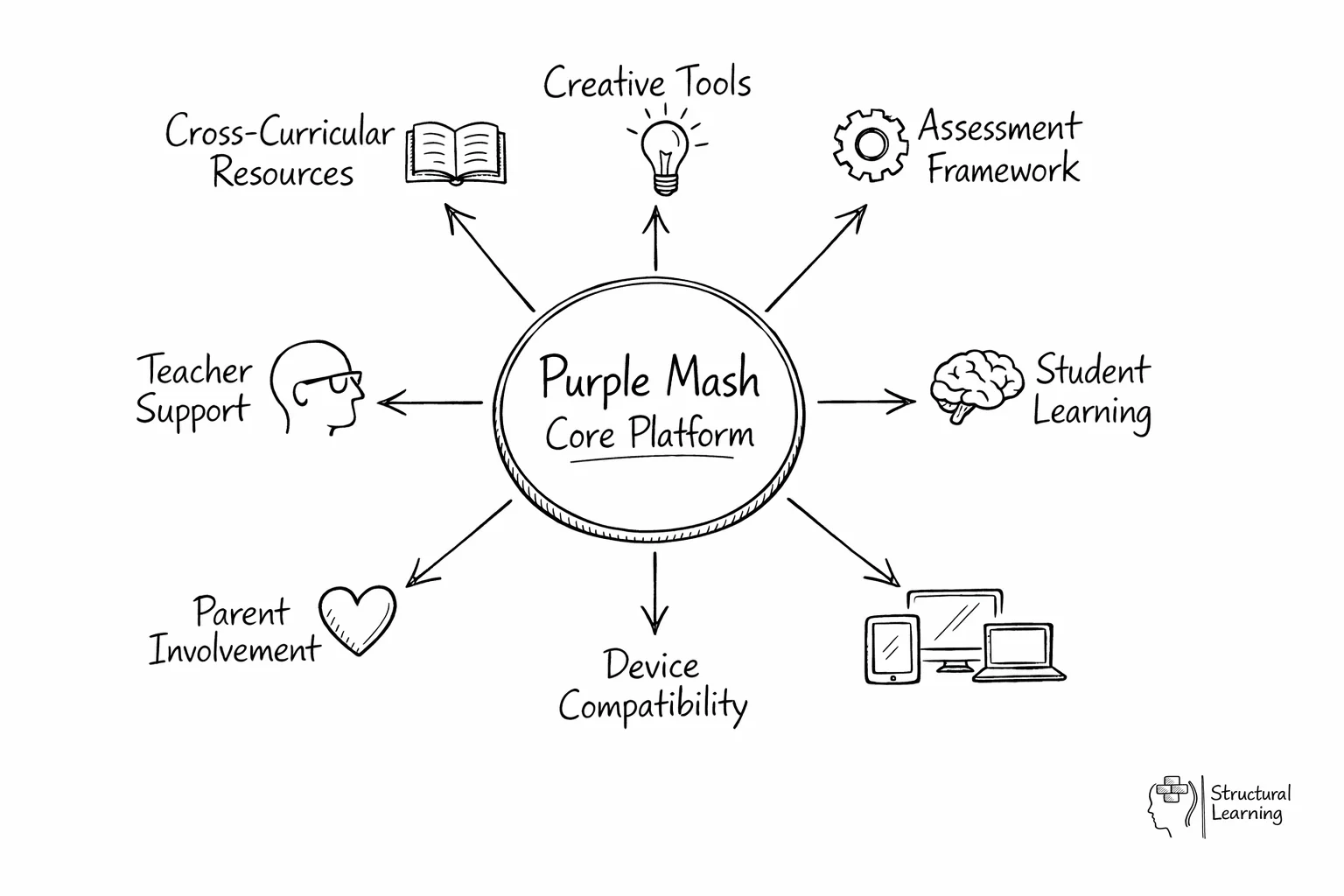
Teachers love Purple Mash because it saves them time and gives them the confidence to teach in different ways. The scheme of work is step-by-step, so it's easy to follow, and the online tools are always up-to-date and constantly improving. The help videos are handy if teachers ever get stuck. Overall, Purple Mash is an incredibly valuable resource that teachers can't live without.
Assess learner progress quickly with our framework. Lesson plans and curriculum maps are ready to use. Find video lessons and CPD activities fast. Spelling resources support all subjects. Assign homework activities easily.
Teachers can use creative tools to engage learners with subjects effectively. Art, coding, and multimedia software let learners create work that they can iterate on, share with peers, and revisit over time (Papert, 1980; Resnick, 2017).
Purple Mash offers tools to support teachers, with templates, lesson plans, and pre-built activities mapped to UK curricula. It provides resources, like lesson plans, saving time. Teachers can deliver effective learning with whiteboard activities.
Purple Mash focuses on internet safety. It offers resources so learners stay safe online. These include posters and quizzes that teach safe internet use.
Purple Mash lets teachers track learner progress with its assessment tool. This tool gives a good view of performance, helping teachers spot problems and offer support. Purple Mash provides online tools for primary teachers, supporting lessons and online safety.
Purple Mash supports differentiated learning. It offers adaptive activities and flexible task setting. It also gives quick feedback for independent progress. Activities change to match the skills of each learner. They also track learner progress (Sharples et al., 2016). Teachers can easily assign tasks to individuals or groups (Holmes et al., 2019). The platform saves work automatically. It gives fast feedback to help learners work independently (Laurillard, 2012).
Education experts at 2Simple designed the Computing Scheme of Work. This scheme covers Reception to Year 6. Lesson plans help non-specialist teachers teach the AI curriculum easily. It gives a clear and simple route for every learner.
The assessment framework included in the scheme of work makes it easy for teachers to assess the progress of learners in computing. Whether you're a new teacher or an experienced educator, you'll find all the resources you need to deliver the Purple Mash Computing Scheme of Work here.
Also included are teacher videos to helps less experienced educators. These videos cover everything from how to set up the Purple Mash website to how to use the assessment framework.
Curriculum Maps
Each unit includes a detailed curriculum map, which shows exactly what will be covered in each topic. This helps teachers to plan their lessons and ensure that they are covering all the necessary material.
Top classroom platforms are digital systems for learning. They offer different strengths to help teach the curriculum. They also boost creativity, marking and learner focus. Purple Mash offers many learning tools. Scratch, EducationCity and BBC Bitesize each have unique benefits. (Papert and Harel, 1991).
Maloney et al. (2010) found Scratch helps learners visualise coding concepts. Purple Mash supports more curriculum topics than Scratch. EducationCity offers interactive games tied to specific curriculum objectives; Purple Mash focuses more on creative open-ended tasks. Ofcom (2023) reported BBC Bitesize aids revision. Purple Mash gives teachers more support materials.
Your school's platform depends on your needs. Check curriculum fit, ease of use, cost, and training. Trial platforms to see what works best for your teaching and each learner's preferences .
KCSIE and AI standards are rules to keep children safe. Schools must address online harms and fake news. They must also teach how to use AI safely. KCSIE rules now list fake news and plot theories as online harms. The Department for Education says schools must include online safety in their plans. This includes AI safety (Department for Education, 2025). Child safety rules under the UK Online Safety Act are now active.
Purple Mash gives busy teachers a manageable route into that work. A Year 5 teacher might set a 2Do in 2Connect and say, “Look at these two images. Which one would you trust, and what evidence supports your view?” Learners then note odd hands, missing source details, exaggerated captions and emotional wording, before turning their thinking into a simple class checklist for spotting misinformation.
This is more than a one-off e-safety lesson. It builds algorithmic awareness by helping learners see that search results, recommendations and trending posts are organised by systems with particular goals, not by truth alone, which fits established AI literacy frameworks that stress critical evaluation as well as use (Long and Magerko, 2020). Purple Mash writing and quiz tools can then be used for short follow-up tasks such as “fact, opinion, advert or AI output?” so the language becomes routine rather than bolted on.
It builds digital citizenship in a way primary learners understand. Children can use Purple Mash to make a poster or comic. They can then discuss who made a post. They can ask who benefits and if they should share it. They learn what makes up a digital footprint. This keeps teacher workload sensible. It also matches the Education for a Connected World rules. Learners learn to judge what they see online. They learn to manage facts and understand online outcomes.
2Simple is the company that makes Purple Mash. Its teaching style puts the primary classroom first. It does not expect every teacher to be an IT expert. Instead, it breaks digital learning into short, easy steps. These steps fit into daily primary teaching practice. This matters a lot in busy schools. Staff need resources that are easy to teach and review. The tools must also link closely to curriculum goals.
The teaching approach behind Purple Mash links well with scaffolding and cognitive load theory. Learners receive enough structure to get started. They are not overwhelmed by too many choices at once. Take a Year 2 lesson as an example. A teacher might model a simple 2Publish task. They provide a sentence stem and success criteria. Then, learners add images and captions independently. This gradual release helps children build confidence. It also keeps the lesson focused.
There is also a strong creative strand running through the platform, which connects well with constructionist ideas from Seymour Papert and later work on creative computing. Children often learn more deeply when they make something visible, share it and improve it. A Year 4 class using 2Code to build a short quiz, or a Year 1 class using 2Paint to create a science picture glossary, is doing more than screen-based practise. They are turning curriculum content into a product that can be explained, discussed and refined.
For teachers, this makes Purple Mash practical as well as engaging. You can begin with templates for learners who need support, set open-ended extensions for confident learners and use saved digital work for quick formative assessment. Black and Wiliam's work on assessment reminds us that progress improves when teachers can see learner thinking clearly, and Purple Mash helps make that thinking easier to capture. In that sense, 2Simple has built more than a resource bank, it has built a platform that fits how primary teaching actually works.
Top Purple Mash tools and games are the features that most effectively link classroom activities to clear learning goals. This reflects Papert’s constructionist view that children learn well by making things, then testing and improving them with feedback from the teacher and their peers.
In practice, 2Code works well with short predict, run, debug routines. Ask learners to create code that moves a character through a maze, then pause for partner talk before they press play. That simple routine slows learners down enough to explain their thinking, spot mistakes and compare different solutions, which is especially useful when a non-specialist teacher wants visible evidence of understanding rather than just a finished screen.
For creative curriculum work, 2Animate and 2Create a Story can help learners show what they know without relying on long written answers. A Year 2 class might animate the life cycle of a butterfly, or a Year 4 class could retell a Roman myth in six short scenes. Mayer’s work on multimedia learning suggests that combining words and images can strengthen understanding when teachers keep the task focused, model success criteria and avoid overcrowded pages.
2Calculate and 2DIY are great for remembering facts and linking subjects. In maths or science, learners enter class survey data into 2Calculate. They create simple charts and discuss the results. This builds early data skills and subject knowledge. With 2DIY, learners make matching games or short quizzes. They can use topics like habitats or spelling patterns. This uses retrieval practice. Dunlosky et al. (2013) identify this as a reliable way to improve learning.
The final verdict for teachers is that Purple Mash offers broad curriculum coverage and practical, time-saving support for UK primary schools. Its tools empower teachers to help learners develop crucial digital skills, while creative tasks and embedded assessments allow learners to reach their full potential.
Explore Purple Mash features to improve your teaching. The platform supports creativity, saves planning time, and provides activities aligned with the UK national curriculum.
These peer-reviewed studies provide the research foundation for the strategies discussed in this article.
Coding and Computational Thinking Across the Curriculum: A Review of Educational Outcomes
27 citations
Mills, K. A. et al. (2024), Review of Educational Research
Mills et al.'s research review found that integrating coding and computational thinking across different subjects can improve pupils' problem-solving skills and logical reasoning. This suggests that Purple Mash's coding tools could be valuable for enhancing learning outcomes beyond just computing lessons.
Computational thinking in K-12 education. An insight through meta-analysis
44 citations
Merino-Armero, J. M., González-Calero, J. A., & Cózar-Gutiérrez, R. (2021), Journal of Research on Technology in Education
This meta-analysis explores the integration of computational thinking in primary and secondary education. The research highlights effective strategies for developing these skills in young learners. Understanding these approaches can help teachers effectively incorporate computational thinking into their Purple Mash lessons and across the curriculum.
Computational thinking in programming with Scratch in primary schools: A systematic review
169 citations
Fagerlund, J., Häkkinen, P., Vesisenaho, M., & Viiri, J. (2020), Computer Applications in Engineering Education
Fagerlund et al.'s systematic review found that Scratch programming can effectively develop computational thinking skills in primary school children. This suggests that teachers can use block-based coding environments like Purple Mash to foster problem-solving and logical reasoning in their pupils.
Dağ, F., Şumuer, E., & Duru, S. (2023), Journal of Computer Assisted Learning
Dağ, Şumuer, and Duru (2023) found that unplugged coding courses can improve computational thinking skills in primary school students. This suggests that teachers can use activities that don't require computers to develop these important skills in their pupils, providing a foundation for later work with Purple Mash.
An analysis of young students' thinking when completing basic coding tasks using Scratch Jnr. On the iPad
138 citations
Falloon, G. (2016), Journal of Computer Assisted Learning
Falloon's 2016 paper analyses how young children think when undertaking basic coding tasks on iPads using Scratch Jnr. Understanding these thought processes can help teachers better support pupils as they learn fundamental programming concepts and develop their computational thinking skills.
School pricing and subscriptions for Purple Mash are based on a paid access model, with costs calculated on pupil numbers or through whole-school licensing. The final price depends on your setting's size and specific needs.
Purple Mash has yearly fees per learner. Smaller schools (under 100 learners) pay about £1.50-£2.00 each year. Larger schools often pay less, around £0.80-£1.20 yearly. A primary with 200 learners might budget £250-£350 per year. Secondary schools sometimes agree custom pricing.
Core tools include 2Code, 2DIY3D, 2Investigate, 2Animate, and 2Publish. We offer unlimited learner accounts. You gain 5GB storage for resources and work. Use the teacher dashboard for marking and feedback. Schools often add modules (coding, storage) for £100-£200 yearly.
Google Classroom is free, but it's a management platform, not a creative tool. Purple Mash fills the creativity gap: your learners can code, design in 3D, animate, and publish within one ecosystem. Seesaw (another platform) charges per teacher, so large schools may pay £500+ annually. Purple Mash's per-student model often works out cheaper for most UK primary schools. The payoff is time: Purple Mash lessons are scaffolded and curriculum-mapped, so you spend less time designing and more time teaching. For a Year 3 teacher delivering design technology and computing, Purple Mash saves roughly 10-15 hours per term on lesson prep, worth the £250 annual cost alone.
The best alternatives for primary schools are digital platforms that offer similar creative and curriculum-aligned tools to Purple Mash. Here's how it compares to other popular options:
| Platform | Price per Student | Key Focus | Best For | UK Curriculum Alignment | EYFS Support |
|---|---|---|---|---|---|
| Purple Mash | £0.80-£2.00 | Integrated creativity: coding, 3D, animation, publishing | Primary schools, design technology + computing | Excellent, curriculum-mapped | Strong, early learner tools |
| Seesaw | Per teacher, ~£40-£60/yr | Digital portfolio and home-school communication | Early years and KS1, parent engagement | Moderate, more flexible | Excellent, EYFS-friendly |
| Tapestry | Per child, ~£0.30-£0.50 | EYFS observations and progress tracking | EYFS and Reception, observation-based | Excellent, EYFS-specific | Excellent, built for EYFS |
| Google Classroom | Free (Google Workspace) | Classroom management and assignment submission | Secondary, assignment distribution | Moderate, not curriculum-designed | Limited, not age-appropriate |
| J2E (Judoclass) | Bespoke, ~£800-£2000/yr | Coding and digital skills training provider | Code-heavy schools, coding specialism | Good, code-focused | Limited, KS2+ only |
Purple Mash offers creative tools for primary learners at a good price. Seesaw helps learners record their portfolios well. Tapestry is vital for delivering the Early Years Foundation Stage. Google Classroom manages assignments for free.
Supporting SEND learners requires accessible digital tools. These tools help learners with different needs join in creative tasks. Purple Mash offers built-in accessibility features. These tools support diverse learning styles (Rose and Meyer, 2002). Teachers can use them to support every learner in their class (CAST, 2018).
Purple Mash uses text-to-speech in many tools, like 2Code and 2DIY3D. This helps learners with dyslexia or sight issues. Keyboard navigation assists learners with motor skill difficulties. High colour contrast and sans-serif fonts aid dyslexic learners. Captions support learners with hearing impairments.
2Code has adjustable difficulty. Block code is good for younger learners (like Scratch). JavaScript suits more experienced learners. Set tasks like animation loops or conditional games. 2Investigate has tiered data tasks. Some learners sort data; others analyse it. Purple Mash assigns resources to help less confident learners.
2DIY3D helps learners with spatial or motor skills. Learners design objects for 3D printing onscreen instead of using scissors. This setup removes barriers but keeps creative problem solving aligned with Universal Design for Learning principles (Rose & Meyer, 2002; CAST, 2018). 2Animate lets learners create stories using pictures and voice, avoiding writing barriers while keeping storytelling intact.
These tool guides offer practical explanations of how Purple Mash features support different subjects in the primary classroom. Here's what each key tool does and how you can use it:
2Code is Purple Mash's coding environment. It's block-based (visual code snapped together like Lego) for beginners, progresses to JavaScript for advanced learners. In Year 3, use 2Code to teach algorithms: "Create a sequence of instructions to make a character move through a maze." Learners aren't writing code from scratch; they're assembling logic blocks (if-then, loops, variables) to solve problems. By Year 6, learners write actual JavaScript and build interactive games. The curriculum progression is built in: each lesson scaffolds the previous one. Assessment is embedded: learners can run their code immediately and see if their logic worked. This instant feedback loop is powerful, learners learn from failure in real time, not from a marked worksheet days later.
Design technology (DT) demands iterative design: sketch, model, test, refine. Paper sketching is fine, but 2DIY3D lets learners model in 3D, see it from all angles, and understand spatial relationships better. In Year 4, a design task might be: "Design a bridge that can hold a weight." Learners use 2DIY3D to build a virtual bridge, export it, 3D print it, test its weight capacity, then iterate the design. This is authentic DT, the digital tool supports the physical design cycle. You can also export learners' designs and 3D print them for classroom displays (a huge motivation boost).
Learners use 2Publish to make digital books and posters. The platform helps them consider layout and audience. A Year 5 task: create a persuasive poster about a favourite author. Learners draft text, add images, and choose fonts. This teaches rhetoric and digital literacy (Bezemer & Kress, 2016). Teachers give feedback in 2Publish, and learners share work with the class.
2Investigate uses real data to teach data handling. Year 5 learners survey classmates about sports. They input data, then make bar charts and reach conclusions. Learners use their own data, not textbook examples. 2Investigate automatically makes charts. This lets learners focus on data patterns, not drawing. Questioning data helps fight misinformation (Huff, 1954). Drawing conclusions with evidence is vital (Tufte, 2001).
Purple Mash supports primary learners with varied online resources. It has coding, writing, and creative tools mapped to UK curricula. Teachers use it for quality lessons across subjects.
Teachers typically use the platform to set "2Dos", which are specific tasks assigned to individuals or groups of learners. These activities can be started in school and completed at home; the built in assessment tools then allow for immediate feedback and progress tracking. Many educators also use the ready made schemes of work to guide their computing and digital literacy lessons.
Auto-marking cuts teacher workload. This lets learners focus on coding. Learners build digital skills safely through tasks (Prensky, 2001). Multimedia tools let learners show off their creativity.
Digital platforms engage learners. They help build computational thinking skills. Technology supports learning, so learners remember facts better (Papert, 1980). Platforms provide structured paths. These paths are based on what each learner already knows (Brennan and Resnick, 2012; Wing, 2006).
Teachers often use the platform as a reward, not part of lessons. Some teachers miss differentiation features, making work too easy or hard. Link digital tasks to objectives for better learner outcomes.
The software teaches learners online safety with quizzes and tools. It makes a safe online space for learners to communicate. These resources help schools meet safeguarding needs. The programme supports digital citizenship education too.