Updated on
September 24, 2026
Digital Tools for Metacognition: A Teacher's Guide
Digital tools for teaching metacognition: AI scaffolding, learning analytics apps and classroom technology that builds self-regulated learners.


Updated on
September 24, 2026
Digital tools for teaching metacognition: AI scaffolding, learning analytics apps and classroom technology that builds self-regulated learners.
Digital tools support metacognition when each one sits inside a routine: a prompt, a pause, feedback and a decision about what to try next. The routine matters more than the tool; the failures are too many tools, unstructured reflection and data nobody acts on.
Digital tools for metacognition make learners’ planning, monitoring and evaluation visible enough to teach. Metacognition means recognising what you know, choosing a strategy, checking whether it is working and changing course when needed (Flavell, 1979). In the classroom, that can look like a teacher asking learners to predict quiz confidence, annotate where they got stuck, or compare a first plan with a revised answer.
The technology matters only when it supports a routine that changes thinking. A shared document, retrieval quiz, learning journal or concept map can capture the moment when a learner checks understanding and decides a next step. Used with clear prompts and feedback, these tools help teachers hear the reasoning behind an answer, not just see the score.
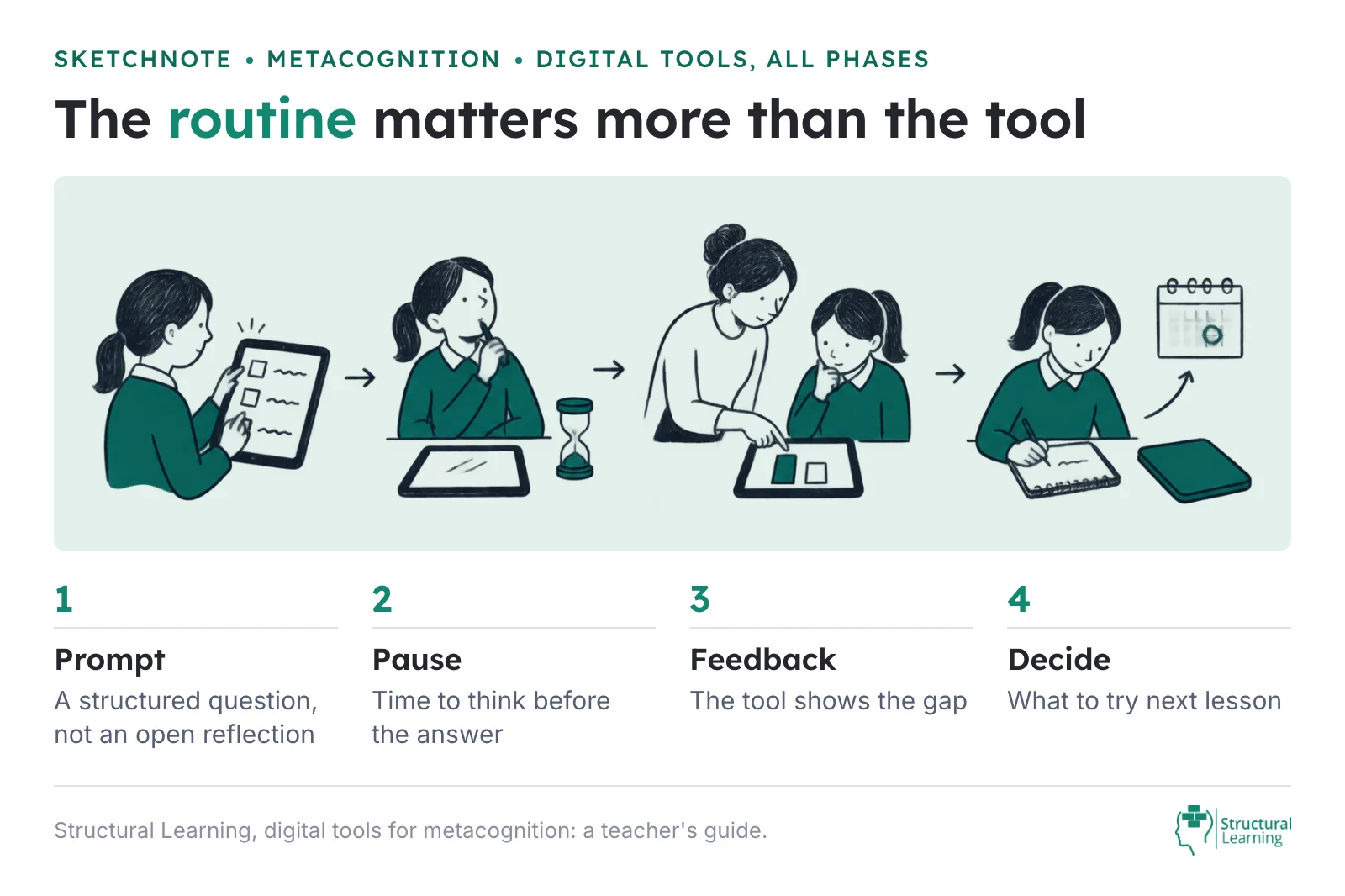
Digital tools for metacognition help learners see how they plan, monitor and adjust their thinking. The tool is not the intervention by itself.
Used well, dashboards, journals, quizzes, screen recordings and concept maps make hidden thinking easier to discuss. They can show whether a learner has checked understanding, noticed a gap or changed strategy after feedback.
Used poorly, the same tools become extra admin or passive tracking. This guide is about practical classroom choices. Which digital tools support reflection? When should you use them? How do you keep the technology tied to learning rather than distraction?
Before you choose a tool, read the classroom model behind all this in our main metacognition guide.
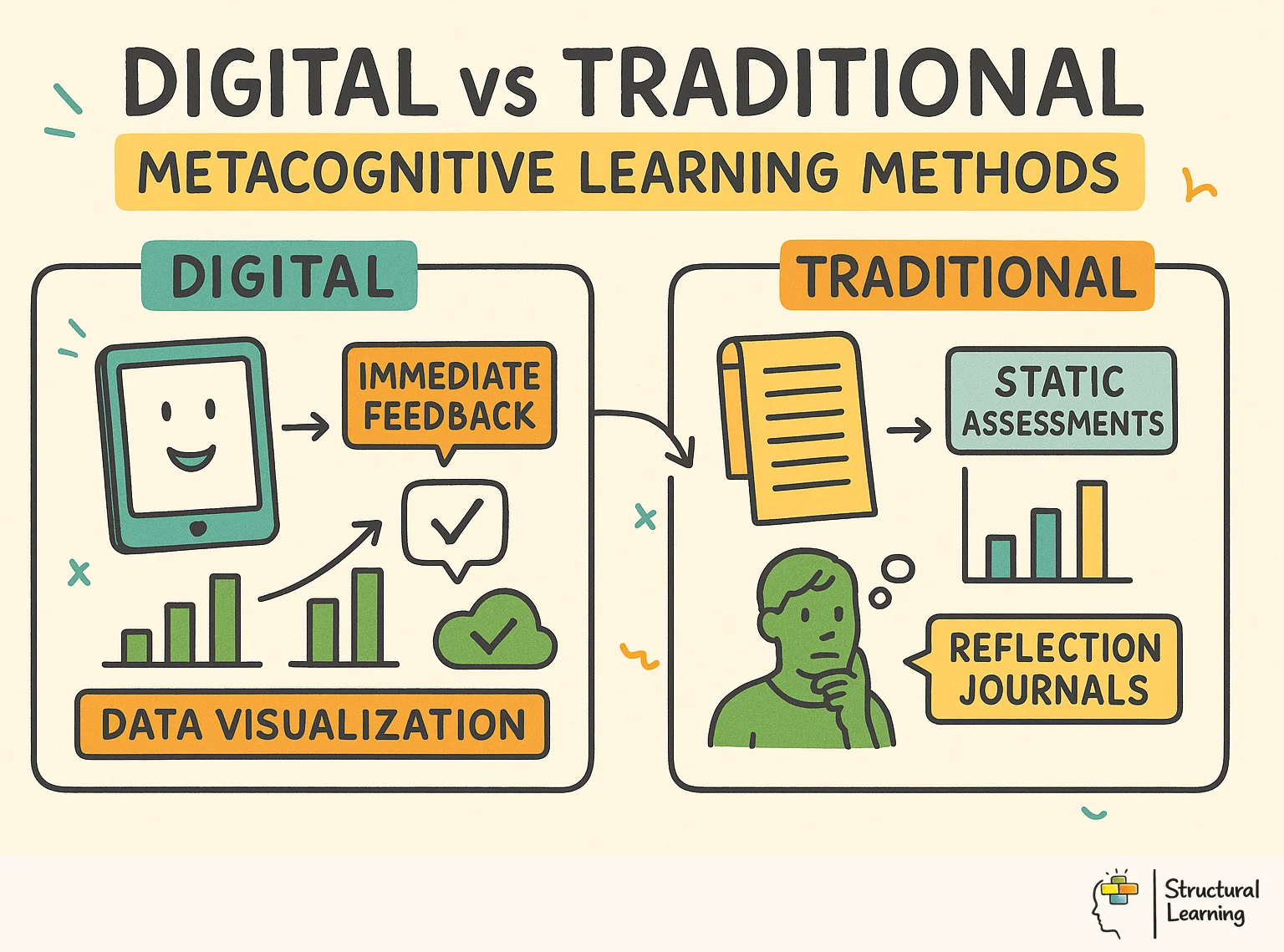
Interactive tech lets learners see their own thinking. A quiz gives the result at once, which prompts a rethink of strategy. Azevedo's research shows timely feedback helps learners judge their own work well (Azevedo et al., 2004).
Technology helps learners show how they think. Data charts and prompts make learning visible. They nudge learners to explain how they thought. Concept mapping turns abstract ideas into pictures.
Learners can then look hard at what they understand. Learning analytics dashboards give hard data on study habits. Learners might not see those patterns without it (Jonassen, 2000; Shute, 2008; Dweck, 2006).
Digital records give a lasting history of learning. Learners can go back to earlier work, where paper notes get lost. They see their growth and spot patterns in the strategies they use (Butler & Winne, 1995; Zimmerman, 2000). This long view is key to strategic thinking in self-regulated learners.
Digital tools give scaffolding that adapts to each learner. This guides their thinking without stress and builds independence. We pull the support back as metacognitive skills strengthen (Brown et al., 1983).
A decade of research by Azevedo shows technology boosts learner self-regulation. Learners who use digital tools with prompts learn better. Successful learners plan, check what they understand, and change strategy. Digital tools help with each of these, says Azevedo.
Zheng's meta-analysis covered 44 studies. It showed that digital scaffolding helps learners' metacognition. Tools for self-evaluation, planning and reflection worked well. How the tech is used matters more than the tech itself, said Zheng. On its own, tech won't boost metacognition without good teaching.
Bannert et al. found that prompts help self-regulated learning in digital settings. Prompts to plan, monitor and evaluate improved learner outcomes.
Learners also built stronger strategies, Bannert et al. suggest. The support the prompts give helps these thinking skills become automatic (Bannert et al., 2009).
Winne's research shows that feedback from data improves a learner's self-awareness (Winne, 2017). Learners compare their own judgement with the data, then adjust how they learn.
Visible thinking works with digital tools, because it makes abstract ideas clearer. Digital thinking maps help learners set out their thoughts.
First, constructivist approaches help learners learn together (Vygotsky, 1978). Second, planning and reflection strengthen a learner's self regulation (Flavell, 1979). Third, feedback supports growth and raises attainment (Hattie & Timperley, 2007).
Choosing the right digital tools, and using them well, matters for building metacognition in class. Here are a few tools that have shown promise in research and in practice: each one only works when it carries a routine the class repeats, the same prompt in the same place every lesson.
| Tool type | What it does for metacognition | The routine that makes it work | Watch out for |
|---|---|---|---|
| Reflection forms (Google Forms, Microsoft Forms) | A three-question form at the end of the lesson: what was the goal, what did you do when stuck, what will you change next time. | Keep the same three questions for six weeks. Read the answers before the next lesson and quote one back to the class. | Ten open questions a week is a chore for learners and unread by teachers. |
| Screen-recorded think-alouds (Loom, Flip, Clips) | A learner records two minutes of solving a problem while saying what they are thinking. | Model one yourself first, then set the task in one lesson a week. Watch three, not thirty. | A polished video is not the point; the pauses and corrections are. |
| Digital exit tickets and polls (Socrative, Mentimeter) | A confidence rating beside each answer, so learners judge their own understanding and you see the calibration gap. | Ask for the rating before the answer is revealed, then show the class where confidence and accuracy parted company. | A leaderboard turns monitoring into a race and the ratings stop being honest. |
| Learning journals (OneNote, Seesaw, Padlet, Google Docs) | A running record of plans, checks and evaluations across a unit, with photos of work. | One prompt per lesson, written in two minutes, kept in the same place all year. | Unstructured journals fill with retelling. Give the sentence stem, not a blank page. |
| A lesson-planning app with the routines built in (Structural Learning) | The plan, monitor and evaluate prompts are written into the lesson itself, with the projector view and the printable for the class. | Build one lesson around a thinking routine, teach it, then reuse the routine in the next topic. | The app supplies the routine; the modelling still has to be yours. |
| Audio and written feedback tools (Kaizena, Mote, Google Classroom comments) | Feedback the learner has to act on, with a reply that names what they changed and why. | One comment, one required response: "What will you do differently on the next draft?" | Feedback nobody answers is marking, not monitoring. |
Teachers who search for a metacognition app usually want the routine, not another place to type. The Structural Learning app builds a lesson around a thinking routine for your topic and year group: a talk routine (Say It), an organising routine (Map It) or a building routine (Build It). The planning, monitoring and evaluating prompts are written into the tasks, the projector view shows them to the class, and the printable pack goes on the desks. You teach it, then keep the routine and change the content. It is free to start.
When implementing digital tools for metacognition, consider the following strategies:
These approaches go further than basic "use tech" tips. They target a specific learner thinking skill. Each also names the digital tool that supports that skill.
Ask learners to answer three questions after each lesson, in Google Forms or Seesaw. What did I find difficult? What strategy helped me? What will I do differently next time?
The digital format makes a searchable archive. Learners can look back over their entries before a test and spot patterns in their learning.
Before a low-stakes quiz on Google Forms or Microsoft Forms, ask learners to rate their confidence: "How well do you think you know this topic? (1-5)." After they see their results, they compare their prediction against reality. Kruger and Dunning (1999) found that low performers can overestimate their ability, and calibration work is consistent with de Bruin et al. (2017). Do not promise a fixed percentage gain from one term of quizzes.
Learners use Loom or Screencastify to record themselves solving a problem while they talk through their thinking. The teacher watches the recording and gives feedback on the thinking, not just the answer. A Year 6 learner on a multi-step maths problem might say this. "I'm going to try the bar model first because I know it helps me see the parts." That one sentence shows planning, choice of strategy, and self-awareness. Without the recording, it would be invisible.
Research on metacognition by Flavell (1979) and Schneider (2008) gives teachers practical classroom strategies. These strategies help learners understand more and do better in maths, according to work by Lucangeli and Cornoldi (1997).
Replace content-only exit tickets with ones that ask about thinking. Add one process question to two content questions. "Which part of today's lesson took the most effort?" or "What strategy did you use when you got stuck?" Platforms like Plickers or Google Forms collect the answers at once. The teacher scans the class data before the next lesson and adjusts the teaching. Learners who say "I guessed" on a particular idea get targeted help the next day.
Use a tool like Kami, or the comments in Google Docs, so learners can annotate each other's work. The instruction matters. "Highlight one place where the writer explained their reasoning clearly." "Suggest one question the writer could ask themselves to improve this paragraph." This brings the checking out into the open. Learners practise judging the quality of thinking, and that carries over to judging their own work. Topping (2009) found that structured peer assessment improves the thinking skills of both the assessor and the person assessed.
Platforms like Seesaw, ClassDojo, or a simple Google Sheets dashboard let learners track their own progress against set goals. The benefit for thinking comes from the review cycle. Learners set a goal on Monday, check progress on Wednesday, and evaluate on Friday. The teacher models the review talk: "Your target was to use evidence in your writing. Looking at your dashboard, which pieces show that?" This makes self-regulated learning concrete and visible.
Tools like Century Tech or Sparx Maths change the difficulty to match how a learner is doing. The chance for thinking comes after the platform adjusts. Ask learners: "The system gave you an easier question. What does that tell you about what you need to practise?" This moves learners from taking in adaptive content to reading the feedback for themselves. They start to spot their own gaps without the teacher pointing them out.
Tools like Popplet, MindMeister, or Coggle let learners build concept maps together. The digital format makes revision visible. Learners can see how their map has changed over a unit of work. A Year 9 history class mapping the causes of World War One can compare week one (three isolated nodes) with week six (fifteen linked nodes). The visual difference shows learning growth in a way that written notes cannot.
Use tablets to record learners during a presentation, a PE performance or a group discussion. Learners then review the footage against a set rubric. Did I make eye contact? Did I use subject vocabulary? Did I respond to my partner's point?
The gap between how they thought they did and how they did is where the growth happens. Teachers reviewing video of their own lessons can notice habits they had missed (Tripp and Rich, 2012).
Platforms like Seesaw, Google Sites, or Book Creator let learners gather their best work across a term or a year. The portfolio is not a collection. It is a reflective artefact. Each entry carries a short note. "I chose this piece because it shows how I improved my paragraph structure after using a graphic organiser." Choosing a piece and saying why makes learners judge their own learning, see where they have grown, and say what made the difference.
This is not the article’s list of journals, Loom and dashboards.
| Routine, as teachers describe it | What you would notice | What the evidence says |
|---|---|---|
| Voice note, not a typed journal UK primary: a short voice note on the platform they already open, used to retell or explain, in the lesson.
|
Year 4 speaking into Showbie during English. Not a written learning journal. | EEF guidance, second edition (13 Nov 2025), recommendation 4: promote metacognitive talk. |
| Retrieval they already use, with a look at the ticks Keep the weekly retrieval quiz. Walk the room while they self-mark. The honesty of the tick is the metacognitive bit, not the platform.
|
Carousel (or the quiz they already pay for) as the homework spine. A teacher checking workings and generous ticks. | EEF Toolkit (May 2025): teachers might use self-marking criteria. The +8 months figure is a mean across 355 studies and can be hard to realise. |
| Workings and time, not a take-home box If the task leaves the room, require full working and check time on each question, so a model cannot cheaply fill it.
|
Answer sheets with workings. A time check. Not a reflection paragraph completed at home. | EEF Toolkit: strategies belong on challenging curriculum tasks, not as a bolt-on. This is a reported homework design, not a trial. Replies on the thread split: show workings, or change the homework and teach AI use. |
| A mark on a gym wall US PE: learners stand in a closure corner. The teacher tallies the day’s answers across the year. UK rooms keep the physical mark; they do not need the US gym vocabulary.
|
Bodies in corners, a running tally. Not a form. The photograph of the display is redrawn elsewhere, not republished. | EEF Toolkit: provide opportunities to reflect, monitor strengths and plan how to overcome difficulties. A tweet is not a trial. |
| Photograph the paper, do not type it US elementary: paper work first, then a photo into the portfolio they already use. UK equivalent is the same photo or a voice note, not a new app.
|
Handwriting on the desk, then a camera. The page is the thinking. The same post states Seesaw Certified Educator, so read it as a teacher's account with a vendor badge. | EEF recommendation 2 (Nov 2025): teach plan, monitor and evaluate on the usual task. A photo of the task is a capture, not a journal. Not a trial of Seesaw. |
| Devices for a two-minute slot, notes on paper In US schools, Chromebooks only for a bell ringer or exit ticket. Notes stay on paper. UK secondary already loses in-class Kahoot to phone-free policy.
|
Laptops away after two minutes. Cornell notes (the poster’s words) on paper. Not a reflection homework. | Gallup / Walton / Joan Ganz Cooney Center, 2,101 US public-school teachers: 61 percent want less device time. That is a poll, not a trial of this classroom. |
| A typed self reflection is now an AI product objection Do not set a take-home typed reflection. If a judgement is needed, it is spoken, written by hand, or made before the tool shows an answer.
|
A fluent first-person paragraph that does not sound like the learner. | Billy J. Stratton, University of Denver, The Conversation, 21 Aug 2026: a chatbot cannot do the messy human voice. Higher education, not a UK classroom trial. |
| Learner-facing AI is not inevitable Do not put a chatbot in front of the learner to produce the reflection. Teacher-facing analysis of a quiz is a different job.
@adamboxer1 |
No learner-facing AI in the routine. A related reply from @dylanwiliam wants any learner-facing AI mediated by the teacher. | EEF recommendation 2 (Nov 2025): teach plan, monitor and evaluate in the subject. A tweet is not a trial. |
Metacognition in the early years is a child noticing what they are doing and choosing what to do next, in words they already have. It does not need a dashboard. It needs an adult who asks "how did you do that?" and a way to keep the answer.
The EEF guidance this page cites (EEF, 2018) treats these skills as teachable from the early years on, in forms that fit the age. In a Reception class that means talk before it means writing, and it means capturing the talk so the child can hear it again.
Two tools from this guide work with four and five year olds once the routine is right. The first is a tablet photo of a model or a piece of mark making, with a ten-second voice note. "I put the big blocks at the bottom so the tower did not fall."
The voice note is the reflection, and the child can replay it the next day. The second is a class video of a shared think-aloud. The teacher solves a puzzle on the carpet and narrates every choice. The recording becomes a model the children watch again before they try their own.
A third routine needs no app at all. Before a quick recall game, every child shows green if they think they know it and amber if they are not sure. Afterwards, ask one child who chose green and got it wrong what they will do differently. That question is the calibration check from routine two, sized for a five year old.
Keep the digital part tiny. One photo, one voice note, one replay. The learning sits in the sentence the child says, and the tool only stops it disappearing.
By Year 2 the same routines carry a little more. Learners can record a think-aloud on a tablet in pairs, one solving and one filming, then swap. They can choose which photo goes into their journal and say why in a single sentence. When "what will you do differently next time?" starts to get answers about strategy rather than effort, the routine is working.
What does not work is the adult-sized version. A typed three-question reflection form asks more of a five year old's writing than of their thinking, so the thinking gets lost. If the tool needs the child to type, it is the wrong tool for this age.
Technology does not produce metacognitive learners on its own. Three mistakes account for most attempts that fail.
Mistake 1: Tool overload. A school brings in five new platforms at once. Learners spend their mental effort learning the tools instead of reflecting on their learning. Start with one tool.
Keep using it for six weeks before adding another. Gathercole and Alloway (2008) found that working memory capacity is the bottleneck. Every new interface competes for the same limited space.
Mistake 2: Reflection without structure. A teacher sets "Write about your learning in your digital journal" and says no more. Learners write vague, shallow entries: "Today was good.
I learned about volcanoes." A structured prompt changes the quality. "Name one thing you found confusing and explain what you did about it" gets real reflection. The prompt does the scaffolding.
Mistake 3: Data collection without action. A school collects self-assessment data through digital forms but never uses it to change the teaching. Learners soon learn that their reflections go nowhere and stop taking them seriously. The feedback loop must be visible: "Last week, twelve of you said you found converting fractions difficult. Today we are starting there." When learners see their reflections change what happens next, they put effort in.
Three signs tell you that digital tools for metacognition are working in your classroom.
Self-assessment accuracy improves. Track the gap between how confident learners say they are and how they score, over time. Effective metacognitive tools narrow this gap. If learners keep rating themselves 5/5 and scoring 2/5, the tool is not helping them check their own work.
Strategy language increases. Listen to how learners talk about their learning. Before the tools: "I don't get it." After they are used well: "I think I need to re-read the question because I might have missed something." Count how often strategies are named in digital journal entries across a half-term. A rising count means the vocabulary for thinking is growing.
Help-seeking becomes targeted. Learners with strong thinking skills ask specific questions: "I understand the method but I keep making errors in the second step. Can you check my working?" Learners without that awareness ask general ones: "I can't do it." Track the ratio of specific to general requests for help. As the digital tools take effect, the specific requests go up.
Five classroom examples show learners using voice notes, mapping ideas, comparing drafts and choosing the next step.
1 · Process
1 · in their English lesson
2 · voice notes on Showbie
3 · orally retell
4 · Escape from Pompeii
Year 4 spoke a retell in the lesson on the platform they already open. That is capture, not a typed journal.
2 · Cause and effect
The stall · AI making homework virtually pointless
What unstuck it · show their full working out
3 · how long they spend on each question
When a model can fill take-home work, the check becomes the workings and the time, not a typed paragraph.
3 · Mind map
closure corners as our reflection tool
2 · sort of
3 · unit/year long answers
4 · yes
5 · not yet
A PE class marks a corner each lesson and the teacher tallies across the year. The gym-wall photograph is not used.
4 · Before and after
Before · paper and pencil work
After · digital portfolio
The thinking stays on paper. The phone only stores it. One teacher's account with a Seesaw badge, not independent classroom evidence.
5 · Process
1 · What I understand
2 · Where it breaks
3 · What I will try next
Three lines in the book, still in the room, before help arrives. Not a typed reflection they can finish at home.
Ross McGill’s one-page stuck plan. Use the shape, not the login. The 5-Minute “I’m Stuck!” Plan.
Choose one digital tool for metacognition and commit to it for the next six weeks. If your learners already use Google Classroom, start there. Add a three-question reflection form as a weekly routine. If they use tablets, try a screen-recorded think-aloud in one lesson a week.
The tool matters less than keeping it up. Metacognitive development builds up over time. A single lesson on "thinking about thinking" does not.
Ask your learners next lesson: "What did you do when you got stuck?" If they say "I asked the teacher" or "I just waited," that tells you where to start. If they say "I re-read the question" or "I tried a different method," they are already building strategies. Digital tools speed this up. They make the invisible visible, the temporary permanent, and the individual shareable.
Digital tools can change learning and build metacognition when they do three things. They make thinking visible, give timely feedback, and help learners decide their next step. Good lesson design and clear teaching of thinking strategies are essential (EEF, 2018). The classroom must value reflection and self-assessment (Nelson & Narens, 1990).
Our job as teachers is to help learners become strategic and self-aware. Learners like that can find their way through a complex world. Used with thought, digital tools help learners take charge of their own learning.
That builds the thinking skills they need to succeed. Technology then serves deeper understanding and lifelong learning.
Not every teacher on social media is convinced a journal app or a dashboard adds anything, and the objections below say so in their own words. Read them before you choose a tool; the replies and the evidence under each one hold the practical answers.
Use the questions below to choose tools that make learner thinking visible without adding another platform to manage.
question
“I’m coming to term with what looks like rampant use of AI making homework virtually pointless.”
What the replies and the evidence say. Teachers split on whether to keep homework with visible working or redesign it around supervised judgement. @jamesgurung keeps homework but demands full working and a time check. @paulhaigh, answering a related thread, wants the homework changed and AI taught. A typed reflection that can be finished at home is now the same problem. Keep the judgement in the room.
question
“Students using AI for educational purposes is neither desirable nor inevitable.”
What the replies and the evidence say. The rest of that post compares learner-facing AI to the mobile-phone cycle. @dylanwiliam, replying to a related Boxer post, adds: no learner-facing AI that is not mediated by the teacher.
question
“but yes, any AI-able coursework isn't worth the hard drive it is etched onto.”
What the replies and the evidence say. Same week, @daisychristo draws the split: learners should not use AI to produce the work, teachers may. That is a public claim, not a classroom trial. If the page offers a digital reflection, it has to be something a model cannot sit in the chair and do: voice, handwriting, or a judgement written before the mark appears.
question
“Because apparently some students fed his material into ChatGPT before to generate a short essay response that’s supposed to be a SELF REFLECTION. Why would you let AI generate a SELF REFLECTION?!”
What the replies and the evidence say. The same account calls it the antithesis of the coursework. Billy J. Stratton’s Conversation essay makes the same point from a University of Denver English classroom: do not mask the messy human voice with a chatbot.
question
“Are other middle school families drowning in Aeries, Google Classroom, ParentSquare, and paper journals?? I wish it all lived in one place.”
What the replies and the evidence say. Families differ on whether one app fixes the overload or schools should reduce the number of tools. @remyjenney says the grandparents’ school was told no, and now there is one app. Alfonso Gonzalez, interviewed in NEA Today, 5 Dec 2025: teaching with tech can engage, but it is all about balance, and teachers want time, not another tool. Do not ask a US family for a fifth login.
question
“When I ask my students to complete an exit ticket on a Google Form, I hear moaning and groaning…”
What the replies and the evidence say. A digital exit ticket is already a groan in this US room. @teacherinRI, on a related thread, says opening the form at the start of class is how they cheat, finish early, and switch off. Gallup (16 Sep 2026): 61 percent of teachers want less device time. Put the check on paper or on boards, in the last two minutes.
Start with the confidence check before your next low-stakes quiz. Ask every learner to write a 1 to 5 rating at the top of the form, then compare it with the score they get. Keep both numbers for six weeks. The gap between them is the only measure of metacognition you need this term, and the form is already collecting it.
Researchers like Flavell (1979) found interactive tools help learners monitor their thinking. These include learning platforms and digital journals for self-assessment. Technologies provide feedback, tracking learner progress as noted by Zimmerman (2000). This makes cognitive skills visible for both teachers and learners, a point supported by Hattie (2009).
Teachers pick tools matching learning goals, like digital exit tickets. Explain how learners should use the software, modelling reflection skills. Regular, short activities, not occasional extras, are needed.
Technology gives learners quick feedback, aiding accurate self-assessment. Digital portfolios record learner work, letting them track progress and spot study habit patterns. Learning analytics dashboards show objective data, helping learners adjust their strategies (Sadler, 1989; Hattie & Timperley, 2007).
Digital prompts can support metacognition when they are tied to clear learning tasks. Azevedo and Hadwin (2005), Bannert et al. (2015) and Zheng et al. (2016) support the broader idea that computer-based scaffolds, prompts and self-regulated learning tools can help learners plan, monitor and adjust their work. The tool still needs explicit teacher modelling and review.
Digital platforms need planned learning activities. Teachers should add prompts, reflection and review routines so the technology serves metacognition. Introducing too many apps at once increases extraneous load and can distract learners from the thinking process.
Concept mapping software is highly effective for turning abstract thought processes into clear visual representations. Applications like Padlet and Flipgrid allow learners to document and explain their reasoning steps to their peers. These platforms help educators identify specific knowledge gaps while giving learners a clear picture of their own understanding.
Azevedo, R. and Hadwin, A. F. (2005). Scaffolding self-regulated learning and metacognition: Implications for the design of computer-based scaffolds. Instructional Science, 33(5-6), 367 to 379.
Azevedo, R., Cromley, J. G. and Seibert, D. (2004). Does adaptive scaffolding facilitate students' ability to regulate their learning with hypermedia? Contemporary Educational Psychology, 29(3), 344 to 370.
Bannert, M., Hildebrand, M. and Mengelkamp, C. (2009). Effects of a metacognitive support device in learning environments. Computers in Human Behavior, 25(4), 829 to 835.
Bannert, M., Sonnenberg, C., Mengelkamp, C. and Pieger, E. (2015). Short- and long-term effects of students' self-directed metacognitive prompts on navigation behavior and learning performance. Computers in Human Behavior, 52, 293 to 306.
Brown, A. L., Bransford, J. D., Ferrara, R. A. and Campione, J. C. (1983). Learning, remembering, and understanding. In J. H. Flavell and E. M. Markman (eds), Handbook of Child Psychology, Volume 3: Cognitive Development (pp. 77 to 166). Wiley.
de Bruin, A. B. H., Dunlosky, J. and Cavalcanti, R. B. (2017). Monitoring and regulation of learning in medical education: the need for predictive cues. Medical Education, 51(6), 575 to 584.
Butler, D. L. and Winne, P. H. (1995). Feedback and self-regulated learning: A theoretical synthesis. Review of Educational Research, 65(3), 245 to 281.
Dweck, C. S. (2006). Mindset: The New Psychology of Success. Random House.
Education Endowment Foundation (2018). Metacognition and Self-Regulated Learning: Guidance Report. Education Endowment Foundation.
Education Endowment Foundation (2025). Metacognition and self-regulation. Teaching and Learning Toolkit. Education Endowment Foundation.
Flavell, J. H. (1979). Metacognition and cognitive monitoring: A new area of cognitive-developmental inquiry. American Psychologist, 34(10), 906 to 911.
Gathercole, S. E. and Alloway, T. P. (2008). Working Memory and Learning: A Practical Guide for Teachers. SAGE.
Hattie, J. (2009). Visible Learning: A Synthesis of Over 800 Meta-Analyses Relating to Achievement. Routledge.
Hattie, J. and Timperley, H. (2007). The power of feedback. Review of Educational Research, 77(1), 81 to 112.
Jonassen, D. H. (2000). Computers as Mindtools for Schools: Engaging Critical Thinking (2nd edition). Merrill.
Kruger, J. and Dunning, D. (1999). Unskilled and unaware of it: How difficulties in recognizing one's own incompetence lead to inflated self-assessments. Journal of Personality and Social Psychology, 77(6), 1121 to 1134.
Lucangeli, D. and Cornoldi, C. (1997). Mathematics and metacognition: What is the nature of the relationship? Mathematical Cognition, 3(2), 121 to 139.
Nelson, T. O. and Narens, L. (1990). Metamemory: A theoretical framework and new findings. Psychology of Learning and Motivation, 26, 125 to 173.
Sadler, D. R. (1989). Formative assessment and the design of instructional systems. Instructional Science, 18(2), 119 to 144.
Schneider, W. (2008). The development of metacognitive knowledge in children and adolescents: Major trends and implications for education. Mind, Brain, and Education, 2(3), 114 to 121.
Shute, V. J. (2008). Focus on formative feedback. Review of Educational Research, 78(1), 153 to 189.
Topping, K. J. (2009). Peer assessment. Theory Into Practice, 48(1), 20 to 27.
Tripp, T. R. and Rich, P. J. (2012). The influence of video analysis on the process of teacher change. Teaching and Teacher Education, 28(5), 728 to 739.
Vygotsky, L. S. (1978). Mind in Society: The Development of Higher Psychological Processes. Harvard University Press.
Winne, P. H. (2017). Learning analytics for self-regulated learning. In C. Lang, G. Siemens, A. Wise and D. Gašević (eds), Handbook of Learning Analytics (pp. 241 to 249). Society for Learning Analytics Research.
Zheng, L. (2016). The effectiveness of self-regulated learning scaffolds on academic performance in computer-based learning environments: a meta-analysis. Asia Pacific Education Review, 17(2), 187 to 202.
Zimmerman, B. J. (2000). Attaining self-regulation: A social cognitive perspective. In M. Boekaerts, P. R. Pintrich and M. Zeidner (eds), Handbook of Self-Regulation (pp. 13 to 39). Academic Press.