Updated on
September 4, 2026
AI in Schools: A Classroom Implementation Guide
AI in schools needs teacher judgement, safe policy and lesson routines for tutoring, workload, feedback, assessment, privacy, SEND and EAL support.


Updated on
September 4, 2026
AI in schools needs teacher judgement, safe policy and lesson routines for tutoring, workload, feedback, assessment, privacy, SEND and EAL support.
AI in schools is the planned use of artificial intelligence tools to support teaching, learning, accessibility, administration and decision-making, while keeping teacher judgement and learner safety in control. The GOV.UK generative AI in education policy defines generative AI as technology that creates new content from training data, including text, images, code, audio, simulations and video (Department for Education, 2025). UNESCO frames generative AI as a human-centred issue, where data privacy, age-appropriate use, teacher capacity and ethical validation matter as much as technical capability (Miao and Holmes, 2023).
The roots of artificial intelligence education go back further than ChatGPT. Intelligent tutoring systems, adaptive software and learning analytics were used long before large language models. Researchers have studied how systems model learner knowledge, give feedback and adapt tasks, but the strongest accounts still keep teachers responsible for purpose, sequence and quality (Luckin et al., 2016; Zawacki-Richter et al., 2019).
A Year 5 Science teacher might use AI to generate three explanations of evaporation. The teacher checks them first, then displays one accurate explanation, one vague explanation and one misconception that water "disappears". Learners write A, B or C on mini-whiteboards, identify the misconception and rewrite the best version using "particles", "heat" and "gas". The AI supplies material. The class does the thinking.
GOV.UK, The Education Hub and UNESCO give schools a useful baseline. GOV.UK sets operational duties around data protection, safeguarding, intellectual property, procurement and assessment integrity. GOV.UK support materials, updated for the 2026 to 2027 academic year, provide CPD modules that schools can adapt for staff training (Department for Education, 2026). The Education Hub gives accessible policy explanations for staff and families. In CPD, the teacher task is simple: take one policy statement, turn it into a classroom decision rule and test it against a real lesson example.
AI in schools matters because it changes how learners get explanations, how teachers prepare work and how schools handle information. The risk depends on the use. A teacher asking AI to draft a quiz from an approved text is not the same as a learner pasting a homework question into ChatGPT and submitting the first answer.
Learning improves when learners retrieve, explain, practise and receive feedback that moves them forward (Black and Wiliam, 1998; Hattie and Timperley, 2007; Roediger and Karpicke, 2006). Learning weakens when a tool removes the thinking the task was meant to develop, especially when it lowers useful difficulty too early (Sweller, 1988; Bjork and Bjork, 2011). This is the main classroom test: does AI protect the thinking, or does it do the thinking?
In GCSE English, the teacher can ask AI to draft inference questions from an approved unseen extract. The teacher deletes predictable questions, adds prompts about writer's methods and prepares follow-ups such as, "Which word made you think that?" Learners produce annotated quotations, a short paragraph and one spoken explanation. The written answer is checked against oral reasoning, not treated as proof on its own.
The DfE position is cautious and practical. Its guidance says AI may reduce administrative burden, support lesson and curriculum planning, help with feedback and tailored revision, and support personalised learning. It also warns about inaccuracy, bias, unsafe content, unreliable outputs, copyright and personal data (Department for Education, 2025). Teacher-facing use brings more immediate benefit and fewer risks than learner-facing use.
This boundary matters because teachers notice hesitation, confidence, misconception, fatigue, effort and classroom context. AI can generate possible prompts, but it cannot know why a quiet learner avoided an answer or whether a fluent paragraph hides fragile understanding. The teacher's job is to decide when the tool supports learning and when it masks it.
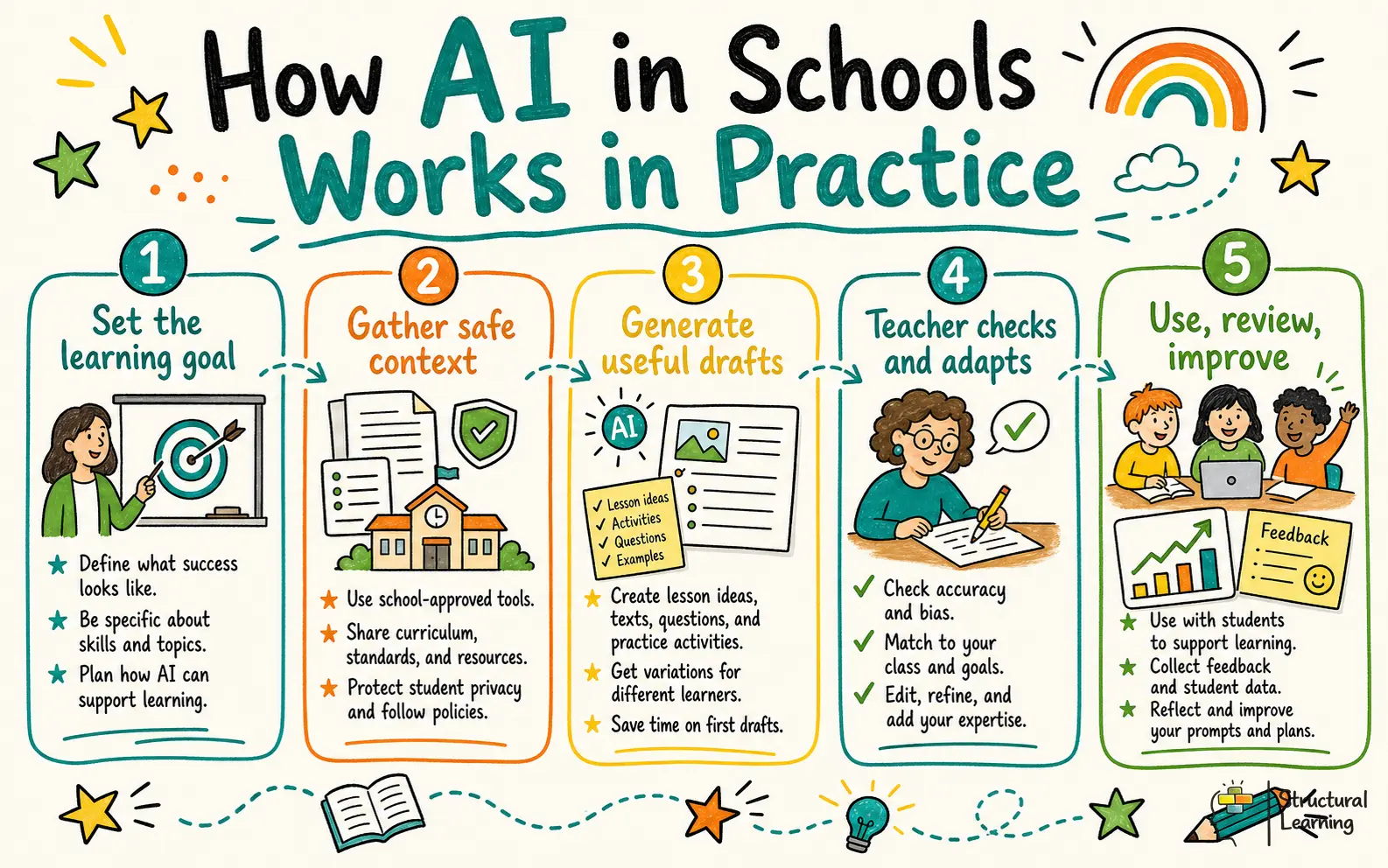
Use AI in schools through three zones: learner support, teacher workflow and risk controls. Every activity should state what AI may do, what the teacher checks and what learners produce without help. This keeps artificial intelligence education tied to pedagogy rather than tool use.
Use AI as a temporary tutor, then require retrieval and evaluation. The teacher sets the prompt, checks the output and asks learners to judge accuracy before using it. Learners produce corrections, not copied answers.

In Year 5 Science, the teacher displays three AI explanations of evaporation. Learners decide which one a scientist would accept, then correct the misconception in one sentence: "Evaporation happens when particles gain enough energy to become a gas." The thinking skill is evaluation, followed by precise explanation.
This routine also teaches hallucination checking in a low-stakes way. The teacher says, "The AI has given us three models. Your job is to decide which model is accurate and why." Learners learn that confident language is not the same as truth.
Use AI to draft resources, then apply teacher judgement before learners see them. This is the safest route for planning, admin tasks and feedback drafts because the teacher remains accountable for quality. It can reduce workload without lowering expectations.
In GCSE English, the teacher uploads no learner data, only an approved extract. They ask AI for eight inference questions, remove the shallow ones, add two questions about writer's methods and prepare oral follow-ups. Learners produce margin annotations, one analytical paragraph and a spoken explanation of their strongest inference.
For feedback, the teacher uses one anonymised paragraph and asks AI for task-level and process-level suggestions. They rewrite the feedback using Hattie and Timperley's three questions: "Where am I going?", "How am I going?" and "Where next?" (Hattie and Timperley, 2007). Learners receive one precise target and produce a revised sentence.
Use AI for accessibility, EAL and SEND support, but do not upload identifiable learner data. AI can simplify texts, create tiered reading versions, suggest vocabulary scaffolds, support text-to-speech and help learners rehearse speech-to-text responses. The teacher must check subject precision and keep the learning objective intact.
In Science, the teacher asks AI to produce three reading versions of a text about diffusion. They check that "concentration", "particles" and "membrane" remain accurate, then ask learners to annotate tier two and tier three words. Learners produce a glossary, a labelled diagram and one accurate explanation using the original scientific terms (Beck, McKeown and Kucan, 2013).
For SEND accessibility, a learner with writing barriers uses speech-to-text to explain a Maths reasoning step. The teacher keeps the learning objective on reasoning, not neat transcription. The learner produces a spoken explanation, a checked transcript and one independently selected diagram.
Misconception 1: AI can replace teachers. It cannot replace subject knowledge, relationships, adaptive questioning or safeguarding judgement. A chatbot can produce five explanations of photosynthesis, but the teacher decides which explanation fits Year 7 prior knowledge and which learner needs a concrete representation before moving to abstract vocabulary.
Misconception 2: AI detection solves academic dishonesty. Detectors can produce false positives and false negatives, especially with edited text or multilingual writing (Liang et al., 2023; Sadasivan et al., 2023). A stronger response is assessment redesign. The teacher asks learners to submit their prompt, AI draft, edited final answer and a short reflection on what they accepted, rejected and changed.
Misconception 3: AI feedback is automatically good feedback. Feedback is useful when it clarifies quality, compares current work with that quality and tells the learner what to do next (Black and Wiliam, 1998; Hattie and Timperley, 2007). In History, AI might give generic praise. The teacher changes it into one precise action: "Add evidence to show why coal mattered more than population growth."
| Zone | AI may do | Teacher does | Learners produce |
|---|---|---|---|
| Learner support | Offer alternative explanations, quiz questions, reading support or study prompts | Check accuracy, set limits and require retrieval | Corrections, explanations, annotations, source checks |
| Teacher workflow | Draft lesson starters, quizzes, feedback options or admin text | Edit for curriculum fit, tone, challenge and safety | Teacher-approved resources and improvement tasks |
| Risk controls | Flag possible bias, hallucination or missing source checks | Apply policy, procurement, data and assessment rules | Prompt logs, drafts, edits and reflections where AI is allowed |
Misconception 4: Personalised means better. Personalised tutors and study aids can help learners rehearse, ask questions and receive alternative explanations, but they can also increase cognitive offloading. If AI supplies the plan, answer and correction too soon, learners may skip retrieval, reasoning and metacognitive monitoring (Dunlosky et al., 2013; Zimmerman, 2002).
Misconception 5: Free tools are fine if they save time. Data protection matters even when the tool feels harmless. Staff should use approved tools, avoid personal data, check age restrictions and follow procurement rules before asking learners to use any platform (Department for Education, 2025). A teacher can ask AI to simplify a public text about rivers, but should not paste a named learner's SEND profile into an open tool.
Start with a one-page policy model. Do not begin with a list of tools. Begin with a benefit and risk check, an approved-tool list and three classroom zones: green, amber and red.
Green uses are teacher-led and low risk. Examples include drafting a lesson starter from an approved source, creating quiz questions, simplifying a public text with no personal data, producing model misconceptions or turning a paragraph into feedback options for teacher review. The teacher checks every output before learners use it.
Amber uses are learner-facing and supervised. Examples include an AI tutor giving alternative explanations, a study aid asking revision questions or a chatbot helping learners improve a paragraph. Learners must cite the tool, keep their prompts and show what they changed.
Red uses should be blocked or redesigned. These include uploading identifiable learner data, using AI for unsupervised homework answers, letting AI make high-stakes decisions, using non-approved tools with learners below the minimum age, entering safeguarding information or relying on AI detection as the main integrity system.
A school can use a local "30% rule" as a discussion prompt, not as a universal standard. For example, leaders might say that no more than 30% of a submitted response should be AI-drafted unless the task explicitly teaches AI evaluation. The principle matters more than the number: learners must still show the thinking the assessment claims to measure (Messick, 1995).
A start-tomorrow sequence works like this. First, choose one low-risk task, such as a Year 8 History starter on causes of the Industrial Revolution. Second, ask AI to generate nine possible causes, then remove or edit weak claims. Third, learners rank the causes in a diamond nine and verify each claim against a textbook or teacher-approved source.
The teacher says, "AI has given us a starting set, not a final answer." Learners produce a ranked diamond nine, two source checks and one paragraph explaining which cause they think had the greatest impact. The routine builds source-checking and argument rather than passive acceptance.
For staff CPD, use one practical classification task. Give staff six examples and ask them to label each green, amber or red. Then ask every department to design one AI-supported lesson starter that still requires retrieval, explanation and teacher review.
In Maths, use AI to create worked examples with one deliberate error. Year 7 learners receive three steps for solving a linear equation, find the error and explain why it breaks the balance rule. They then complete two independent practice questions without AI support. The teacher checks whether learners can explain the mistake before moving to fluency practice.
In English, use AI to draft inference questions, not answers. The teacher reviews the questions, removes anything too easy and adds prompts that require textual evidence. Learners produce annotated quotations, one paragraph and a short oral answer to show that the written response is not empty fluency.
In Science, use AI as a misconception generator. For evaporation, diffusion or forces, ask AI for three explanations and tell learners that one is wrong. Learners produce a corrected explanation and a labelled diagram, then compare both with the textbook.
In History, use AI to generate possible causes, consequences or interpretations. For the Industrial Revolution, learners rank AI-generated causes in a diamond nine and verify claims against approved sources. The teacher uses AI as a debate prompt, not as a source of truth.
For EAL, use AI to create tiered reading versions of a science text. The teacher checks vocabulary precision, then asks learners to annotate key terms and rebuild the original explanation. Learners produce a glossary, a labelled diagram and one spoken explanation using the subject words.
For SEND, use AI-linked accessibility tools carefully. Text-to-speech can help a learner access a long source, and speech-to-text can reduce transcription barriers. The teacher still checks that the task measures reasoning, explanation or analysis, not simply the production of neat text.
For academic integrity, redesign homework. Ask learners to submit the prompt, AI draft, final edited response and a reflection on what changed. This gives learners, teachers and families a record of process, which is more useful than guessing whether ChatGPT wrote a paragraph.
For hallucinations and bias, run a short lab. Give learners an AI answer about school AI policy and ask them to compare it with GOV.UK and UNESCO guidance. They highlight unsupported claims, missing cautions about data protection and any claim that sounds confident but lacks evidence.
For school operations, keep AI away from sensitive decisions unless the tool has been formally approved. Drafting a newsletter paragraph is different from profiling attendance risk or summarising a safeguarding record. Data protection, accountability and procurement rules come first.
AI can support learner explanations, study aids, accessibility tools, lesson planning, admin drafts, feedback suggestions and school operations. The safe classroom version always includes teacher review and learner accountability. In Year 6 Science, an AI quiz becomes useful when learners explain why each wrong option is wrong.
Sometimes, but not reliably enough to make detection the main strategy. Teachers should design tasks where learners show process: prompt, notes, draft, edits, source checks and oral explanation. In GCSE English, a learner might bring an AI draft, but must explain which inference they kept, which they rejected and why.
It can be if it removes retrieval, planning, reasoning or evaluation. It can help if learners critique outputs, find errors, compare explanations and justify choices. A Year 7 Maths error-spotting task keeps critical thinking active because learners must diagnose the mistake before solving a new question.
No. AI can produce content, but teachers decide purpose, timing, challenge, safeguarding, relationships and next questions. A teacher hears a half-correct answer and asks the one question that exposes the misconception. AI cannot make that classroom judgement.
Use approved tools, avoid uploading identifiable learner data and check whether inputs are stored or used for model training. Do not enter names, behaviour notes, SEND details, safeguarding information or assessment records into an open tool. For EAL and SEND support, use anonymised content and teacher-checked outputs.
Start with green, amber and red uses. Green means teacher-led and checked, amber means supervised learner use with a process record, and red means no use because of privacy, safeguarding, age, assessment or procurement risk. Ask each department to create one example in each category, then test the examples against a real lesson.

Use AI in your next lesson only as a checked error-spotting activity: show one AI-generated worked example with a deliberate mistake, then ask learners to find it, explain it and complete one independent question.
Related AI in education guides: AI policy for schools, human-led AI classroom practice, AI tools for teachers, AI literacy for teachers, AI lesson planning, learning science and AI lesson planning, AI marking and feedback, AI retrieval practice quizzes, AI in special education.
Authoritative guidance on AI in education: Ofsted findings from AI early adopters in schools and FE.
For the wider picture, explore our AI and EdTech tools hub, our home for evidence-based AI guidance across policy, lesson planning, and classroom practice.