Updated on
September 24, 2026
AI Marking and Feedback: A Teacher's Guide [2026]
A practical guide to using AI for marking and feedback in schools. Covers what AI can and cannot mark, subject-specific approaches, tool comparison.

![AI Marking and Feedback: A Teacher's Guide [2026]](https://cdn.prod.website-files.com/5b69a01ba2e409501de055d1/6998967a726ded1ef8ce883e_69989679ea7233bf4e5b63d8_ai-marking-and-feedback-classroom-teaching.webp)
Updated on
September 24, 2026
A practical guide to using AI for marking and feedback in schools. Covers what AI can and cannot mark, subject-specific approaches, tool comparison.
AI marks quizzes and finds errors, providing written feedback (AI tools). For more on this topic, see Ai tools. It cannot judge argument quality or a learner's confidence. AI won't see shy learners attempt extensions. Knowing this limit separates useful AI from harmful shortcuts.
The current DfE guidance on generative AI in education says AI can support tasks such as feedback, planning and administration, but schools remain responsible for safe, effective and responsible use. This guide applies that principle to marking across subjects and key stages.
The distinction is straightforward. AI marking tools work well on tasks with clear right-or-wrong answers and struggle with anything requiring interpretation. A Year 3 spelling test and a GCSE English Language Paper 2 response require fundamentally different kinds of assessment.
The key principle: AI should mark the work that takes you the most time but requires the least professional judgement. A set of 30 vocabulary tests takes 45 minutes of a teacher's evening. AI handles them in seconds, with equal accuracy. That 45 minutes is better spent writing targeted feedback on three learners' essays.
AI feedback is instant, consistent and impersonal. Teacher feedback is slower, variable and deeply contextual. Both have value, and the research suggests they work best in combination (Hattie and Timperley, 2007).
AI can spot surface features such as missing evidence or weak paragraph structure, but it cannot know whether a learner has improved since the last draft or which misconception the teacher has already addressed. Treat AI comments as draft prompts for professional review, not as research-backed judgements about the learner.
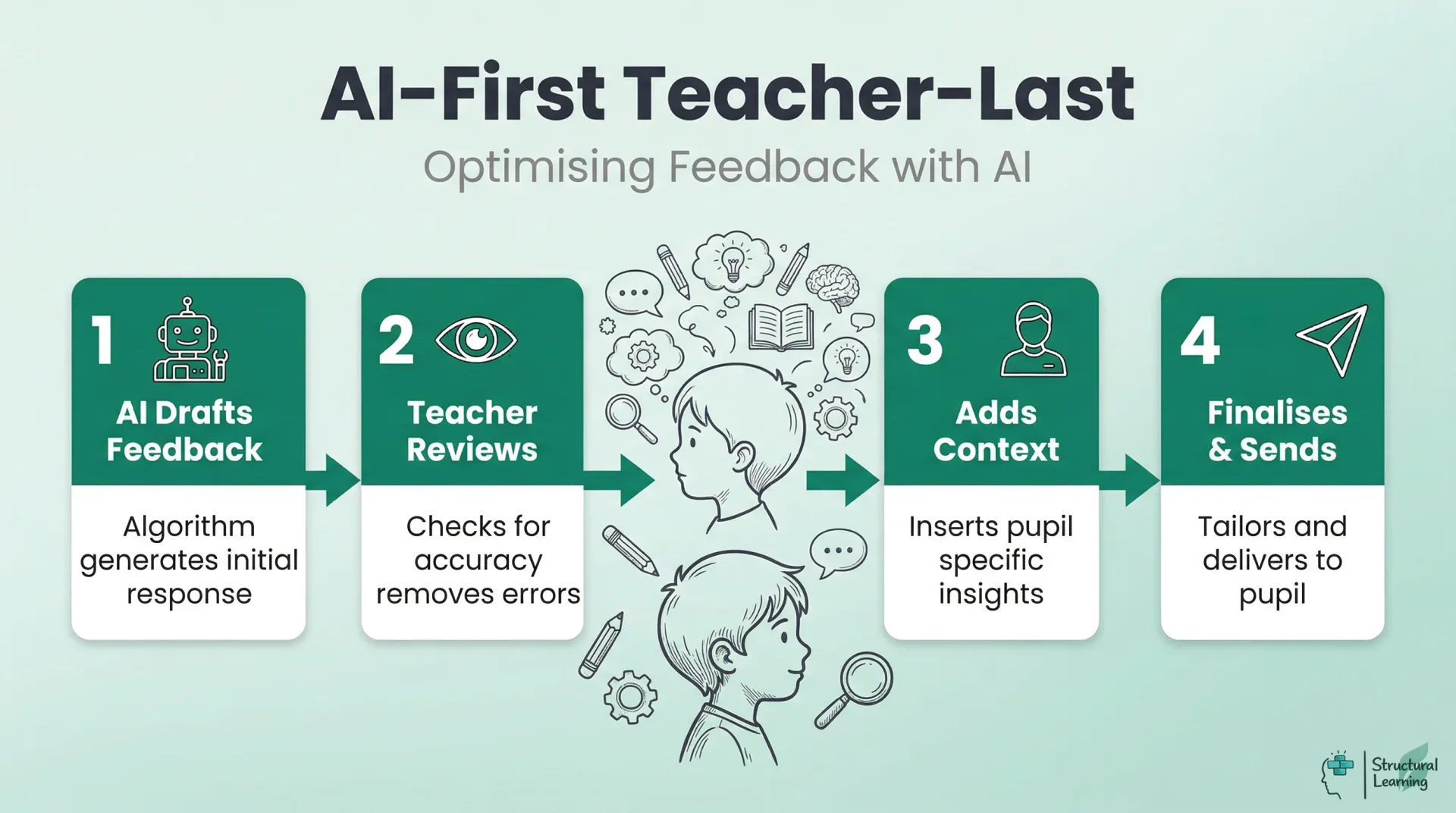
A safer working model is "AI first, teacher last" feedback. The AI generates an initial response. The teacher reviews it, removes anything inaccurate, adds personal context and decides what the learner sees. Kasneci et al. (2023) support this cautious human-in-the-loop stance for large language models in education.
Not all feedback is equal. Hattie and Timperley's (2007) model identifies four levels, and AI performs differently at each.
| Task Type | AI Reliability | Teacher Role | Example |
|---|---|---|---|
| Multiple-choice quizzes | High | Review misconception patterns | KS2 science end-of-topic quiz |
| Short-answer recall | High | Check for partial credit edge cases | Year 8 history key dates |
| Grammar and spelling | High | None needed for surface errors | Year 5 writing SPaG check |
| Maths calculations | High | Review method marks vs answer marks | Year 10 algebra homework |
| Extended writing (argument) | Low | Full assessment required | GCSE English Language Paper 2 |
| Creative writing | Very low | Full assessment required | Year 7 narrative writing |
| Practical/performance | Not applicable | Teacher observation only | PE, drama, science practicals |
Use AI for task feedback. See "Chatgpt teachers practical classroom" for ideas. For more on this topic, see Chatgpt teachers practical classroom. Give learners self-regulation and personal feedback. Your knowledge is key here. This supports Wiliam's (2011) "responsive teaching," adapting learning.
AI marking tools are developing quickly, but quality, privacy controls and assessment validity differ between products. Before a school adopts a tool, leaders should check the task type, curriculum fit, data-processing terms, human review route and whether the output will affect grades or reporting. Ofqual is clear that AI as the sole marker is not appropriate for regulated high-stakes marking.
No single tool replaces a teacher's marking. The most effective approach combines two or three tools for different task types: one for quiz auto-marking, one for writing feedback generation, and your own professional judgement for everything else.
The value of AI marking varies significantly across subjects. What works in mathematics homework does not transfer directly to English literature essays. Here is a subject-by-subject breakdown of where AI adds genuine value and where it falls short.
AI can check SPaG (spelling, punctuation and grammar) with high accuracy. It can identify missing paragraphs, flag overuse of simple sentences, and detect where a learner has not addressed the question. What it cannot do is assess the quality of a metaphor, the effectiveness of a structural choice, or whether a Year 11 student has developed a convincing personal voice. Use AI to handle the surface features of writing so you can focus your marking time on content and craft.
Practical example: After a Year 9 persuasive writing task, run all 30 pieces through Grammarly for Education to flag SPaG errors. Then spend your marking time on argument structure, evidence use and rhetorical technique. You have saved 40 minutes on surface marking and redirected that time to the feedback that actually shifts grades.
AI maths marking is most useful where answers, methods and success criteria are explicit. Auto-marked homework can identify common errors quickly, but teachers still need to review non-standard methods, partial reasoning and misconceptions before using the results for feedback or intervention.
Practical example: Set a Year 7 fractions homework on Hegarty Maths. The platform marks it overnight and produces a class summary showing that 18 of 28 learners struggled with converting mixed numbers. You now have diagnostic data before the next lesson, without marking a single paper.
AI and auto-marking tools can handle factual science questions and closed quizzes effectively when answers are constrained. "Explain" and "evaluate" tasks are different: they require argument construction, causal reasoning and judgement about misconceptions, so teachers should review those responses themselves.
Practical example: Use Educake for a Year 10 biology quiz on cell division. The platform auto-marks 20 recall questions and flags three learners who consistently confuse mitosis and meiosis. For the two 6-mark "explain" questions, you mark those yourself, using the quiz data to target your written feedback.
AI struggles to mark extended analytical writing in history, geography and RE. World War One essays require source interpretation, contextual knowledge and argument quality (Wineburg, 2001). AI may help prepare checklists or flag missing references, but the teacher should judge the historical reasoning and decide what feedback will move the learner forward.
| Feedback Level | What It Addresses | AI Capability | Teacher Action |
|---|---|---|---|
| Task (correctness) | Is the answer right or wrong? | Strong | Trust AI output for factual tasks |
| Process (strategy) | How did the learner approach the task? | Moderate | Review and refine AI suggestions |
| Self-regulation (metacognition) | Can the learner monitor their own learning? | Weak | Write metacognitive prompts yourself |
| Self (personal) | How does the learner feel about the work? | None | Personal, relational feedback only |
Practical example: Before marking a set of Year 8 history essays, paste the question and mark scheme into ChatGPT and ask it to generate a checklist of what a strong answer includes. Then use that checklist as a marking aid, rather than relying on AI to assess the essays directly.
In primary settings, AI marking works well for phonics checks, spelling tests and times tables quizzes. Many schools already use Times Tables Rock Stars, which auto-marks and tracks progress without any teacher input. For writing assessment in Key Stage 1 and 2, teacher moderation remains essential because the writing frameworks (working towards, expected, greater depth) require professional judgement about consistency across a piece of work.
Practical example: A Year 4 teacher uses Times Tables Rock Stars for daily recall practice and an auto-marked reading comprehension quiz on Purple Mash for homework. This frees two hours per week for detailed feedback on extended writing, where teacher assessment against the writing frameworks is required.
If you are using a general-purpose AI tool like ChatGPT or Claude to generate feedback, the quality of the output depends entirely on the quality of your prompt. A vague instruction produces vague feedback. A specific, structured prompt produces feedback you can use.
The five elements of an effective AI marking prompt are: year group, subject and exam board, the specific task or question, the assessment criteria, and the format you want the feedback in. Missing any one of these produces generic output.
Here is a complete prompt you could paste into any AI tool:
| Tool | Best For | Limitations | UK Curriculum Alignment |
|---|---|---|---|
| Marking.ai | KS3/KS4 extended writing feedback | Requires rubric setup; inconsistent on creative writing | Strong (UK-built) |
| Grammarly for Education | Grammar, spelling, tone | Surface-level only; no content assessment | Moderate (US-default, UK mode available) |
| ChatGPT / Claude | Generating draft feedback comments | No learner data; generic without strong prompts | Neutral (depends on prompt) |
| Educake | Science quizzes with auto-marking | Science-only; limited feedback depth | Strong (UK exam board aligned) |
| Carousel Learning | Retrieval practice with spaced repetition | Quiz-based only; no extended writing | Strong (UK teacher-built) |
| Seneca Learning | KS3-KS5 revision with adaptive feedback | Pre-set content; limited teacher customisation | Strong (UK spec aligned) |
"You are a KS3 science teacher in a UK state school. A Year 9 learner has answered the following 6-mark question: 'Explain how vaccination prevents disease.' Their response is below. Using the AQA trilogy science mark scheme for 6-mark questions, provide: (1) a mark out of 6 with brief justification, (2) one specific strength with a quote from their work, (3) one specific improvement with an example of what they should have written. Write all feedback addressed to the learner using 'you' language."
This level of specificity consistently produces feedback that teachers find usable. Without the exam board, year group and format instructions, the same AI tool produces generic comments that add no value.
Automated essay scoring can reproduce bias because models learn associations from historical responses and scoring patterns. Bridgeman, Trapani and Attali (2012) found group differences by gender, ethnicity and country when comparing human and machine scoring. Ofqual therefore treats fairness and validity as core tests before AI is used in marking.
For UK teachers, the specific risks include:
AI marking tools may penalise language varieties, concise answers or response styles that differ from the training data. Bridgeman, Trapani and Attali (2012) found group differences when comparing human and machine essay scoring, and Ofqual's 2026 working paper treats fairness, validity and transparency as central requirements before AI is used in marking.
Length bias: Most AI grading systems correlate length with quality. A concise, well-argued paragraph may score lower than a rambling, repetitive one simply because it is shorter. This particularly affects learners with SEND who may write less but with greater precision.
AI tools favour formulaic structures (PEEL), trained on top exam answers. They reward structural patterns, like topic sentences, say researchers. This occurs even if a learner achieves similar quality unconventionally. This can harm creative learners.
The practical response is straightforward: never use AI as the sole assessor for any work that contributes to learner grades. Use it as a first-pass filter, then apply your own professional judgement. Where you notice patterns of bias, adjust the tool's rubric or switch to manual assessment for that task type.
Uploading learner work to AI creates data protection duties. UK GDPR says learner work with personal info (names, schools) is personal data. Before using AI marking tools, check three crucial things.
| Weak Prompt | Strong Prompt |
|---|---|
| "Mark this essay" | "This is a Year 10 GCSE English Language Paper 2 response on animal testing. Using AQA's mark scheme for Question 5 (content and organisation: 24 marks; SPaG: 16 marks), identify two strengths and two areas for improvement. Write feedback in second person, addressed to the learner." |
| "Give feedback on this work" | "This Year 8 learner wrote a paragraph explaining why Henry VIII broke from Rome. The learning objective was to use evidence to support a historical claim. Provide one piece of praise (what they did well) and one 'next step' (specific improvement). Keep the language at a reading age of 12." |
Where is the data processed? DfE data-protection guidance asks schools to understand how AI tools collect, process, store and share personal data. Do not approve a tool for learner work until the school has checked data location, processor terms, privacy notices, retention, security and whether the use fits the school's lawful basis.
Is learner work used for training? Some AI services use submitted content to improve models or services. Staff should use only approved tools, avoid entering personal data into unapproved systems, and check whether learner work is retained, shared or used for model training before uploading anything.
Do you have a DPIA? A Data Protection Impact Assessment may be needed where AI use is high risk or involves children's personal data at scale. Your school's DPO should review any AI marking tool before department-wide use, and the approved-tool list should state what staff may upload, for which purpose, and who checks the output.
Removing names reduces obvious risk, but anonymisation is not a complete safeguard if work includes details that can identify the learner, school, family or incident. Use minimal data, approved tools and human checking; do not treat candidate numbers or initials as a guarantee that AI feedback is safe.
The most effective approach is not to replace your existing marking with AI but to restructure it so that AI handles the routine tasks and you focus on the high-value assessment work. Here is a weekly workflow that several UK schools have adopted successfully.
This workflow saves about 2.5 hours weekly. Over 39 weeks, teachers gain nearly 100 hours. Teachers can use this time for lesson planning and targeted support. They can also build learner relationships.
Common problems with AI marking are practical rather than mysterious: over-trusting grades, giving learners raw AI feedback, using the wrong tool for the task, underestimating review time, and skipping staff training. These are implementation risks that schools can manage with clear policy, examples and human review.
1. Trusting AI grades for reporting. AI-generated marks should never go directly into a markbook without teacher verification. A tool that gives a Year 10 essay 18/30 may be broadly right, but the difference between 16 and 20 can determine a predicted grade. Only use AI marks for formative purposes.
2. Giving learners raw AI feedback. Unreviewed AI feedback can be confusing, contradictory or inappropriate. A learner who receives "Your analysis lacks depth" without further explanation is no better off than receiving no feedback at all. Always review before sharing.
3. Using the wrong tool for the task. Running a creative writing portfolio through a grammar checker does not constitute marking. Match the tool to the assessment objective. Grammar tools check grammar. They do not assess imagination, voice or narrative craft.
4. Ignoring the workload shift. AI marking does not eliminate workload; it shifts it. You spend less time on routine marking but more time reviewing AI outputs, managing data, and handling the inevitable edge cases where the AI gets it wrong. Budget for this transition period.
5. Skipping staff training. Do not roll out AI marking until staff know what the tool can and cannot mark, what data can be entered, and when human review is required. A short, task-specific briefing is safer than quoting an unsupported national percentage.
AI tools can support peer and self-assessment by providing a reference point against which learners compare their own work. Rather than asking "Is my essay good?", the learner can ask the AI to identify structural features, then compare the AI's analysis with their own self-assessment. This builds metacognitive skills: the ability to evaluate one's own learning (Flavell, 1979).
A practical classroom approach: after learners complete a piece of writing, ask them to self-assess against three success criteria. Then run the same piece through an AI tool that provides feedback against the same criteria. Learners compare their self-assessment with the AI's analysis and write a short reflection on the differences. This teaches learners to calibrate their own judgement, which is the foundation of independent learning.
The risk is that learners treat AI feedback as the "correct" answer, undermining the purpose of self-assessment. Frame the AI output as "one perspective" rather than the definitive assessment. Emphasise that the teacher's judgement, informed by knowledge of the learner, remains the standard against which work is measured.
Start small. The biggest risk with AI marking is trying to transform everything at once, getting overwhelmed, and reverting to old habits. This two-week plan introduces AI marking gradually, with built-in checkpoints.
| Day | AI Task | Teacher Task | Time Saved |
|---|---|---|---|
| Monday | Auto-mark weekend homework quizzes | Review misconception reports, plan reteaching | 30 min |
| Tuesday | Generate draft feedback for extended writing | Review, personalise and approve feedback | 45 min |
| Wednesday | SPaG check on collected classwork | Focus on content quality, not surface errors | 20 min |
| Thursday | Auto-mark mid-week retrieval practice | Identify learners needing intervention | 20 min |
| Friday | Generate weekly progress summaries | Review summaries, update records, plan next week | 30 min |
AI marking uses software to analyse learner responses and draft scores, comments or feedback. It is most suitable for constrained tasks such as quizzes, grammar checks and factual answers. For complex writing or high-stakes decisions, it should support teacher review rather than replace it.
Teachers usually begin by using AI tools to mark routine assessments like vocabulary tests or homework quizzes. The most effective approach is a method where the AI creates the first draft of the comments. The teacher then reviews and edits this text to add personal context before returning the work to the learner.
The safest benefit claim is narrower: AI can reduce time spent on routine, low-stakes marking when the task is constrained and the output is checked. It may free teacher time for planning or targeted feedback, but schools should measure the local workload effect rather than relying on an unsupported three-to-five-hour statistic.
DfE guidance says AI can support some education tasks, but schools and teachers remain responsible for accuracy, safety and professional judgement. Ofqual's marking guidance adds a stricter warning for regulated assessment: AI should not be the sole mechanism for determining a learner's mark.
AI may wrongly assess essays or creative writing. Algorithms struggle to judge historical arguments and a learner's voice. Teachers should check automated feedback before learners see it (Wiggins, 1998; Sadler, 1989; Hattie & Timperley, 2007).
AI tools cannot accurately mark GCSE extended writing like teachers can. Software flags spelling, but misses argument nuance and subject reasoning. Teachers must fully assess long answers, ensuring exam board alignment.
Week 1: One class, one tool, one task type. Choose your most straightforward marking task (a homework quiz or vocabulary test) and one AI tool. Set the quiz, let the tool mark it, and spend 15 minutes reviewing the results. Note what the tool got right, what it missed, and how long the process took compared to manual marking.
Week 2: Add feedback generation. Take a set of extended writing from the same class. Use an AI tool to generate draft feedback, then review and personalise each piece before returning it to learners. Track the time difference: how long did AI-assisted feedback take compared to writing it from scratch?
After two weeks, you have enough data to decide whether to expand AI marking to other classes and task types. Most teachers find that the initial investment in learning the tool pays back within the first month. The key is starting with tasks where AI is genuinely reliable, building confidence, and expanding gradually.
For wider classroom use, see our guide to AI tools for teachers. Keep the same rule: use AI for drafts, options and low-risk checks, then apply professional judgement before any feedback, grade or report reaches learners.
For the wider picture, explore our AI and EdTech tools hub, our home for evidence-based AI guidance across policy, lesson planning, and classroom practice.
These sources draw on current official guidance and traceable academic records.
Generative artificial intelligence (AI) in education
Department for Education, updated 2025. Use this for safe and responsible AI use, professional judgement, checking outputs and formal-assessment cautions.
Generative artificial intelligence (AI) and data protection in schools
Department for Education, updated 2025. Use this for privacy notices, personal data, approved tools, model-training risk and DPO review.
Principles of AI use in marking
Ofqual (2026). Use this for assessment validity, transparency, fairness, accountability and human judgement in high-stakes marking.
Ofqual's approach to regulating AI use in qualifications
Ofqual (2024). Use this for the principle that AI may complement marking processes but should not be treated as sole judgement in regulated qualifications.
Towards artificial intelligence-based assessment systems
Luckin (2017), Nature Human Behaviour. Use this for cautious wording on AI-enabled assessment possibilities, not as proof of automatic workload reduction.
Hattie and Timperley (2007), Review of Educational Research. Use this for feedback levels and the distinction between task, process and self-regulation feedback.
Formative assessment and the design of instructional systems
Sadler (1989), Instructional Science. Use this for formative assessment and standards, not for unsupported AI time-saving claims.
Comparison of Human and Machine Scoring of Essays: Differences by Gender, Ethnicity, and Country
Bridgeman, Trapani and Attali (2012), Applied Measurement in Education. Use this for fairness cautions in automated essay scoring.
ChatGPT for good? On opportunities and challenges of large language models for education
Kasneci et al. (2023), Learning and Individual Differences. Use this for a balanced account of LLM opportunities, limitations and human oversight in education.