Updated on
September 24, 2026
AI in Lesson Planning: Save Time Without Sacrificing Quality
AI can draft objectives, generate activities and align content to curriculum standards in minutes. The quality, though, depends entirely on the prompt.


Updated on
September 24, 2026
AI can draft objectives, generate activities and align content to curriculum standards in minutes. The quality, though, depends entirely on the prompt.
AI creates lesson plans fast, but vague requests yield poor results. Specific prompts, like year group and prior knowledge, are key. Our guide gives prompt examples and aligns outputs with Rosenshine's principles (Rosenshine, 2012). We cover common errors that make teachers reject AI tools early.
What does the research say? Rosenshine's (2012) principles remain the gold standard for lesson structure, and AI tools are most effective when prompted with these frameworks explicitly. Holmes et al. (2019) note that AI-generated lesson plans often lack the contextual knowledge of individual learners that effective differentiation requires, making teacher review necessary.
The tools work: they generate objectives, sequence activities, create differentiated resources and align content to curriculum standards in minutes rather than hours. But the quality of the output depends almost entirely on the quality of the input. Knowing how to write effective prompts is the single most important skill for AI-assisted planning.
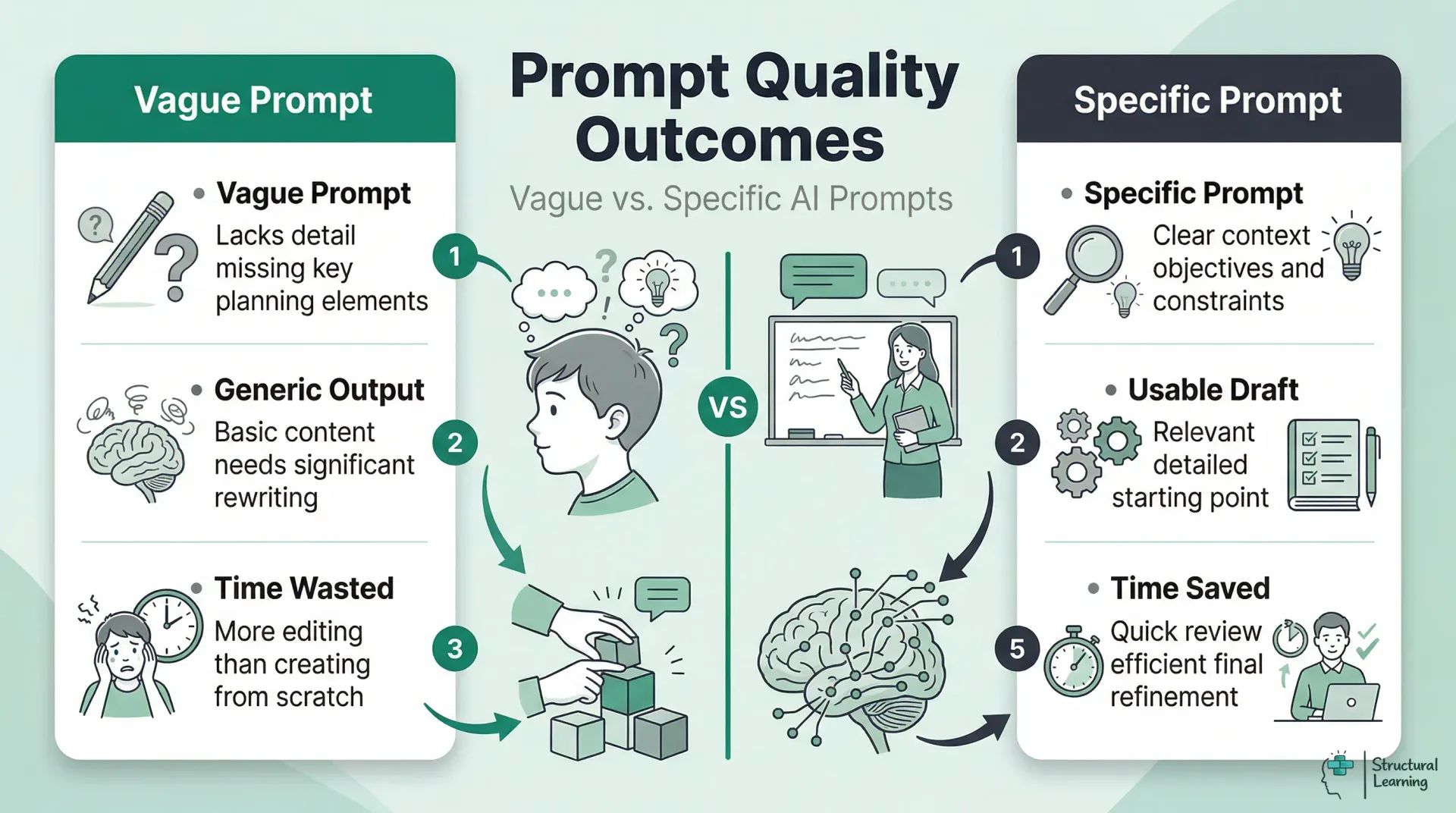
Every effective AI planning prompt contains five elements: context, objective, constraints, differentiation needs and output format. Missing any one of these produces a generic plan that requires more editing than it saves.
Combining all five elements into a single prompt produces a plan that typically needs 10-15 minutes of refinement rather than 45 minutes of creation from scratch. The more specific you are about what your learners already know and where they typically struggle, the more useful the AI output becomes. For a comprehensive library of prompt templates across subjects and key stages, see our guide to AI prompts anyone teaching should know.
Different subjects have different planning demands, and the most effective AI prompts reflect those differences. Here are worked examples that teachers have refined through classroom use.
English (KS3). "Create a 60-minute lesson on persuasive writing for Year 8. Learners can identify persuasive techniques (rhetorical questions, repetition, emotive language) but struggle to use them in their own writing. Include: analysis of a model text with annotations, a scaffolded writing frame for lower attainers, and an assessment task where learners write the opening paragraph of a persuasive letter. Success criteria should reference AQA English Language Paper 2."
Plan three Year 6 maths lessons (KS2) on adding fractions with different denominators. Learners know equivalent fractions, but struggle when denominators share no factor. Use concrete-pictorial-abstract progression, as Bruner (1966) suggests. Lesson 1: Use fraction bar manipulatives. Lesson 2: Use bar model representations (Skemp, 1971). Lesson 3: Learners do abstract calculation with self-checking. Include a five-question exit ticket in each lesson.
Plan a Year 10 GCSE Biology lesson (AQA 4.6.1) on natural selection. Learners understand inheritance, but confuse it with Lamarckism. Start with a misconception activity. Use peppered moths as a worked example. Include finch beak data interpretation and a 6-mark question with a model answer. Provide sentence starters for writing.
History (KS3). "Plan a 50-minute lesson on the causes of the English Civil War for Year 8. Learners have studied Tudor England but this is their first lesson on the Stuarts. Include: a timeline sorting activity, source analysis of two contemporary documents (one pro-Parliament, one pro-King), paired discussion using 'What might X have thought about this?' prompts, and a written judgement task: 'Was religion or money the main cause?' Provide a writing frame with connectives for lower attainers."
Plan a Reception "People Who Help Us" week (Communication and Language ELG). Set up a doctor's surgery role-play area. Run three group activities (6 learners). Offer five investigation activities. Develop vocabulary: stethoscope, prescription, appointment, symptom, diagnosis. Suggest quick home learning ideas for parents.
AI lesson plans improve when you include Rosenshine's principles. Without this prompt, AI creates activity-heavy lessons (Rosenshine, 2012). These weaker plans often lack review, modelling, and guided practice (Rosenshine, 2012).
Add this to lesson planning: Use Rosenshine's principles. Start with a quick review of past work (5 min). Next, present new content in steps, modelling clearly (10 min). Then, guide learners in practice, checking their understanding (15 min). Finally, learners practise independently as you monitor them (15 min).
The principle of "scaffolding difficult tasks" is where AI adds particular value. Once AI has generated a lesson plan, you can prompt it to create scaffolded versions of each activity: "Take the independent task and create three versions: one with a fully worked example and sentence starters, one with key vocabulary provided, and one with no scaffolding for learners working at greater depth." This produces differentiated resources in seconds that would take 20 minutes to create manually.
AI struggles with setting suitable difficulty levels because it lacks knowledge of individual learner understanding.. Teachers are best placed to judge if an activity suits their learners. Review the AI plan using your knowledge and adjust pacing and support accordingly.
AI tools use US standards unless you specify UK frameworks.. Requesting a "Year 5 maths lesson on fractions" gives US Common Core content.. Always state "National Curriculum KS2" or the exam board to guide learners..

Use the National Curriculum programme of study for Year 3 science planning. For example, plan a lesson asking questions and using enquiries (NC KS2). Specific curriculum references help AI match content to Ofsted expectations.
For GCSE and A-Level, include the exam board and specification point number. "Create a revision lesson for AQA GCSE English Literature Paper 2 Section B: Power and Conflict poetry. Focus on comparing 'Ozymandias' and 'London' using the assessment objectives AO1 (informed personal response), AO2 (language, form and structure) and AO3 (context)." This level of specificity produces resources that align with mark schemes rather than generic poetry analysis.
EYFS planning needs specific areas and Early Learning Goals. For example, design activities for Communication and Language, based on Listening, Attention and Understanding ELG. Learners are within the 40-60 month band. General AI tools struggle with child-led learning, so offer clear guidance. Mentioning the developmental band is key for age-appropriate content.
Teachers who abandon AI planning tools usually do so because they made one of five predictable mistakes in their first few attempts. Recognising these patterns early saves frustration.
1. Accepting the first output without iteration. AI planning works best as a conversation. If the first response is too generic, do not start over. Instead, follow up: "That's too broad. Narrow the starter activity to focus specifically on the misconception that heavier objects fall faster." Each iteration sharpens the output. Expect 2-3 rounds of refinement for a good plan.
2. Not specifying UK curriculum alignment. AI defaults to US standards unless told otherwise. Always include "National Curriculum KS2" or "AQA GCSE specification 4.1.2" or "EYFS Communication and Language ELG" in your prompt. Without this, you get standards-aligned plans, but aligned to the wrong standards.
3. Forgetting to include prior knowledge. "Create a lesson on fractions for Year 5" produces a generic plan. "Create a lesson on fractions for Year 5 who can identify unit fractions but struggle to compare fractions with different denominators" produces a targeted plan. The prior knowledge statement is the most important sentence in your prompt.
4. Using AI for the wrong tasks. AI is excellent for generating activities, resources, questions and differentiated materials. It is poor at sequencing learning across a half-term in a way that builds understanding progressively, because it lacks knowledge of your school's curriculum mapping and your department's agreed approaches. Use AI for within-lesson planning; keep medium-term planning as a human task.
5. Trying to replace planning thinking with generation. The pedagogical decisions, what to teach next, what misconceptions to address, how to sequence concepts, are the valuable part of planning. AI should handle the production work after you have made those decisions. Outsourcing the thinking produces technically adequate but pedagogically shallow lessons that do not respond to your learners' actual needs.
AI's greatest planning value may be in differentiation, the task that most teachers find most time-consuming and most difficult to do well consistently. Producing three versions of a worksheet at different challenge levels takes 30 minutes manually; AI generates them in under a minute.
Support learners with special educational needs by adapting lessons. For example, change a Year 7 lesson for a learner with dyslexia. Offer short sentences, sans-serif font, and a cream background. Pre-teach key vocabulary with visuals and use graphic organisers. This quick start, refined by SENCo or teacher, saves time.
AI builds bilingual vocabulary and sentence starters for EAL learners. It can tailor difficulty to each learner. AI also designs extension tasks for able learners. These tasks promote deeper understanding, not just faster work. Design, for instance, a maths task where the learner explains column addition. Use base-ten blocks for visual proof.
The practical limit of AI differentiation is the same as its general planning limit: it does not know your specific learners. It can produce resources at different levels, but you must match the right level to the right child. Schools that maintain a simple "learner profile prompt bank" (a paragraph per learner describing their needs, updated termly) find that pasting this into AI prompts produces dramatically more personalised outputs. For comprehensive guidance on AI applications for learners with additional needs, see our guide to AI in special education.
The teachers who sustain AI-assisted planning beyond the first half-term are those who build it into a specific routine rather than using it ad hoc. Here is a weekly pattern that experienced AI-using teachers report works well.
Sunday evening (30 minutes). Review the upcoming week's objectives. For each lesson, write a 3-line planning prompt that includes the five elements (context, objective, constraints, differentiation, format). Paste all prompts into your AI tool. Save the outputs without reading them in detail.
Monday morning (15 minutes). Review the AI-generated plans for Monday and Tuesday. Adjust activities based on your knowledge of the class. Add specific learner names to grouping suggestions. Check that the difficulty level matches your expectations. Print or upload to your planning format.
Wednesday (10 minutes). Review plans for Thursday and Friday. By now you have seen how the week's learning has progressed. Adjust the AI plans based on what actually happened in Monday-Wednesday lessons. This responsive adjustment is the most valuable part of the process, AI gets you the structure; you provide the responsiveness.
This routine typically saves 2-3 hours per week compared to planning from scratch. The time saving comes not from AI writing perfect plans, but from AI providing a solid draft that you refine, rather than staring at a blank page. For a comprehensive overview of AI tools available for planning and other classroom tasks, see our complete guide to AI for teachers.
AI tools speed up lesson planning by making resources. They create worksheets, assessments, and displays easily. Parent communication and homework tasks are also simple. A single prompt generates these quickly.
Plan lessons first, then request related resources. State needs clearly: "Retrieval starter (5 questions), forces content," etc. Request scaffolds and extension tasks too. Exit tickets (4 questions) assess learning. This aligns resources quickly.
For retrieval practice, AI is particularly powerful. Prompt: "Create a retrieval practice grid for Year 9 History covering the last 4 weeks of content (causes of WW1, the Western Front, the Home Front, the Treaty of Versailles). Include 16 questions: 4 factual recall, 4 explain, 4 source-based, and 4 requiring links between topics. Arrange in a 4x4 grid with increasing difficulty from top-left to bottom-right." The resulting resource would take 20-30 minutes to create manually; AI produces it in seconds.
For further reading on this topic, explore our guide to IBDP syllabus.
For further reading on this topic, explore our guide to Whole Class Reading.
For further reading on this topic, explore our guide to Forest Schools.
Report writing is another high-impact use case. Prompt: "Write a Year 4 end-of-term report comment for a learner who has made good progress in reading (moved from working towards to expected standard), needs to develop inference skills, and participates well in group discussions but rushes independent written work." Anonymised prompts like this produce draft comments that teachers refine with personal knowledge, saving the bulk of report-writing time during busy assessment periods. For a broader overview of how AI fits across all aspects of classroom teaching, see AI for teachers: the complete classroom guide.
AI lessons often lack challenging activities. Webb's (1997) Depth of Knowledge helps teachers check this. Level 1 is recalling facts; Level 2 uses skills in known situations. Level 3 needs reasoning, says Webb (1997). Level 4 involves complex thinking, investigations, and linking subjects.
Without explicit instruction, AI defaults to Levels 1 and 2. A vague prompt produces recall questions and simple application tasks. Specifying DoK level directly changes the output. Try: "Generate 3 questions at Webb's DoK Level 3 (Strategic Thinking) for Year 10 history learners on the causes of the First World War. Each question should require learners to construct an argument, justify a claim with evidence, or evaluate competing explanations. Avoid factual recall." The resulting questions are genuinely harder to produce and harder for learners to answer, which is precisely what the EEF's evidence on cognitive challenge recommends. For a deeper exploration of the framework and how to use it across your department, see our full guide to Webb's Depth of Knowledge.
Before using any AI-generated lesson, run these 5 checks grounded in cognitive science. These checks ensure that regardless of how well-written a lesson is, it follows the learning science principles that actually improve learner achievement.
Does the starter include retrieval from previous learning? A retrieval starter requires learners to recall prior knowledge without notes or peer support. Examples: memory quiz, low-stakes test, "write down everything you remember about fractions," quick recall game. Red flag: if the starter is primarily new information or exploration, not retrieval. A Year 4 teacher receives an AI-generated maths lesson with this starter: "Today we're learning about fractions. Discuss with a partner what you think a fraction is." She rewrites it: "Quick quiz (2 minutes, no notes): what do you call the number above the line in a fraction? What do you call the number below?"
Is new content introduced in small steps with frequent checking for understanding? Small steps mean one key idea per minute, not bundling multiple concepts. Checking means asking learners to show understanding (thumbs up, mini whiteboards, hand raise) before moving on. Red flag: if the lesson teaches 3-4 new ideas in the first 10 minutes without pausing to check. An AI-generated science lesson introduces the water cycle in one continuous 15-minute explanation, then asks learners to draw it. Rosenshine's evidence shows this will cause cognitive overload. The teacher breaks it into 5 mini-steps: evaporation (check), condensation (check), precipitation (check), collection (check), then guided practice drawing the cycle.
Are there worked examples before independent practice? A worked example shows the teacher doing the task step-by-step while learners watch and take notes. This reduces cognitive load by showing the correct method before learners attempt it. Red flag: if learners move straight from instruction to independent practice without seeing a model. An AI-generated English lesson asks learners to analyse a poem in the first activity (no worked example). The teacher adds a worked example: "I'm going to think aloud as I analyse this opening line. The poet uses 'silver' to describe moonlight. This is a metaphor because… I notice the imagery of metal, which suggests… Here's how I'd write that idea in an analytical sentence." Then learners attempt their own analysis.
Does the lesson progress up Bloom's taxonomy, not stay at Remember? Bloom's has 6 levels: Remember (recall facts), Understand (explain), Apply (use in new context), Analyse (break down), Evaluate (judge), Create (make). A weak lesson stays at "Remember", learners just recall facts. A strong lesson starts at Understand and reaches Apply or Analyse. Red flag: if all activities are recall-based. An AI-generated history lesson: "Learners will recall 5 facts about the Industrial Revolution." This is entirely at the Remember level. The teacher rewrites: "Learners will recall facts (Remember), explain why these changes happened (Understand), then analyse which change had the biggest impact on your local town (Analyse)."
Is there a plenary that requires learners to generate, not just receive? A generative plenary has learners produce something: write a summary, explain to a partner, create a quiz, classify examples. This forces the brain to process deeply, which strengthens memory (Bjork & Bjork, 1992). Red flag: if the plenary is a recap where the teacher explains the learning. An AI-generated PE lesson ends with: "The teacher will summarise what they learned about attacking strategies." This is passive listening. The teacher changes it: "Learners will work in pairs to create their own attacking drill. Each pair demonstrates their drill, and the class identifies which principles they used."
A Year 6 English teacher receives an AI-generated lesson on persuasive writing. She runs the 5 checks:
| Element | What to Include | Example |
|---|---|---|
| Context | Year group, subject, topic, prior knowledge, known misconceptions | "Year 5 Science. Learners can name the planets but confuse rotation and revolution." |
| Objective | Specific learning outcome with curriculum reference | "By the end of the lesson, learners explain the difference between Earth's rotation and revolution. NC KS2 Science: Earth and space." |
| Constraints | Lesson duration, available resources, activity types required | "60 minutes. Include a concrete demonstration using a torch and globe, paired discussion, and independent written task." |
| Differentiation | Specific learner needs, ability range, SEND considerations | "3 EAL learners need sentence stems. 4 learners working at greater depth need an extension comparing Earth and Mars orbits." |
| Output format | How you want the plan structured | "Format as: starter (5 min), teacher input (15 min), guided practice (15 min), independent task (20 min), plenary (5 min)." |
After applying these checks, the lesson follows evidence-based design principles. The AI draft was well-written, but the checks ensured it would actually improve learning.
References:
Link: Rosenshine's Principles: A Teacher's Guide
AI creates metacognitive prompts that teachers lack time for. These activities push learners to think about their own learning. The EEF (Education Endowment Foundation) notes this adds +7 months progress. (Hattie, 2008; Nelson, 1992; Flavell, 1979).
Try prompting: "Add three metacognitive checkpoints to this lesson. At each checkpoint, learners should pause and answer a self-regulation question: (1) 'What strategy am I using and is it working?' (2) 'What is the hardest part of this task and what could I do differently?' (3) 'What would I tell a friend who was stuck on this?'" These prompts develop self-regulated learning habits that transfer across subjects.
AI can also create reflective journal prompts for the end of a lesson or unit: "Generate 5 reflection questions for Year 9 learners completing a unit on coastal geography. Questions should prompt learners to evaluate their own understanding, identify what they found difficult, and plan how they will revise the material." The resulting prompts are typically more varied and thoughtful than a teacher could generate in the 2 minutes available at the end of a lesson.
AI tools help with inquiry learning. They create questions, research aids, and assessments (Hmelo-Silver, Duncan, & Chinn, 2007). Specify how much choice you want for the learner. For example, a guided structure where you give the question differs from open inquiry (Krajcik et al., 1998). This impacts the AI output (Hmelo-Silver et al., 2007; Krajcik et al., 1998).
AI is also well-placed to generate structured talk scaffolds that give oracy activities the same rigour as written tasks. Accountable talk stems ("I agree with X because...", "I want to build on Y's point by...", "The evidence for this is...") reduce the cognitive load of managing both thinking and speaking simultaneously. Debate role cards, Socratic questioning sequences and discussion protocols can all be generated from a single prompt: "Generate four discussion roles for a Year 7 English class debating whether social media helps or harms teenagers. Each role should have a specific responsibility, a set of 3 sentence starters, and a self-evaluation question at the end." The resulting scaffold supports structured dialogue without removing the intellectual demand. For a broader framework connecting oracy to language development and classroom practice, see our guide to the importance of oracy in language development.
Consider AI's role in lesson planning, too. AI tools can craft tailored learning experiences. Use AI to differentiate activities for each learner's needs. Our guide offers templates (SEND adaptations included) and subject-specific advice.. It helps integrate AI across subjects (Wiggins, 1998; Christodoulou, 2017).
Not sure which AI platform works best for planning? Read our independent comparison of AI tools for guidance on selecting the right tool.
Authoritative guidance on AI in education: DfE guidance on generative AI in education, DfE support materials for using AI in education settings, Ofsted findings from AI early adopters in schools and FE, EEF Teacher Choices trial on ChatGPT in lesson preparation.
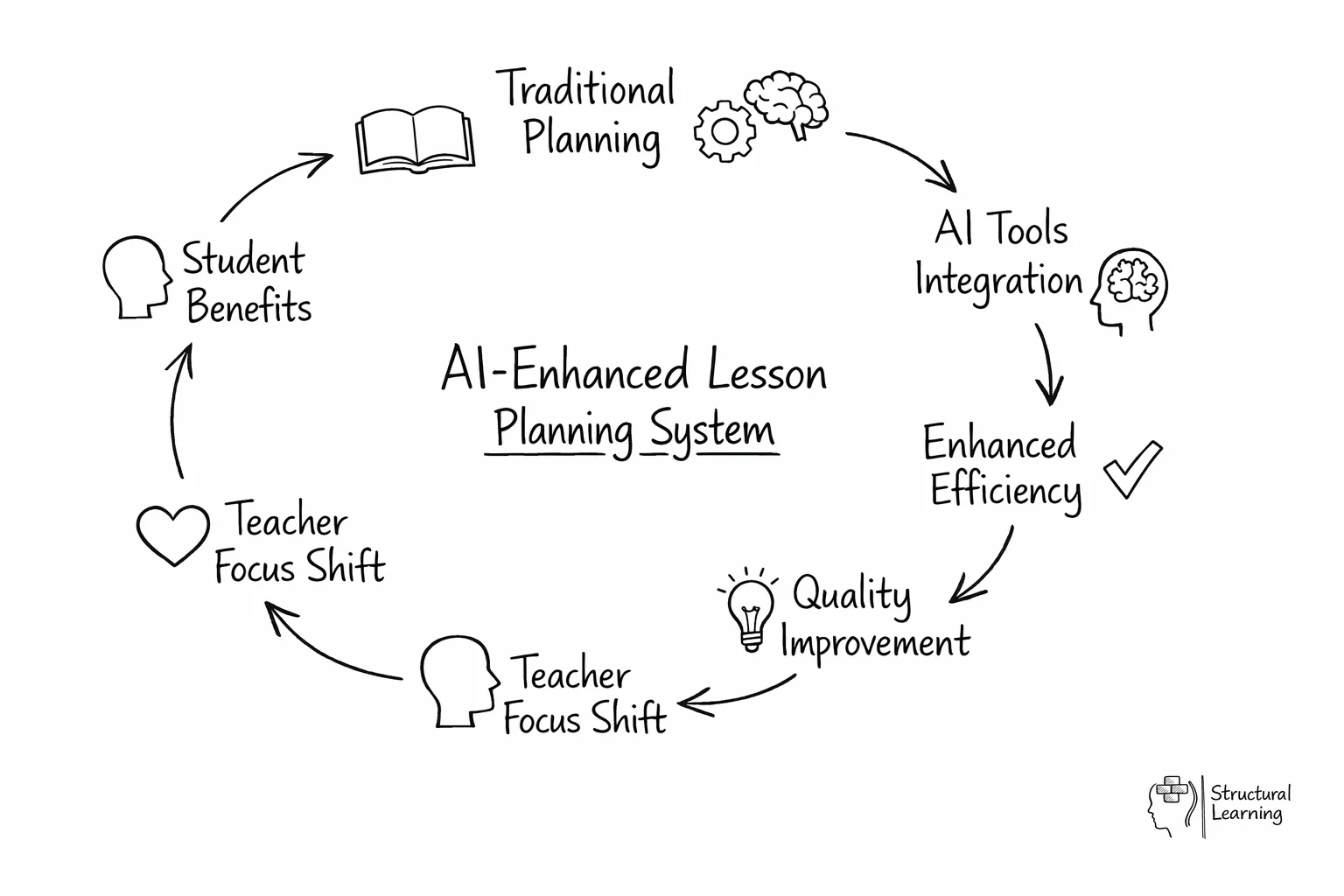
For the wider picture, explore our AI and EdTech tools hub, our home for evidence-based AI guidance across policy, lesson planning, and classroom practice.
You can also explore AI prompts mapped to Bloom's taxonomy.
AI lesson planning involves using artificial intelligence tools to generate teaching sequences, resources and assessments based on specific teacher prompts. Instead of writing plans from scratch, teachers provide details about their year group, curriculum objectives and learner needs. The tool then produces a structured draft that the teacher can refine and adapt for their specific classroom context.
Effective prompts need five things to stop generic AI content. Context, learning aims, and limits like time matter most. Differentiation needs and output format are important too. Giving details on prior knowledge and misconceptions creates better plans (Kasneci et al., 2023).
AI tools can reduce the time teachers spend on planning, according to Ofsted findings from AI early adopters in schools. This happens when AI drafts lessons and makes varied resources. Teachers still need time to check and change these for learners.
AI tools structure content well using frameworks like Rosenshine's (research). Studies find generated plans lack precise differentiation context. Researchers agree: use these tools to draft, not replace, teacher judgement (academic consensus).
The most frequent mistake is writing vague prompts that lack specific details about the year group, curriculum standards and learner misconceptions. Teachers also frequently fail to review the output, mistakenly assuming the tool understands the specific social dynamics and prior learning of their class. Trying to automate an entire term of planning at once rather than starting with a single subject is another common error that leads to frustration.
Teachers instruct AI to scaffold lessons with tools like sentence starters. Specify SEND learner needs in the prompts to target resource generation. Teachers then check if AI adaptations suit individual learners.
Each paper supports AI planning with evidence. They offer practical uses alongside research findings. This helps the learner and teacher.
Principles of Instruction: Research-Based Strategies That All Teachers Should Know
Rosenshine (2012)
Rosenshine's (2012) 10 principles guide lesson planning. These principles (daily review, etc.) are a good framework for AI tools. Use them, or AI lessons risk being shallow, say Kirschner, Sweller and Clark (2006).
Artificial Intelligence in Education: Promises and Implications
Holmes, Bialik & Fadel (2019)
AI helps teachers plan and decide, according to the authors. It mainly reduces admin work, letting teachers focus on teaching. Their lesson plan analysis showed quality gains with teacher input.
The Science of Learning: 77 Studies That Every Teacher Needs to Know
Bradley-Busch & Jones (2020)
A practical synthesis of cognitive science research relevant to lesson design. The book covers retrieval practice, spaced practice, interleaving and cognitive load theory, all principles that should inform how teachers structure AI planning prompts. The more of these principles you include in your prompts, the more pedagogically sound the AI output becomes.
Teacher and AI: Classroom Teachers' Use of AI
320+ citations
Chen et al. (2022)
A systematic review showing that planning and resource creation are the dominant AI use cases among classroom teachers. The study found that prompt quality and institutional support are the strongest predictors of successful adoption. Teachers with access to prompt templates and peer support groups reported higher satisfaction and sustained usage over time.