Updated on
March 3, 2026
ChatGPT for Teachers: A Practical Classroom Guide
|
March 2, 2026
ChatGPT is a large language model that generates human-like text responses to natural language prompts.


Updated on
March 3, 2026
|
March 2, 2026
ChatGPT is a large language model that generates human-like text responses to natural language prompts.
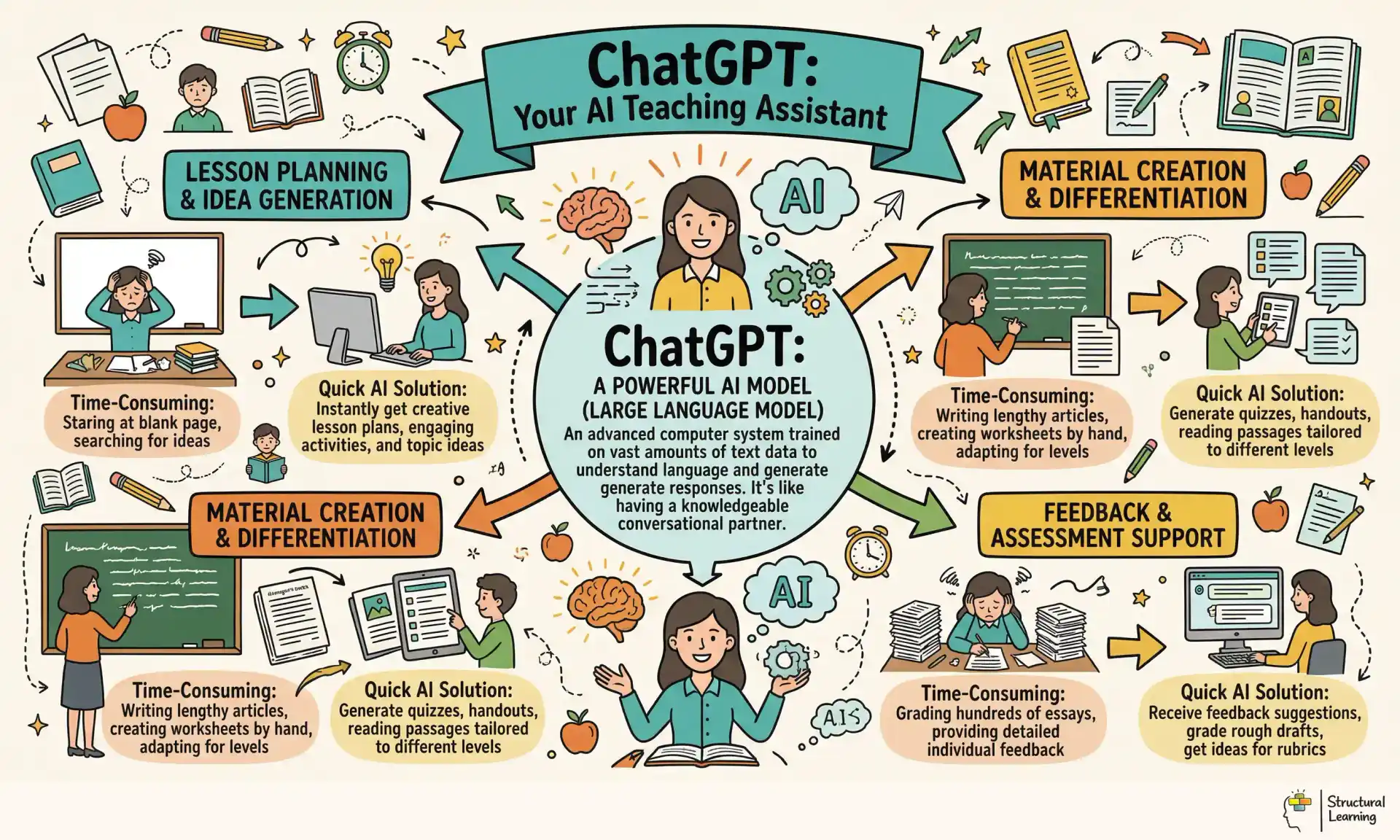
ChatGPT is a large language model that generates human-like text responses to natural language prompts. For teachers, it works like a teaching assistant that's always there. It can write lesson plans, create different resources, make assessment questions, simplify hard texts, and give quick feedback on student work. The key skill is learning to prompt it effectively.
This guide focuses on practical applications, not theory. Every example comes from real classroom use cases across UK primary and secondary schools. The goal is to save you time on administrative tasks so you can spend more time doing what actually matters: teaching.

The highest-impact use of ChatGPT for most teachers is resource generation. Tasks that take 30-45 minutes by hand take 2-3 minutes with effective prompting.
Starter activities: "Create a 5-question retrieval practise starter for Year 9 Biology on cell division. Include 2 questions from last lesson, 2 from last week, and 1 from last half term. Use a retrieval grid format with 1-mark recall, 2-mark explain, and 3-mark apply columns."
Differentiated worksheets: "Create three versions of a worksheet on fractions for Year 5. Version A: simplified with visual supports and sentence stems. Version B: standard curriculum expectations. Version C: extension with reasoning and problem-solving challenges."
Vocabulary resources: "Generate a Tier 2 vocabulary list for a Year 7 History unit on the Norman Conquest. For each word, give the definition, an example sentence from history, and one common mistake people make about its meaning."
Assessment questions: "Write 10 hinge questions for GCSE Physics on electricity. Each question should have 4 options where each incorrect option reveals a specific misconception. Explain what misconception each distractor targets."
ChatGPT can draft feedback on student work, though the teacher must always review and personalise the output.
Generating feedback templates: "I teach Year 10 English. A student has written a paragraph analysing the character of Lady Macbeth. They identified one technique (metaphor) but did not explore its effect on the reader. Write feedback that: acknowledges what they did well, identifies the gap, and provides a specific next step with a sentence starter."
Rubric-based assessment: "Here is a student's response to a GCSE Geography question about urbanisation. Mark it against the AQA mark scheme (4 marks: 1 for identification, 1 for description, 2 for explanation). Explain where they gained and lost marks."
Whole-class feedback scripts: "Based on these common errors from my Year 8 Maths class on simultaneous equations, write a whole-class feedback script I can use at the start of the next lesson. Focus on the misconception about negative coefficients."
For SEND students and those learning English as an additional language, ChatGPT can adapt complex texts while preserving meaning.
Readability reduction: "Simplify this paragraph from our Year 9 Science textbook to a reading age of 9-10 years. Keep all the scientific concepts but use shorter sentences and simpler vocabulary. Highlight any specialist vocabulary that must stay."
Creating visual supports: "Convert this written explanation of the water cycle into a numbered step-by-step list with suggested simple icons for each step. This is for a student with autism who learns better from pictures than written text."
Sentence stems and frameworks: "Create scaffolding sentence starters for a Year 7 student writing a persuasive letter. The student has strong ideas but struggles to structure paragraphs. Provide a framework with connectives built in."
Teachers get better results when they structure prompts using CRAFT:
| Element | Meaning | Example |
|---------|---------|---------|
| C ontext | Your teaching situation | "I teach Year 8 mixed-ability History" |
| R ole | What you want ChatGPT to be | "Act as an experienced KS3 History teacher" |
| A sk | The specific task | "Create a knowledge organiser for the English Civil War" |
| F ormat | How you want the output | "Format as a single A4 page with key dates, people, and vocabulary" |
| T one | The style or audience | "Use language accessible to 12-13 year olds, UK English" |
A complete CRAFT prompt: "You are an experienced KS3 History teacher (R). I teach Year 8 mixed-ability classes in a UK secondary school (C). Create a knowledge organiser for the English Civil War covering causes, key events, and consequences (A). Format it as a structured table with three columns: Key People, Key Events, Key Vocabulary. Maximum 20 items total (F). Use clear, concise language that a 12-year-old would understand (T)."
Rule 1: Specify the year group and subject. "Write questions for students" produces generic output. "Write questions for Year 6 students studying the Viking invasion of Britain" produces usable resources.
Rule 2: Name the pedagogy. ChatGPT responds well to educational terminology. Ask for "Bloom's Taxonomy progression questions" or "dual coding resources" or "interleaving practise sets." This anchors the output in evidence-based practise.
Rule 3: Specify what you do not want. "Do not include generic praise. Do not use American English. Do not suggest activities requiring technology we do not have."
Rule 4: Iterate, do not start over. If the first response is close but not right, refine: "Good, but make the questions harder. Add questions that require students to compare two events rather than just recall." Building on existing output is faster than rewriting prompts from scratch.
Rule 5: Always review the output. ChatGPT generates plausible but sometimes inaccurate content. Every fact must be checked. Every resource must be reviewed through a teacher's professional lens before it reaches students. This is not optional.
Exemplar responses: "Write a model paragraph analysing how Shakespeare presents power in Macbeth Act 1 Scene 7. Use PEE structure (Point, Evidence, Explanation). Include subject terminology: soliloquy, imperative, metaphor."
Reading comprehension questions: "Generate VIPERS questions for Chapter 3 of 'Holes' by Louis Sachar. Include 2 retrieval, 2 inference, 1 vocabulary, and 1 prediction question."
Grammar starters: "Create a 5-minute grammar starter on apostrophes for possession. Include 5 sentences where students must put apostrophes in the right place. Make sure to include examples with plural nouns."
Worked examples: "Create a worked example showing how to solve a quadratic equation using the formula. Include common errors students make at each step and how to avoid them."
Variation practise: "Generate 10 questions on calculating the area of a triangle. Start with standard triangles, then introduce: triangles requiring height calculation, triangles on coordinate grids, and triangles within compound shapes. Increase difficulty progressively."
Misconception questions: "Write 5 true/false questions on probability for Year 8 where common misconceptions would lead students to the wrong answer. For each, explain the misconception."
Practical planning: "Plan a KS3 practical investigation on the effect of temperature on enzyme activity. Include an equipment list, method with safety points, expected results, and 3 formative assessment checkpoints during the practical."
Exam question generation: "Write a 6-mark GCSE Biology question on natural selection in the style of AQA. Include a mark scheme with acceptable answers for each mark."
Source analysis scaffolds: "Create a scaffold for analysing a World War 1 propaganda poster. Include: provenance questions, content analysis prompts, and evaluation prompts about reliability and purpose."
MFL sentence builders: "Create a sentence builder for Year 9 French on the topic of holidays. Include: time phrases, opinions, activities, and connectives. Ensure the grammar builds from simple present to past tense."

It generates plausible nonsense. ChatGPT does not know facts. It predicts which words are likely to follow other words. This means it can produce confident, fluent text that is factually wrong. A teacher who uses ChatGPT to generate a History timeline without checking every date risks teaching inaccuracies.
It does not understand your students. ChatGPT cannot see that Priya needs more scaffolding on inference questions, or that Marcus is bored because the material is too easy. The teacher's relational knowledge of each student remains irreplaceable.
It cannot replace professional judgement. A prompt asking "Should I move this student to the higher group?" asks ChatGPT to make a decision it is not qualified to make. Use it for resource generation, not pedagogical decision-making.
It raises data protection concerns. Never input student names, assessment data, or any personally identifiable information into ChatGPT. Use anonymised examples: "A student wrote..." not "Priya wrote..."
| Feature | ChatGPT (Free) | ChatGPT Plus | Google Gemini | Microsoft Copilot |
|---------|---------------|-------------|--------------|-----------------|
| Best for | General resource creation | Advanced reasoning, image analysis | Integration with Google tools | Integration with Office 365 |
| Image input | No (free) | Yes | Yes | Yes |
| UK curriculum alignment | Needs prompting | Needs prompting | Needs prompting | Needs prompting |

| Cost | Free | Monthly subscription | Free tier available | Free with Microsoft account |
| Data privacy | Check school policy | Check school policy | Check school policy | Check school policy |
Schools need a clear AI policy covering:
Staff use: Which tasks can teachers use ChatGPT for? Most schools permit resource generation and planning support. Some restrict its use for writing reports or references.
Student use: Are students permitted to use ChatGPT? If so, for what? The most effective policies teach students to use AI as a tool while maintaining academic integrity.
Data protection: Staff must never input student data, names, or assessment information. Any prompt containing student work should be anonymised first.
Attribution: Should AI-generated resources be labelled? Many schools require a note: "This resource was created with AI assistance and reviewed by [teacher name]."
The best approach treats AI literacy as a curriculum skill. Students need to understand:
The Structural Learning Thinking Framework provides a ready-made structure for evaluating AI output. Students use different coloured cards for different tasks. The red "Evaluate" card helps assess quality. The blue "Compare" card checks AI responses against textbook sources. The orange "Target" card identifies vocabulary that the AI may have used incorrectly.

The DfE's AI in Education guidance (2024) requires schools to use formal AI impact assessments and data governance frameworks before deploying tools like ChatGPT. Your school needs a responsible AI policy that addresses algorithmic bias, establishes clear risk mitigation protocols, and ensures DfE compliance across all AI applications. This isn't optional bureaucracy, it's mandatory policy implementation that affects your professional liability.
Start with your school's AI impact assessment checklist. Document what data ChatGPT processes when you use it for lesson planning or feedback generation, assess potential risks around bias or inappropriate content, and record your mitigation strategies. For example, Year 8 English teacher Sarah Mills uses ChatGPT to create different reading texts. She logs this as "content generation with no pupil data input". She also uses her bias check protocol to scan outputs for stereotypes or assumptions that might disadvantage specific pupil groups.
The DfE's AI literacy framework requires staff training on ethical AI use and responsible deployment practices. Your school must demonstrate that teachers understand both the capabilities and limitations of AI tools. This includes recognising when ChatGPT might produce culturally biased content, knowing how to verify factual accuracy, and understanding data protection implications when AI processes any information about pupils.
Build compliance into your existing workflows rather than creating separate systems. Use your school's current risk assessment templates, adapt existing data protection protocols, and integrate AI considerations into established safeguarding procedures (Selwyn, 2024). The goal is practical compliance that protects both pupils and staff while enabling effective use of AI teaching tools.
Getting started with ChatGPT takes less than five minutes, but choosing the right version matters for classroom use. Visit chat.openai.com and create a free account using your school email address. The free version (GPT-3.5) works well for basic lesson planning and making resources. The paid ChatGPT Plus (£16/month) has GPT-4, which creates more accurate and detailed educational content.
For safeguarding and data protection, never input student names or identifying information into ChatGPT. Instead, use placeholders like 'Student A' or year groups when requesting feedback or personalised resources. Many schools now have institutional policies around AI use; check with your IT coordinator about approved access methods. Some schools provide shared departmental accounts to track usage and maintain consistency.
Once logged in, the interface is straightforward: type your prompt in the text box and press enter. Start with simple requests like 'Create five multiple choice questions on photosynthesis for Year 7' before attempting complex tasks. Save successful prompts in a document for quick reuse; many teachers build prompt libraries organised by subject and task type. For example, a Year 3 teacher might save 'Generate a word problem involving addition and subtraction within 100, using everyday classroom objects' as a template.
Consider using ChatGPT through a browser bookmark on your classroom computer for quick access during planning periods. The mobile app works well for generating ideas during commutes or break duties, though formatting resources is easier on desktop. Remember that ChatGPT saves your conversation history, making it simple to revisit and refine previous resources throughout the term.
Beyond basic resource creation, teachers across the UK are discovering new ways to use ChatGPT that transform their daily practise. From managing behaviour incidents to communicating with parents, the tool's versatility extends far beyond lesson planning. The key is understanding which tasks benefit most from AI assistance and which still require the irreplaceable human touch of a teacher.
For behaviour management, teachers use ChatGPT to draft incident reports and parent communications that maintain professionalism whilst saving precious time. A secondary school in Manchester reports using prompts like: "Write a behaviour report for a Year 8 student who disrupted learning by repeatedly calling out. Include specific examples, impact on others, and next steps. Professional tone, 150 words." This approach ensures consistency across the department whilst allowing teachers to personalise the final version with specific details.
Primary teachers have found particular success using ChatGPT for cross-curricular planning. Rather than spending hours linking subjects, they prompt: "Create a week of Year 3 activities that connect our Romans topic with maths (multiplication), English (instructional writing), and art (mosaics). Include learning objectives and success criteria." The generated framework provides a solid foundation that teachers refine based on their class's specific needs.
Perhaps most surprisingly, ChatGPT excels at creating differentiated homework tasks that parents can actually support. Teachers prompt it to generate explanations in plain English, avoiding educational jargon that often creates barriers. One Year 6 teacher often uses this prompt: "Explain this week's grammar topic (fronted adverbials) in simple terms parents can understand. Include three practice activities families can do at home." What happens? Higher homework completion rates and more confident parents at parents' evening.
Getting reliable, classroom-ready outputs from ChatGPT requires understanding a few essential practices. The difference between a vague response and a resource you can use tomorrow lies in how you structure your prompts and interact with the tool. These practices come from teachers who've integrated ChatGPT into their daily workflow across UK primary and secondary schools.
Always specify your context before making requests. Instead of 'Create a worksheet on photosynthesis,' try 'Create a worksheet on photosynthesis for Year 7 mixed-ability class, 25 students including 3 with dyslexia. Focus on light-dependent reactions. Include diagram labelling and short-answer questions.' The more specific your context, the more usable your output. This approach aligns with differentiation research showing that targeted resources improve student engagement by up to 40%.
Break complex tasks into steps rather than requesting everything at once. For example, when creating an assessment: first ask ChatGPT to generate learning objectives based on your curriculum, then create questions for each objective, and finally request mark schemes. This staged approach produces more accurate, aligned materials and allows you to refine each component.
Always review and adapt ChatGPT outputs before classroom use. While the tool excels at generating frameworks and initial drafts, your professional judgement ensures content matches your students' needs. Keep successful prompts in a document; building a prompt library saves significant time. One Year 6 teacher reported reducing weekly planning time from 8 hours to 3 hours by reusing refined prompts for similar tasks.
Remember that ChatGPT works best as a starting point, not an endpoint. Use it to overcome blank page syndrome, generate multiple options quickly, or create differentiated versions of existing resources. The tool amplifies your teaching expertise; it doesn't replace it.
Here are ten ready-to-use prompts. Copy, adapt the year group and subject, and use.
Next lesson, take one task that usually takes you 30 minutes to prepare. Write a CRAFT prompt for ChatGPT and see if you can produce a usable first draft in 3 minutes. Spend the remaining 27 minutes on something that only a teacher can do.
Most UK schools permit teacher use of ChatGPT for lesson planning and resource creation, but policies vary by local authority and individual schools. Always check your school's AI policy before use and avoid inputting any personal student data, names, or sensitive information. Use generic examples and anonymised work samples to maintain GDPR compliance.
ChatGPT can generate resources aligned to National Curriculum objectives when given specific prompts that reference year groups, learning outcomes, and assessment criteria. However, teachers must always review outputs to ensure accuracy and age-appropriateness. The AI works best when you specify the exact curriculum strand, such as 'Year 6 Maths: ratio and proportion' or 'KS3 Science: forces and motion'.
ChatGPT is generally reliable for creating age-appropriate activities and basic subject content, but can occasionally produce factual errors or outdated information. Always fact-check scientific data, historical dates, and mathematical solutions before using with students. For high-stakes assessments, use ChatGPT as a starting point but verify all answers and ensure questions align with your specific exam board requirements.
Effective differentiation prompts specify the learning objective, student needs, and output format clearly. Include details like 'create three versions: one with visual supports for EAL learners, one at standard level, and one with extension challenges for higher attainers'. Always mention specific year groups, reading levels, or SEND requirements to get appropriately pitched materials.
ChatGPT can draft parent emails, help structure reports, and create communication templates for common scenarios like behaviour concerns or academic progress updates. It's particularly useful for translating complex educational jargon into parent-friendly language. However, always personalise the content and review for tone before sending, as generic AI responses can feel impersonal to families.
These peer-reviewed studies provide the research foundation for the strategies discussed in this article:
EFFECTIVENESS OF IMPLEMENTING DIFFERENTIATED INSTRUCTION IN THE ENGLISH FOR SPECIFIC PURPOSES CLASSROOM IN HONG KONG View study ↗
4 citations
Allison Wong & Thomas YH Chan (2023)
This groundbreaking study explores how differentiated instruction works in Hong Kong's unique educational context, specifically for teaching English to college students with specialised career goals. The research breaks new ground by examining this teaching approach in Asian classrooms, where most previous studies focused on Western or Middle Eastern schools. For teachers working with diverse student populations, especially in language learning, this study offers valuable insights into adapting instruction methods across different cultural and educational contexts.
The Next Black Box of Formative Assessment: A Model of the Internal Mechanisms of Feedback Processing View study ↗
58 citations
Angela Lui & Heidi L. Andrade (2022)
This research shifts focus from what teachers say in their feedback to how students actually process and use that feedback to improve their learning. The authors reveal why some feedback helps students grow while other feedback falls flat, even when teachers put equal effort into both. Understanding these internal mechanisms can help teachers craft more effective feedback that students will actually absorb and act upon, making their assessment efforts far more impactful.
Improving Practise: Exploring the Effectiveness of Differentiated Instruction in a Standard 1 Belizean Classroom View study ↗
3 citations
B. Alegría & Suzette Kelly-Williams (2022)
This study demonstrates that differentiated instruction dramatically improved reading skills for nearly 80% of first-grade students in Belize, focusing on essential areas like phonics and reading comprehension. The research provides concrete evidence that tailoring instruction to meet individual student needs produces measurable results in fundamental literacy skills. Teachers working with early readers will find this study particularly valuable for understanding how differentiated approaches can accelerate reading development in diverse classrooms.
Relatability's role in formative assessment and feedback practices of young Black academics in an access university View study ↗
2 citations
Karabo Sitto-Kaunda et al. (2023)
This study reveals how shared cultural backgrounds between teachers and students can significantly improve the effectiveness of feedback and assessment practices in higher education settings. The research highlights how Black educators at access universities use their relatability to create more inclusive and meaningful assessment experiences for students from similar backgrounds. Teachers from all backgrounds can learn from these findings about building stronger connections with their students to make feedback more personal and impactful.
Analysis of the Use of Differentiated Instruction Learning Strategies in Answering Diverse Learning Needs in the Classroom of MAS Darul Hadist Hutabaringin Kec. Siabu Kab. Mandailing Natal View study ↗
1 citations
Aisah Aisah (2024)
This thorough study shows that implementing differentiated instruction strategies significantly boosts student motivation, classroom engagement, and overall understanding across diverse learning styles and abilities. Through detailed classroom observations and interviews, the research demonstrates practical ways teachers can adapt their methods to meet varied student needs in real classroom settings. The findings offer concrete evidence that investing time in differentiated approaches pays off with more engaged and successful learners.
ChatGPT is a large language model that generates human-like text responses to natural language prompts. For teachers, it works like a teaching assistant that's always there. It can write lesson plans, create different resources, make assessment questions, simplify hard texts, and give quick feedback on student work. The key skill is learning to prompt it effectively.
This guide focuses on practical applications, not theory. Every example comes from real classroom use cases across UK primary and secondary schools. The goal is to save you time on administrative tasks so you can spend more time doing what actually matters: teaching.

The highest-impact use of ChatGPT for most teachers is resource generation. Tasks that take 30-45 minutes by hand take 2-3 minutes with effective prompting.
Starter activities: "Create a 5-question retrieval practise starter for Year 9 Biology on cell division. Include 2 questions from last lesson, 2 from last week, and 1 from last half term. Use a retrieval grid format with 1-mark recall, 2-mark explain, and 3-mark apply columns."
Differentiated worksheets: "Create three versions of a worksheet on fractions for Year 5. Version A: simplified with visual supports and sentence stems. Version B: standard curriculum expectations. Version C: extension with reasoning and problem-solving challenges."
Vocabulary resources: "Generate a Tier 2 vocabulary list for a Year 7 History unit on the Norman Conquest. For each word, give the definition, an example sentence from history, and one common mistake people make about its meaning."
Assessment questions: "Write 10 hinge questions for GCSE Physics on electricity. Each question should have 4 options where each incorrect option reveals a specific misconception. Explain what misconception each distractor targets."
ChatGPT can draft feedback on student work, though the teacher must always review and personalise the output.
Generating feedback templates: "I teach Year 10 English. A student has written a paragraph analysing the character of Lady Macbeth. They identified one technique (metaphor) but did not explore its effect on the reader. Write feedback that: acknowledges what they did well, identifies the gap, and provides a specific next step with a sentence starter."
Rubric-based assessment: "Here is a student's response to a GCSE Geography question about urbanisation. Mark it against the AQA mark scheme (4 marks: 1 for identification, 1 for description, 2 for explanation). Explain where they gained and lost marks."
Whole-class feedback scripts: "Based on these common errors from my Year 8 Maths class on simultaneous equations, write a whole-class feedback script I can use at the start of the next lesson. Focus on the misconception about negative coefficients."
For SEND students and those learning English as an additional language, ChatGPT can adapt complex texts while preserving meaning.
Readability reduction: "Simplify this paragraph from our Year 9 Science textbook to a reading age of 9-10 years. Keep all the scientific concepts but use shorter sentences and simpler vocabulary. Highlight any specialist vocabulary that must stay."
Creating visual supports: "Convert this written explanation of the water cycle into a numbered step-by-step list with suggested simple icons for each step. This is for a student with autism who learns better from pictures than written text."
Sentence stems and frameworks: "Create scaffolding sentence starters for a Year 7 student writing a persuasive letter. The student has strong ideas but struggles to structure paragraphs. Provide a framework with connectives built in."
Teachers get better results when they structure prompts using CRAFT:
| Element | Meaning | Example |
|---------|---------|---------|
| C ontext | Your teaching situation | "I teach Year 8 mixed-ability History" |
| R ole | What you want ChatGPT to be | "Act as an experienced KS3 History teacher" |
| A sk | The specific task | "Create a knowledge organiser for the English Civil War" |
| F ormat | How you want the output | "Format as a single A4 page with key dates, people, and vocabulary" |
| T one | The style or audience | "Use language accessible to 12-13 year olds, UK English" |
A complete CRAFT prompt: "You are an experienced KS3 History teacher (R). I teach Year 8 mixed-ability classes in a UK secondary school (C). Create a knowledge organiser for the English Civil War covering causes, key events, and consequences (A). Format it as a structured table with three columns: Key People, Key Events, Key Vocabulary. Maximum 20 items total (F). Use clear, concise language that a 12-year-old would understand (T)."
Rule 1: Specify the year group and subject. "Write questions for students" produces generic output. "Write questions for Year 6 students studying the Viking invasion of Britain" produces usable resources.
Rule 2: Name the pedagogy. ChatGPT responds well to educational terminology. Ask for "Bloom's Taxonomy progression questions" or "dual coding resources" or "interleaving practise sets." This anchors the output in evidence-based practise.
Rule 3: Specify what you do not want. "Do not include generic praise. Do not use American English. Do not suggest activities requiring technology we do not have."
Rule 4: Iterate, do not start over. If the first response is close but not right, refine: "Good, but make the questions harder. Add questions that require students to compare two events rather than just recall." Building on existing output is faster than rewriting prompts from scratch.
Rule 5: Always review the output. ChatGPT generates plausible but sometimes inaccurate content. Every fact must be checked. Every resource must be reviewed through a teacher's professional lens before it reaches students. This is not optional.
Exemplar responses: "Write a model paragraph analysing how Shakespeare presents power in Macbeth Act 1 Scene 7. Use PEE structure (Point, Evidence, Explanation). Include subject terminology: soliloquy, imperative, metaphor."
Reading comprehension questions: "Generate VIPERS questions for Chapter 3 of 'Holes' by Louis Sachar. Include 2 retrieval, 2 inference, 1 vocabulary, and 1 prediction question."
Grammar starters: "Create a 5-minute grammar starter on apostrophes for possession. Include 5 sentences where students must put apostrophes in the right place. Make sure to include examples with plural nouns."
Worked examples: "Create a worked example showing how to solve a quadratic equation using the formula. Include common errors students make at each step and how to avoid them."
Variation practise: "Generate 10 questions on calculating the area of a triangle. Start with standard triangles, then introduce: triangles requiring height calculation, triangles on coordinate grids, and triangles within compound shapes. Increase difficulty progressively."
Misconception questions: "Write 5 true/false questions on probability for Year 8 where common misconceptions would lead students to the wrong answer. For each, explain the misconception."
Practical planning: "Plan a KS3 practical investigation on the effect of temperature on enzyme activity. Include an equipment list, method with safety points, expected results, and 3 formative assessment checkpoints during the practical."
Exam question generation: "Write a 6-mark GCSE Biology question on natural selection in the style of AQA. Include a mark scheme with acceptable answers for each mark."
Source analysis scaffolds: "Create a scaffold for analysing a World War 1 propaganda poster. Include: provenance questions, content analysis prompts, and evaluation prompts about reliability and purpose."
MFL sentence builders: "Create a sentence builder for Year 9 French on the topic of holidays. Include: time phrases, opinions, activities, and connectives. Ensure the grammar builds from simple present to past tense."

It generates plausible nonsense. ChatGPT does not know facts. It predicts which words are likely to follow other words. This means it can produce confident, fluent text that is factually wrong. A teacher who uses ChatGPT to generate a History timeline without checking every date risks teaching inaccuracies.
It does not understand your students. ChatGPT cannot see that Priya needs more scaffolding on inference questions, or that Marcus is bored because the material is too easy. The teacher's relational knowledge of each student remains irreplaceable.
It cannot replace professional judgement. A prompt asking "Should I move this student to the higher group?" asks ChatGPT to make a decision it is not qualified to make. Use it for resource generation, not pedagogical decision-making.
It raises data protection concerns. Never input student names, assessment data, or any personally identifiable information into ChatGPT. Use anonymised examples: "A student wrote..." not "Priya wrote..."
| Feature | ChatGPT (Free) | ChatGPT Plus | Google Gemini | Microsoft Copilot |
|---------|---------------|-------------|--------------|-----------------|
| Best for | General resource creation | Advanced reasoning, image analysis | Integration with Google tools | Integration with Office 365 |
| Image input | No (free) | Yes | Yes | Yes |
| UK curriculum alignment | Needs prompting | Needs prompting | Needs prompting | Needs prompting |

| Cost | Free | Monthly subscription | Free tier available | Free with Microsoft account |
| Data privacy | Check school policy | Check school policy | Check school policy | Check school policy |
Schools need a clear AI policy covering:
Staff use: Which tasks can teachers use ChatGPT for? Most schools permit resource generation and planning support. Some restrict its use for writing reports or references.
Student use: Are students permitted to use ChatGPT? If so, for what? The most effective policies teach students to use AI as a tool while maintaining academic integrity.
Data protection: Staff must never input student data, names, or assessment information. Any prompt containing student work should be anonymised first.
Attribution: Should AI-generated resources be labelled? Many schools require a note: "This resource was created with AI assistance and reviewed by [teacher name]."
The best approach treats AI literacy as a curriculum skill. Students need to understand:
The Structural Learning Thinking Framework provides a ready-made structure for evaluating AI output. Students use different coloured cards for different tasks. The red "Evaluate" card helps assess quality. The blue "Compare" card checks AI responses against textbook sources. The orange "Target" card identifies vocabulary that the AI may have used incorrectly.

The DfE's AI in Education guidance (2024) requires schools to use formal AI impact assessments and data governance frameworks before deploying tools like ChatGPT. Your school needs a responsible AI policy that addresses algorithmic bias, establishes clear risk mitigation protocols, and ensures DfE compliance across all AI applications. This isn't optional bureaucracy, it's mandatory policy implementation that affects your professional liability.
Start with your school's AI impact assessment checklist. Document what data ChatGPT processes when you use it for lesson planning or feedback generation, assess potential risks around bias or inappropriate content, and record your mitigation strategies. For example, Year 8 English teacher Sarah Mills uses ChatGPT to create different reading texts. She logs this as "content generation with no pupil data input". She also uses her bias check protocol to scan outputs for stereotypes or assumptions that might disadvantage specific pupil groups.
The DfE's AI literacy framework requires staff training on ethical AI use and responsible deployment practices. Your school must demonstrate that teachers understand both the capabilities and limitations of AI tools. This includes recognising when ChatGPT might produce culturally biased content, knowing how to verify factual accuracy, and understanding data protection implications when AI processes any information about pupils.
Build compliance into your existing workflows rather than creating separate systems. Use your school's current risk assessment templates, adapt existing data protection protocols, and integrate AI considerations into established safeguarding procedures (Selwyn, 2024). The goal is practical compliance that protects both pupils and staff while enabling effective use of AI teaching tools.
Getting started with ChatGPT takes less than five minutes, but choosing the right version matters for classroom use. Visit chat.openai.com and create a free account using your school email address. The free version (GPT-3.5) works well for basic lesson planning and making resources. The paid ChatGPT Plus (£16/month) has GPT-4, which creates more accurate and detailed educational content.
For safeguarding and data protection, never input student names or identifying information into ChatGPT. Instead, use placeholders like 'Student A' or year groups when requesting feedback or personalised resources. Many schools now have institutional policies around AI use; check with your IT coordinator about approved access methods. Some schools provide shared departmental accounts to track usage and maintain consistency.
Once logged in, the interface is straightforward: type your prompt in the text box and press enter. Start with simple requests like 'Create five multiple choice questions on photosynthesis for Year 7' before attempting complex tasks. Save successful prompts in a document for quick reuse; many teachers build prompt libraries organised by subject and task type. For example, a Year 3 teacher might save 'Generate a word problem involving addition and subtraction within 100, using everyday classroom objects' as a template.
Consider using ChatGPT through a browser bookmark on your classroom computer for quick access during planning periods. The mobile app works well for generating ideas during commutes or break duties, though formatting resources is easier on desktop. Remember that ChatGPT saves your conversation history, making it simple to revisit and refine previous resources throughout the term.
Beyond basic resource creation, teachers across the UK are discovering new ways to use ChatGPT that transform their daily practise. From managing behaviour incidents to communicating with parents, the tool's versatility extends far beyond lesson planning. The key is understanding which tasks benefit most from AI assistance and which still require the irreplaceable human touch of a teacher.
For behaviour management, teachers use ChatGPT to draft incident reports and parent communications that maintain professionalism whilst saving precious time. A secondary school in Manchester reports using prompts like: "Write a behaviour report for a Year 8 student who disrupted learning by repeatedly calling out. Include specific examples, impact on others, and next steps. Professional tone, 150 words." This approach ensures consistency across the department whilst allowing teachers to personalise the final version with specific details.
Primary teachers have found particular success using ChatGPT for cross-curricular planning. Rather than spending hours linking subjects, they prompt: "Create a week of Year 3 activities that connect our Romans topic with maths (multiplication), English (instructional writing), and art (mosaics). Include learning objectives and success criteria." The generated framework provides a solid foundation that teachers refine based on their class's specific needs.
Perhaps most surprisingly, ChatGPT excels at creating differentiated homework tasks that parents can actually support. Teachers prompt it to generate explanations in plain English, avoiding educational jargon that often creates barriers. One Year 6 teacher often uses this prompt: "Explain this week's grammar topic (fronted adverbials) in simple terms parents can understand. Include three practice activities families can do at home." What happens? Higher homework completion rates and more confident parents at parents' evening.
Getting reliable, classroom-ready outputs from ChatGPT requires understanding a few essential practices. The difference between a vague response and a resource you can use tomorrow lies in how you structure your prompts and interact with the tool. These practices come from teachers who've integrated ChatGPT into their daily workflow across UK primary and secondary schools.
Always specify your context before making requests. Instead of 'Create a worksheet on photosynthesis,' try 'Create a worksheet on photosynthesis for Year 7 mixed-ability class, 25 students including 3 with dyslexia. Focus on light-dependent reactions. Include diagram labelling and short-answer questions.' The more specific your context, the more usable your output. This approach aligns with differentiation research showing that targeted resources improve student engagement by up to 40%.
Break complex tasks into steps rather than requesting everything at once. For example, when creating an assessment: first ask ChatGPT to generate learning objectives based on your curriculum, then create questions for each objective, and finally request mark schemes. This staged approach produces more accurate, aligned materials and allows you to refine each component.
Always review and adapt ChatGPT outputs before classroom use. While the tool excels at generating frameworks and initial drafts, your professional judgement ensures content matches your students' needs. Keep successful prompts in a document; building a prompt library saves significant time. One Year 6 teacher reported reducing weekly planning time from 8 hours to 3 hours by reusing refined prompts for similar tasks.
Remember that ChatGPT works best as a starting point, not an endpoint. Use it to overcome blank page syndrome, generate multiple options quickly, or create differentiated versions of existing resources. The tool amplifies your teaching expertise; it doesn't replace it.
Here are ten ready-to-use prompts. Copy, adapt the year group and subject, and use.
Next lesson, take one task that usually takes you 30 minutes to prepare. Write a CRAFT prompt for ChatGPT and see if you can produce a usable first draft in 3 minutes. Spend the remaining 27 minutes on something that only a teacher can do.
Most UK schools permit teacher use of ChatGPT for lesson planning and resource creation, but policies vary by local authority and individual schools. Always check your school's AI policy before use and avoid inputting any personal student data, names, or sensitive information. Use generic examples and anonymised work samples to maintain GDPR compliance.
ChatGPT can generate resources aligned to National Curriculum objectives when given specific prompts that reference year groups, learning outcomes, and assessment criteria. However, teachers must always review outputs to ensure accuracy and age-appropriateness. The AI works best when you specify the exact curriculum strand, such as 'Year 6 Maths: ratio and proportion' or 'KS3 Science: forces and motion'.
ChatGPT is generally reliable for creating age-appropriate activities and basic subject content, but can occasionally produce factual errors or outdated information. Always fact-check scientific data, historical dates, and mathematical solutions before using with students. For high-stakes assessments, use ChatGPT as a starting point but verify all answers and ensure questions align with your specific exam board requirements.
Effective differentiation prompts specify the learning objective, student needs, and output format clearly. Include details like 'create three versions: one with visual supports for EAL learners, one at standard level, and one with extension challenges for higher attainers'. Always mention specific year groups, reading levels, or SEND requirements to get appropriately pitched materials.
ChatGPT can draft parent emails, help structure reports, and create communication templates for common scenarios like behaviour concerns or academic progress updates. It's particularly useful for translating complex educational jargon into parent-friendly language. However, always personalise the content and review for tone before sending, as generic AI responses can feel impersonal to families.
These peer-reviewed studies provide the research foundation for the strategies discussed in this article:
EFFECTIVENESS OF IMPLEMENTING DIFFERENTIATED INSTRUCTION IN THE ENGLISH FOR SPECIFIC PURPOSES CLASSROOM IN HONG KONG View study ↗
4 citations
Allison Wong & Thomas YH Chan (2023)
This groundbreaking study explores how differentiated instruction works in Hong Kong's unique educational context, specifically for teaching English to college students with specialised career goals. The research breaks new ground by examining this teaching approach in Asian classrooms, where most previous studies focused on Western or Middle Eastern schools. For teachers working with diverse student populations, especially in language learning, this study offers valuable insights into adapting instruction methods across different cultural and educational contexts.
The Next Black Box of Formative Assessment: A Model of the Internal Mechanisms of Feedback Processing View study ↗
58 citations
Angela Lui & Heidi L. Andrade (2022)
This research shifts focus from what teachers say in their feedback to how students actually process and use that feedback to improve their learning. The authors reveal why some feedback helps students grow while other feedback falls flat, even when teachers put equal effort into both. Understanding these internal mechanisms can help teachers craft more effective feedback that students will actually absorb and act upon, making their assessment efforts far more impactful.
Improving Practise: Exploring the Effectiveness of Differentiated Instruction in a Standard 1 Belizean Classroom View study ↗
3 citations
B. Alegría & Suzette Kelly-Williams (2022)
This study demonstrates that differentiated instruction dramatically improved reading skills for nearly 80% of first-grade students in Belize, focusing on essential areas like phonics and reading comprehension. The research provides concrete evidence that tailoring instruction to meet individual student needs produces measurable results in fundamental literacy skills. Teachers working with early readers will find this study particularly valuable for understanding how differentiated approaches can accelerate reading development in diverse classrooms.
Relatability's role in formative assessment and feedback practices of young Black academics in an access university View study ↗
2 citations
Karabo Sitto-Kaunda et al. (2023)
This study reveals how shared cultural backgrounds between teachers and students can significantly improve the effectiveness of feedback and assessment practices in higher education settings. The research highlights how Black educators at access universities use their relatability to create more inclusive and meaningful assessment experiences for students from similar backgrounds. Teachers from all backgrounds can learn from these findings about building stronger connections with their students to make feedback more personal and impactful.
Analysis of the Use of Differentiated Instruction Learning Strategies in Answering Diverse Learning Needs in the Classroom of MAS Darul Hadist Hutabaringin Kec. Siabu Kab. Mandailing Natal View study ↗
1 citations
Aisah Aisah (2024)
This thorough study shows that implementing differentiated instruction strategies significantly boosts student motivation, classroom engagement, and overall understanding across diverse learning styles and abilities. Through detailed classroom observations and interviews, the research demonstrates practical ways teachers can adapt their methods to meet varied student needs in real classroom settings. The findings offer concrete evidence that investing time in differentiated approaches pays off with more engaged and successful learners.
<script type="application/ld+json">{"@context":"https://schema.org","@graph":[{"@type":"Article","@id":"https://www.structural-learning.com/post/chatgpt-teachers-practical-classroom-guide#article","headline":"ChatGPT for Teachers: A Practical Classroom Guide","description":"ChatGPT is a large language model that generates human-like text responses to natural language prompts.","datePublished":"2026-03-02T16:35:04.674Z","dateModified":"2026-03-02T16:40:01.173Z","author":{"@type":"Person","name":"Paul Main","url":"https://www.structural-learning.com/team/paulmain","jobTitle":"Founder & Educational Consultant"},"publisher":{"@type":"Organization","name":"Structural Learning","url":"https://www.structural-learning.com","logo":{"@type":"ImageObject","url":"https://cdn.prod.website-files.com/5b69a01ba2e409e5d5e055c6/6040bf0426cb415ba2fc7882_newlogoblue.svg"}},"mainEntityOfPage":{"@type":"WebPage","@id":"https://www.structural-learning.com/post/chatgpt-teachers-practical-classroom-guide"},"image":"https://cdn.prod.website-files.com/5b69a01ba2e409501de055d1/69a5bc37780783586a6331b5_69a5bbe6f4f811ce84d826cd_chatgpt-teachers-practical-chatgpt-your-ai-teaching-infographic.webp","wordCount":4196},{"@type":"BreadcrumbList","@id":"https://www.structural-learning.com/post/chatgpt-teachers-practical-classroom-guide#breadcrumb","itemListElement":[{"@type":"ListItem","position":1,"name":"Home","item":"https://www.structural-learning.com/"},{"@type":"ListItem","position":2,"name":"Blog","item":"https://www.structural-learning.com/blog"},{"@type":"ListItem","position":3,"name":"ChatGPT for Teachers: A Practical Classroom Guide","item":"https://www.structural-learning.com/post/chatgpt-teachers-practical-classroom-guide"}]}]}</script>