Updated on
September 11, 2026
AI Dual Coding: Visual Resources That Cut Cognitive Load
Master AI dual coding visual learning resources to reduce cognitive load. Learn exact prompts to generate minimalist, SEND-accessible classroom graphics.

Updated on
September 11, 2026
Master AI dual coding visual learning resources to reduce cognitive load. Learn exact prompts to generate minimalist, SEND-accessible classroom graphics.
AI Dual Coding: Generating Visual Learning Resources That Reduce Cognitive Load explains how teachers can use AI tools to create or refine visuals. These visuals pair carefully chosen images with short verbal explanations. This helps learners build linked mental representations without overloading working memory. The approach draws on dual coding theory (Paivio, 1986), so teachers should treat it as a design discipline, not a request for decorative classroom images.
AI dual coding is led by the teacher. It uses artificial intelligence to create, simplify or critique visual and verbal learning materials. The aim is to help learners connect words, images and relationships while keeping unnecessary cognitive load low.
Dual coding theory, developed by Allan Paivio (1971; 1986), proposes that information is represented in distinct but connected verbal and non-verbal systems, and that learning can benefit when instruction links words with relevant visuals. AI dual coding is the practice of using generative AI tools to produce paired text and image resources that exploit this dual-channel encoding, reducing cognitive load and strengthening recall in line with Mayer's (2009) cognitive theory of multimedia learning.
For example, a Year 8 science teacher could ask an AI tool to strip a complex particle diagram down to three labelled stages, then ask learners to explain which arrows, labels and symbols are necessary. The learning benefit comes from judging and improving the visual, not simply looking at a polished map produced by the tool.
AI dual coding uses AI to create simple images that support lessons. Paivio (1986) argued that verbal and nonverbal information are represented in distinct but connected systems, and Mayer (2009) found that learners often learn more deeply from well-designed combinations of words and pictures than from words alone. Teachers use specific prompts to make AI work as a learning tool. This helps avoid the unfocused output that standard AI can produce.
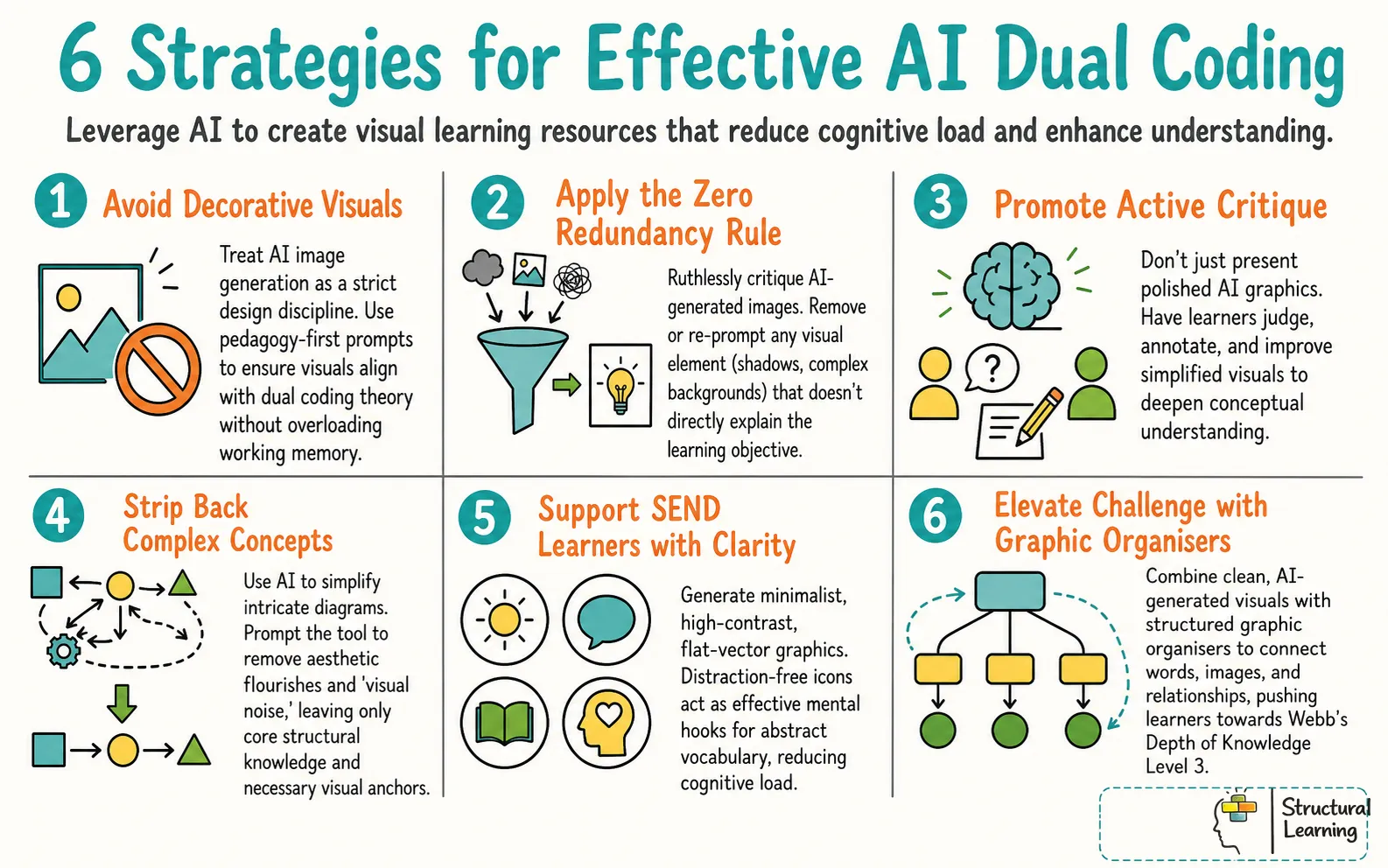
The goal is to support working memory, not entertain learners. Standard AI images impress with aesthetic detail, shadows, and complex backgrounds. AI dual coding strips away these stylistic flourishes to present core structural knowledge. The resulting graphics are sparse, acting as clear mental hooks for new vocabulary and complex processes.
This methodology relies on the zero redundancy rule. Teachers check every AI-generated graphic before classroom use. If an element in the image does not directly explain the learning objective, the teacher removes it or re-prompts the AI. This keeps the visual channel uncluttered.
For a practical overview of how these ideas apply in lessons, see our guide to working memory in the classroom.
For example, a geography teacher introducing coastal erosion could prompt the AI for a flat black outline of a cliff face with one directional arrow. A crashing wave photograph would add visual noise without adding meaning. Learners copy this simple anchor into their workbooks alongside the definition, focusing their cognitive capacity on the concept.
What the teacher does: The teacher refines AI prompts to remove extraneous details from a diagram of the water cycle, focusing on arrows and labels.
What learners produce: Learners create their own simplified diagrams of the water cycle, using the AI-generated image as a template.
Paivio (1971) showed our brains use two linked paths for words and images. Using both paths boosts learning, improving memory encoding. Teachers who link speech to visuals help learners remember more (Paivio, 1971).
AI clashes with Sweller's (1988) cognitive load theory. AI tools can add unhelpful details that swamp a learner's memory. Complex AI images use up space, so the learner struggles with the core lesson.
Mayer (2009) showed learners gain more when we cut unnecessary words and images. Dual coding AI uses this coherence principle. It ensures AI creates only essential visuals.
Oliver Caviglioli's classroom work supports pedagogical minimalism in visual design. This means clear structure, no decoration, and a clear semantic role for every element. When AI follows these design rules, it can quickly produce effective learning resources.
For example, a science teacher reviewing an AI-generated diagram of a plant cell can realise the heavy shading and 3D effects violate Mayer's coherence principle. The teacher alters the prompt to demand a 2D line drawing with zero background. Learners can now identify the cell wall and nucleus without visual distraction.
What the teacher does: The teacher uses AI to generate two versions of a diagram: one with high detail and one minimalist.
What learners produce: Learners compare the two diagrams and discuss which is easier to understand and why, referencing cognitive load.
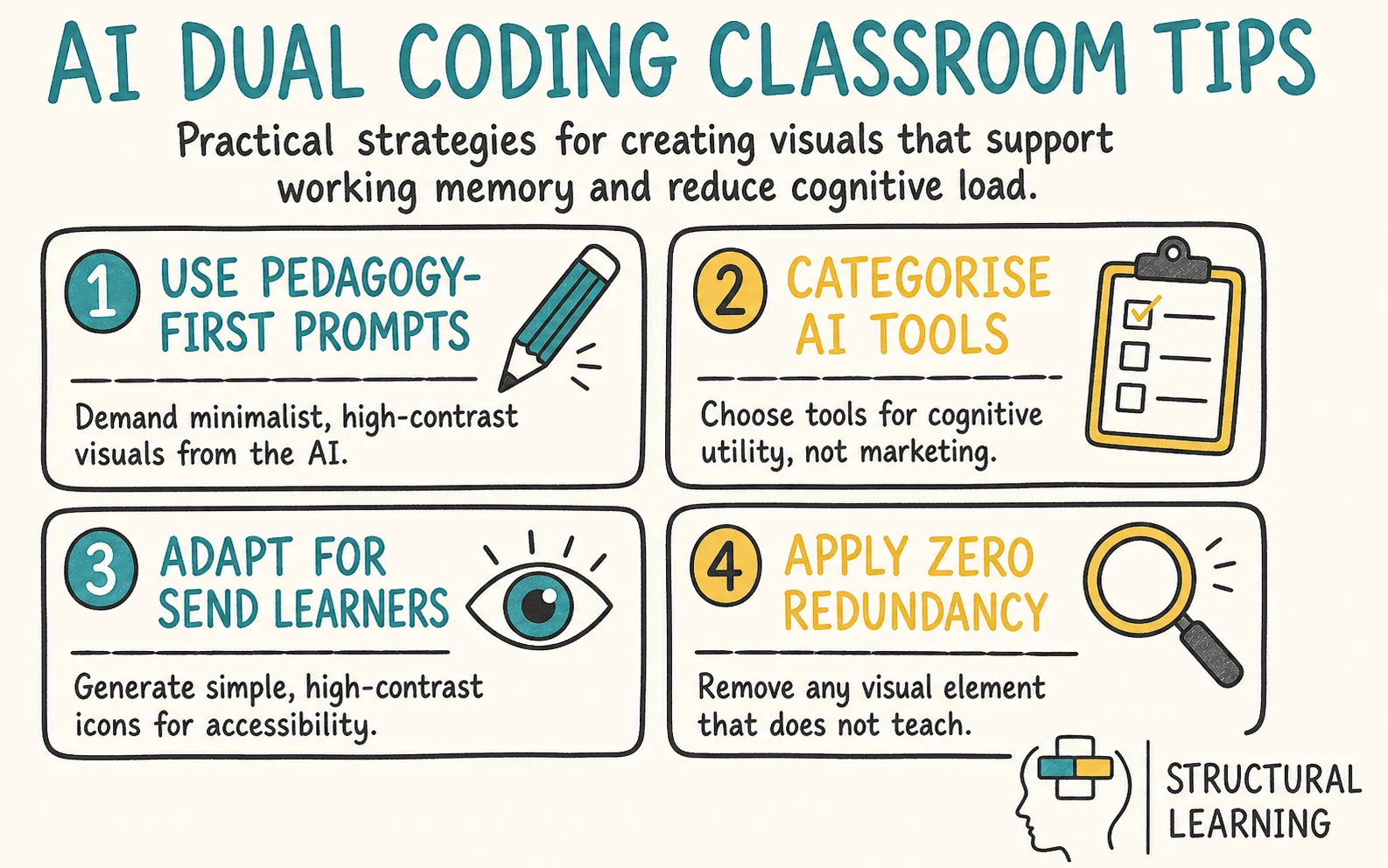
Generative AI requires precise language input from teachers. Pedagogy-first prompts demand minimalism and high contrast. A best practice for prompting is to include the subject, the desired visual format, and explicit negative constraints (what the AI should not draw or include).
To achieve this, teachers construct prompts that leave no room for AI interpretation. Tell the AI exactly what to exclude. Phrases like "zero shading", "pure white background", and "black outlines only" are mandatory for effective dual coding graphics.
For example, an English teacher needing an icon for 'foreshadowing' could use this prompt: "minimalist magnifying glass hovering over an open book, flat vector, black and white, pure white background, no shading". Learners draw this icon next to the definition in their glossaries.
What the teacher does: The teacher creates a template for pedagogy-first prompts. It includes sections for the subject, the format, and negative constraints, which say what the AI should avoid.
What learners produce: Learners use the template to create their own prompts for AI-generated images related to their current topic.
According to researchers, teachers should categorise AI tools by cognitive use, not by marketing. Use image generators, like Midjourney or Canva AI, for vocabulary icons. Constrain prompts using pedagogy, as this helps these tools produce single objects.
Complex image generators often create errors in text and concepts. For structural knowledge, use AI diagramming tools (Claude with Mermaid.js or Whimsical). These tools logically map relationships from a text description, which sidesteps the visual problems that pixel-based image generators run into when asked to draw structured diagrams.
For example, a history teacher can input the feudal system hierarchy into an AI diagramming tool. This avoids asking a pixel-based generator to draw a pyramid, which produces unreliable results. The AI produces a clean, text-based flowchart. Learners use this blank structure to recreate the hierarchy from memory.
What the teacher does: The teacher researches and creates a table comparing different AI tools based on their suitability for dual coding principles.
What learners produce: Learners use the table to select the most appropriate AI tool for a specific task, justifying their choice.
SEND learners often need visuals that are consistent and low-noise. AI-generated visuals should meet accessibility standards, such as high contrast, simple line work and clear figure-ground separation. Complex or busy AI art can cause visual stress and reduce learning for some learners. For this reason, simpler images are usually safer.
AI helps teachers create simple, consistent icons for vocabulary. This fits with wider principles of robust vocabulary instruction (Beck et al., 2002). Their work predates generative AI, but the design principle of clear, consistent representations still transfers. These icons give learners visual support during lessons and help all learners, including those with SEND, stay focused on key ideas.
Visuals also aid understanding when learners miss parts of a spoken explanation (Paivio, 1991).
For example, a primary teacher introducing 'monarchy' to a mixed-ability class could generate a simple black crown icon on a pale yellow background. The yellow reduces visual glare for dyslexic learners. The SEND learner refers to this card on their desk whenever the word appears in the class text.
What the teacher does: The teacher uses an AI image generator to create different versions of the same image, improved for different SEND needs (e.g., high contrast for visual impairments, simplified design for cognitive impairments).
What learners produce: Learners with SEND provide feedback on the different versions of the image, explaining which is most helpful for their learning.
Before presenting any AI-generated graphic to a class, the teacher must apply the zero redundancy protocol. If a visual element does not teach the concept, it must be removed. Teachers cannot assume an AI output is ready for the classroom simply because it looks professional.
If an AI tool produces a graphic with unnecessary borders, decorative shadows, or irrelevant background elements, the teacher must intervene. They must crop the image, use a background removal tool, or re-prompt the AI to strip the graphic down to its pedagogical core.
For example, a maths teacher generating three apples to teach fractions can find the AI adds a wooden table, a window, and sunlight. None of these elements belong in the graphic. The teacher uses a simple editing tool to delete everything except the three apples before presenting the slide to the class.
Teachers can use a checklist to assess AI images. The checklist applies Mayer's coherence principle and redundancy principle from multimedia learning (Mayer, 2009). Use it to give feedback to the learner on AI image creation.
Learners critique AI images using a checklist. They suggest ways to improve the images, reducing visual clutter .
Misconception: AI dual coding means generating very realistic images. These images are made to capture learner attention.
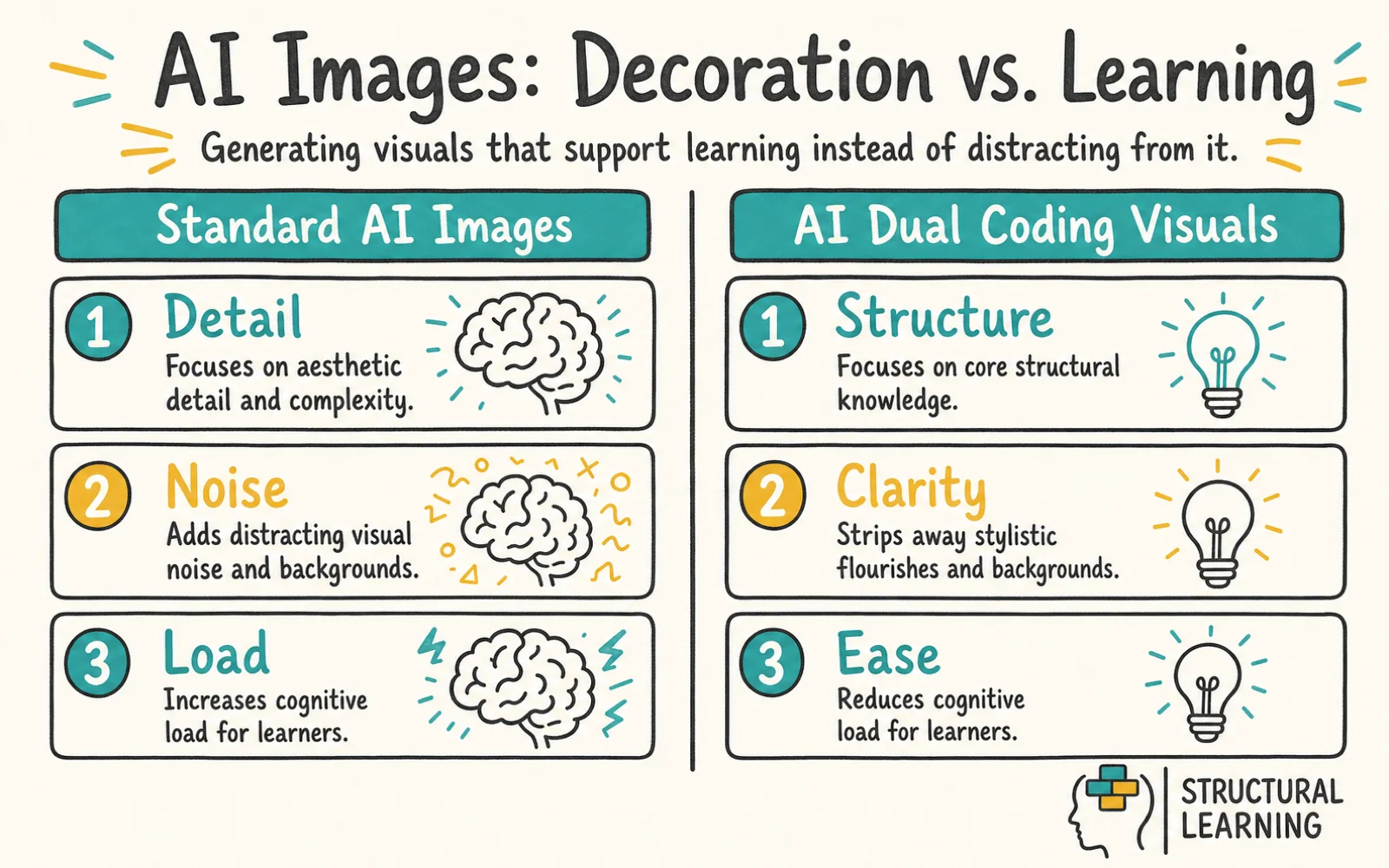
Images with too much detail can add to learner workload through extraneous cognitive load. Use less to help learners focus working memory on the lesson, not pictures. Irrelevant details grab attention and damage how learners remember knowledge.
Misconception: Any AI image paired with text on a slide constitutes dual coding.
Unnecessary duplication between text, narration and images can violate Mayer's redundancy and coherence principles when it adds extraneous processing without supporting the learning goal (Mayer, 2009). Visuals and words should support each other, not repeat. Learners reading long text with complex AI images get overloaded (Mayer, 2009).
Misconception: AI diagram tools can replace direct teacher explanation. This includes explanation of complex topics.
Correction: AI visuals are mental anchors, not replacements for direct instruction. The teacher still needs to guide the learner's attention through the graphic. They do this with clear explanatory talk, linking the visual structure on the board to the verbal concepts being taught.
Misconception: It takes more time to prompt AI for minimalist graphics than to simply search the internet.
Correction: The initial prompt design does require thought. Once you have a reliable template, you can generate unified, distraction-free icon sets in seconds, far quicker than scrolling through image search results.
Teachers can address AI dual coding errors directly. They explain why misconceptions are wrong, referencing cognitive science (Clark & Paivio, 1991). This helps the learner understand complex AI concepts. Teachers should correct errors early (Willingham, 2009; Sweller, 1988).
Learners share initial ideas on AI dual coding in class. They explain how their understanding of this topic changed. (Adapted from research by Paivio, 1971 and Sadoski, 2005).
Context: A primary teacher is teaching how a seed germinates. Textbook diagrams often include extra soil textures, worms, and background plants. These details can distract learners from the core biological process.
Action: The teacher uses an AI image generator with a constrained prompt: "Four-step cut-away diagram of a germinating seed, flat vector style, black outlines only, pure white background, no text, no shading, zero background elements". The teacher places this clean diagram on a slide and pairs it with aligned verbal labels.
Learner Task: Learners receive a printed copy of the minimalist AI graphic. They verbally explain each stage of germination to their partner, physically pointing to the specific structural element on the paper as they speak.
Researchers propose that the teacher shows each germination stage. Model precise explanations and point to diagram elements, they suggest. This helps every learner understand.
What learners produce: Learners take turns explaining the stages of germination to each other, using the AI-generated diagram as a visual aid.
World War 1's causes confuse learners. Long slides fill working memory fast (Sweller, 1988). Learners then struggle to link the key events (Kirschner, 2002; Mayer, 2009).
AI diagramming tools help teachers map concepts quickly. Core causes like militarism prompt the tool . The tool creates a clear flowchart of relationships automatically.
Learner Task: Learners review the concept map on the board as the teacher explains the narrative. They then receive a partially completed version of the map on their desks and fill in the missing causal links from memory, using the structure to guide their recall.
What the teacher does: The teacher provides sentence starters to help learners articulate the causal links between the different factors leading to World War 1.
What learners produce: Learners complete the partly finished concept map. They use the sentence starters to explain how the different causes of World War 1 are linked.
Paivio (1971) and Sadoski's dual-coding work suggest that concrete words, imagery, and relevant visual representations can support memory and comprehension, but visuals should match the learning goal rather than be treated as universally necessary. Abstract vocabulary, like 'ambiguous', can be difficult to grasp. Offer learners images to help them understand new words.
Action: The teacher uses an AI image generator to create literal, flat-vector icons for each target word. The prompt states: "Simple black and white line drawing representing ambiguity, a literal fork in a road, minimalist, thick lines, pure white background, no shading".
Learner Task: Learners draw the minimalist AI icon next to the vocabulary word in their vocabulary books. They then write their own sentence using the target word, referencing the icon to check they have grasped the core meaning.
Linking vocabulary to consistent visual icons is a well-established dual-coding strategy (Clark & Paivio, 1991). The teacher shows sentences that use the target vocabulary. AI icons are linked to word meanings so the visual and verbal codes work together rather than competing.
Learners create sentences with target vocabulary. They then explain how AI icons helped them understand word meanings. This method is consistent with the wider literature on dual coding and vocabulary instruction (Clark & Paivio, 1991; Beck et al., 2002).
Inaccurate visuals can confuse learners about equivalent fractions. Different clip art styles can also hinder understanding because the surface features change, even when the underlying concept stays the same. This inconsistency distracts learners from grasping fraction equivalence.
Action: The teacher uses an AI tool to generate a uniform set of fractional shapes. The prompt specifies: "Simple 2D circle divided into four equal segments, exactly one segment shaded solid grey, flat vector, no 3D effects, pure white background".
Learners use AI shapes on the whiteboard as guides. They model equivalent fractions with mini-whiteboards at their desks. Learners match proportions to the AI graphic (Papert, 1980).
The AI shows teachers shapes. Teachers use these to explain equivalent fractions and their maths. Learners see the fraction relationships.
Learners show equivalent fractions on mini-whiteboards. They use AI shapes as visual support while they explain the maths links. This fits the wider dual-coding rationale for pairing symbolic and pictorial representations of the same concept (Paivio, 1986).
Teachers often use dual coding only for vocabulary icons. This can keep learners at Level 1 (Recall). Integrating AI structural maps with graphic organisers helps learners reach Level 3 (Strategic Thinking) and Level 4 (Extended Thinking). The visual structure supports analysis, not just memory (Paivio, 1971).
Blank AI Venn diagrams can act as a scaffold. They support learners as they compare historical figures and use source information. The structural visual frees working memory, so learners can focus on categorisation and comparison instead of remembering the structure itself. This is consistent with the wider cognitive-load case for graphic organisers (Sweller, 1988).
Learners can then move beyond simple recall to active thinking.
What the teacher does: The teacher provides a list of historical sources for learners to use when completing the Venn diagram.
Learners use historical sources to fill in a Venn diagram. They compare and contrast figures (Wineburg, 1991; Perfetti, Rouet, & Britt, 1999). The activity shows what learners understand (Bransford et al., 2000).
Fiorella and Mayer (2015) argue that meaningful learning occurs when learners actively make sense of material by selecting, organising and integrating information. It does not happen when they only receive it passively. AI dual coding resources should never be passive viewing experiences. The graphics must require interaction, completion, or verbal explanation from the learner.
For example, a teacher presents an AI-generated timeline of the space race with several missing nodes. The learners must actively generate the missing links using their prior knowledge. They build their own mental models based on the visual scaffolding the AI provided.
What the teacher does: The teacher provides a set of clues to help learners fill in the missing nodes on the timeline.
What learners produce: Learners use the clues and their prior knowledge to complete the timeline, explaining the sequence of events in the space race.
Schemas are patterns that organise information in long-term memory. Minimalist AI graphics can show these schemas on the page. When the graphic is clear, learners can use it to structure their own memory in the same way (Bartlett, 1932; Piaget, 1954).
AI generates science charts. Learners use them like maps. When teachers introduce new species, learners can quickly place the info in their minds..
The teacher explains the biological classification hierarchy to learners. This links the explanation to the AI chart. As a result, learners can understand biological structure.
Learners use the AI chart to classify new species. They explain their reasoning using the hierarchy's structure. Showing the classification hierarchy in a clean visual structure helps understanding because it makes the links between categories clear rather than hidden. This aligns with dual coding and cognitive-load principles (Paivio, 1986; Sweller, 1988).
AI dual coding has clear classroom value, but it is often overstated. First, dual coding is not the same as a visual learning style. Pashler et al. (2008) found weak evidence for teaching learners according to fixed sensory preferences, so teachers should not assume that adding images helps every learner in every task.
Second, AI image tools often favour polished detail over instructional clarity. Mayer's coherence principle warns that unnecessary words, images and decorative features can increase extraneous load rather than reduce it (Mayer, 2009). Harp and Mayer (1998) also showed that seductive details can damage learning when interesting material pulls attention away from the core explanation.
Third, ready-made AI organisers can remove useful cognitive work. If learners only view a completed map, they may miss the harder learning process of selecting, organising and integrating ideas. The stronger task is to ask learners to critique the AI output, identify missing links and justify revisions.
Fourth, simple iconography is not culturally neutral. Work on algorithmic bias shows that AI systems can encode unequal patterns from training data (Buolamwini and Gebru, 2018). A familiar icon for home, family, food or history may carry extra cultural load for EAL learners or learners from diverse communities. Despite these limits, dual coding remains valuable when teachers use it with restraint, clear curriculum alignment and learner explanation.
Related AI in education guides: AI policy for schools.
Authoritative guidance on AI in education: DfE guidance on generative AI in education, DfE support materials for using AI in education settings, Ofsted findings from AI early adopters in schools and FE, EEF Teacher Choices trial on ChatGPT in lesson preparation.
Midjourney and Canva AI create basic icons if you limit prompts. For clear diagrams, try text-based AI with Mermaid.js or Whimsical. This avoids visual clutter (researchers, date unknown).
Generative image models often misspell words, so learners see errors. Use "no text, no words, blank" in prompts, focusing on learning first. Manually add text labels in presentation software for accurate spelling, since AI image generators are still unreliable at rendering text.
Default AI images often lack sufficient contrast and contain distracting background elements. You must explicitly prompt the AI for accessibility to meet SEND requirements. Use strict phrases like "high contrast, thick black lines, pale yellow background, minimalist" to guarantee the outputs are appropriate for all learners.
Learners can use these tools, but only with parameters and supervision. If learners generate their own visual anchors, they must be taught the zero redundancy rule first. Otherwise, they will spend the lesson generating complex artwork rather than encoding the target knowledge.
Learning AI prompt limits takes time (OpenAI, 2024). Saving a good prompt template lets you quickly make visual resources. You can generate them for a whole term faster than searching websites.
What the teacher does: The teacher runs a Q&A session, answering common questions about AI dual coding and sharing practical classroom tips.
What learners produce: Learners ask questions about AI dual coding and share their own experiences using AI tools for learning.
For tomorrow, check your slides. Find a wordy slide. Replace text with an AI icon. Explain the concept clearly (Jonassen, 1995; Mayer, 2009; Paivio, 1986).
Black, P. (1998). Inside the black box.
Paivio, A. (1986). Mental representations: A dual coding approach.
Webb, N. (1997). Criteria for alignment of expectations and assessments.
These peer-reviewed studies provide the evidence base for the strategies discussed above.
Teachers face growing challenges integrating AI. Researchers explored preservice teachers' views (Hsu et al., 2023). They considered AI's use in open, distributed learning. Studies showed learners need support adapting (Holmes et al., 2024). Future research should address practical classroom applications.
Karataş et al. (2024)
Karataş et al. (2024) explore how trainee teachers see AI in online learning. The paper offers UK teachers insight into future educator views on using AI in varied learning settings, and can inform teacher training and whole-school AI strategies.
Researchers explored blended learning during the pandemic, examining how to help international learners feel connected. He and colleagues (2024) provide useful takeaways for teachers running hybrid sessions.
He et al. (2024)
He et al. (2024) show how videoconferencing affects learner engagement and satisfaction in blended learning, with particular attention to international learners' experiences. Teachers can use these findings to improve online links and the learner experience in hybrid settings.
For the wider picture, explore our AI and EdTech tools hub, our home for evidence-based AI guidance across policy, lesson planning, and classroom practice.