Updated on
March 23, 2026
AI Graphic Organisers: Visual Thinking Tools
|
March 23, 2026
Discover how AI graphic organisers and visual thinking tools reduce cognitive load, support pupils with SEND, and bridge the gap to extended writing.


Updated on
March 23, 2026
|
March 23, 2026
Discover how AI graphic organisers and visual thinking tools reduce cognitive load, support pupils with SEND, and bridge the gap to extended writing.
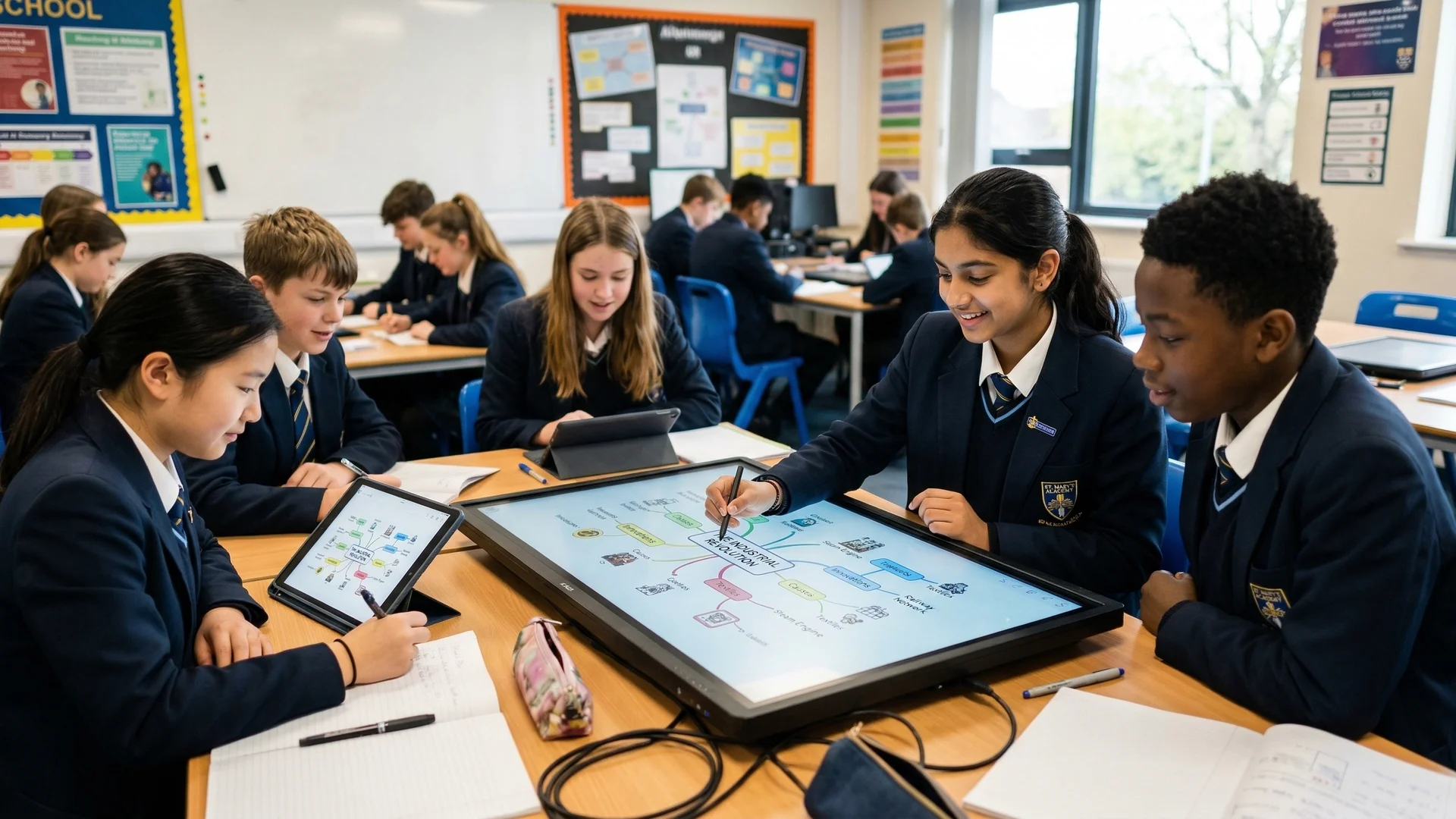
* Artificial intelligence transforms static graphic organisers into dynamic tools that adapt to specific cognitive tasks and reading ages.
* AI acts as a cognitive co-pilot by generating evidence-based visual frameworks, rather than bypassing student effort.
* Effective use of visual tools requires matching the specific spatial layout to the intended thinking type (Caviglioli, 2019).
* Adaptive AI tools provide targeted scaffolding to reduce working memory overload for neurodivergent pupils and those with SEND.
* The pedagogical goal is always the transition from using AI-generated visual scaffolds to producing independent extended writing.
* Prompting an AI to generate a visual map requires explicit instructions about the desired cognitive process and vocabulary level.
An AI graphic organiser is a digital environment where artificial intelligence interprets text and automatically generates structured spatial representations of that information. Teachers use these visual thinking tools to instantly convert complex lesson materials into accessible maps, charts, and diagrams, moving away from static worksheets and towards adaptable visual frameworks.
The primary function of these tools is not to do the thinking for the pupil. Instead, the AI acts as a cognitive co-pilot, constructing the optimal visual arena for thinking. Teachers can input a difficult text and prompt the AI to extract core arguments, arranging them into a format that clearly shows cause and effect, sequence, or hierarchy.
This adaptability addresses a major problem with traditional resources. A teacher can take a single historical source and use AI to generate three different visual maps with varying levels of complexity: one with high-level academic vocabulary for advanced readers, another with simplified noun phrases and structured colour coding for pupils needing additional support.
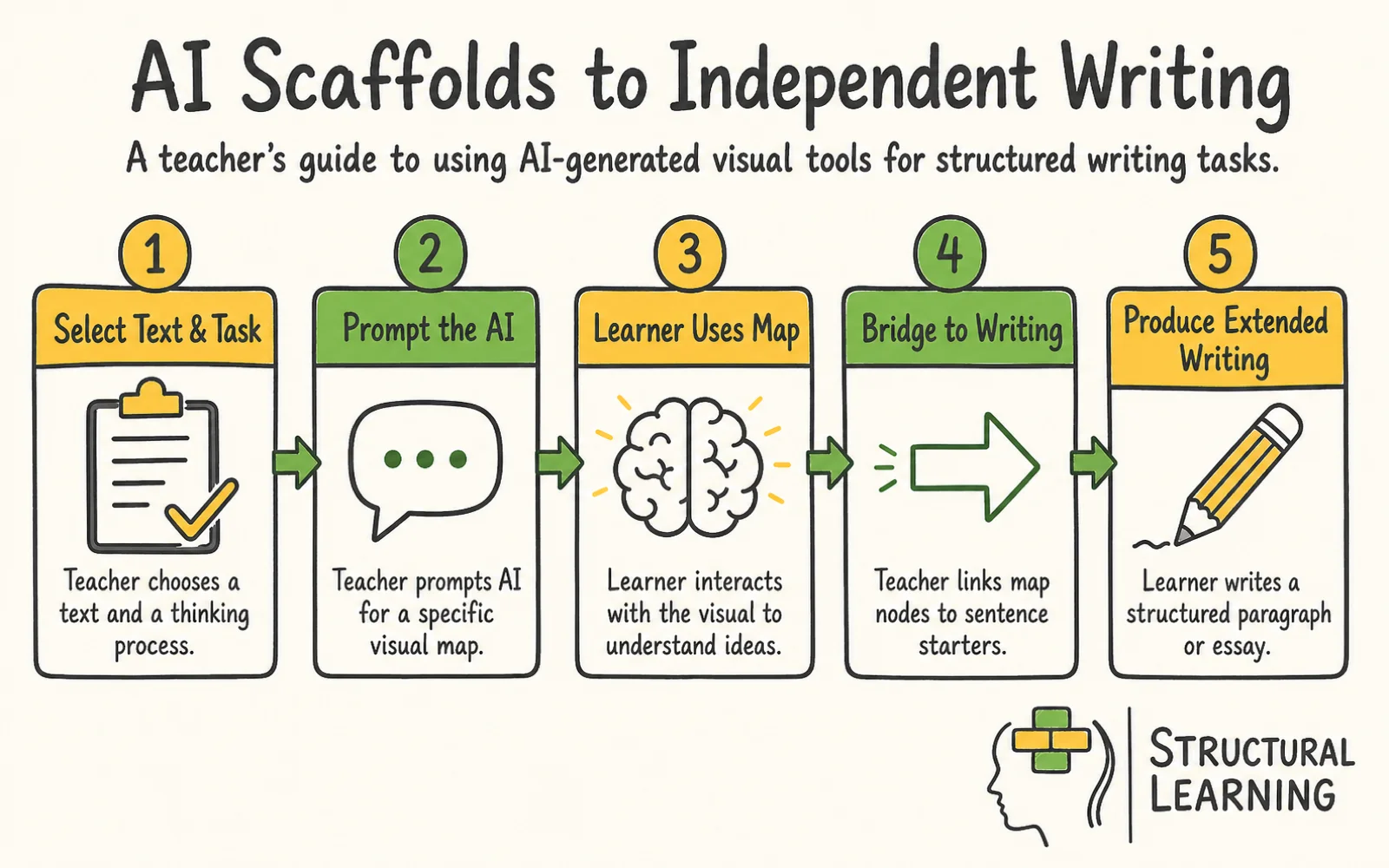
AI graphic organisers also bridge the gap between abstract thought and concrete writing. When a pupil faces a blank page, the cognitive demand of generating ideas and structuring sentences simultaneously is often too high. A dynamic visual tool breaks this process into manageable steps. The pupil interacts with the AI-generated visual nodes first, using them as building blocks to construct their final written response.
What the teacher does / what pupils produce: The teacher inputs a complex scientific explanation of photosynthesis into an AI tool, prompting it to generate a flowchart. Pupils then use this flowchart as a visual guide to write a paragraph explaining the process in their own words, using the nodes as prompts for each sentence.
The effectiveness of visual thinking tools is rooted in cognitive science. Dual Coding Theory (Paivio, 1971) states that the human brain processes verbal and visual information through separate but linked channels. Presenting information using both text and spatial arrangement strengthens the memory trace. AI tools apply this principle instantly by converting paragraphs of verbal instruction into dual-coded diagrams.
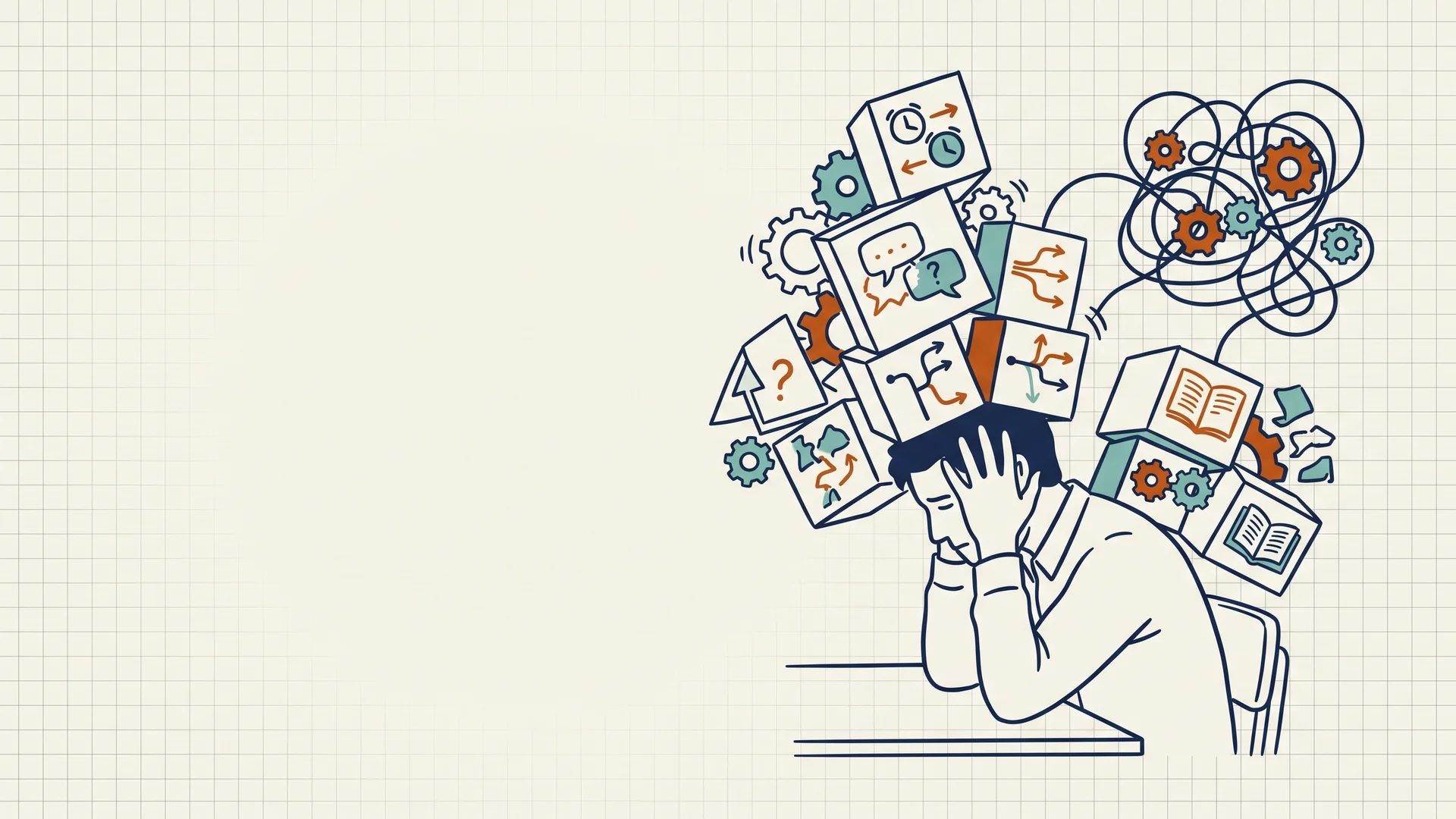
Cognitive Load Theory provides another layer of understanding. Working memory has limitations and can only process a small number of new elements at once (Sweller, 1988). Dense paragraphs of text often create high extraneous cognitive load. Pupils spend mental energy simply trying to track connections between sentences and ideas. An AI-generated graphic organiser removes this unnecessary visual search effort by explicitly drawing the connections with lines, proximity, and grouping.
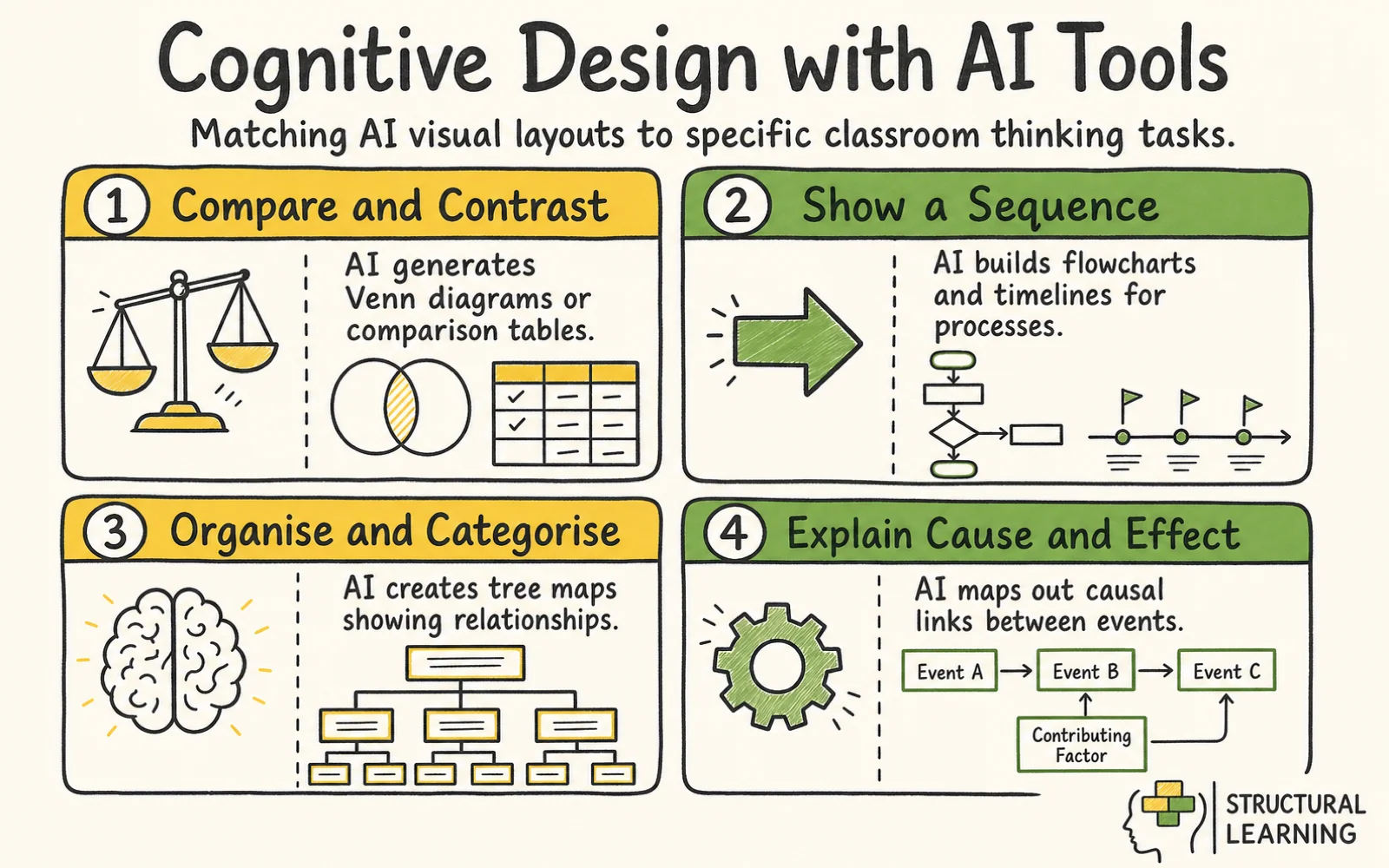
The design of the visual itself dictates its effectiveness. Spatial arrangement communicates meaning before the pupil even reads the words (Caviglioli, 2019). A hierarchy looks different from a sequence. AI tools must be prompted correctly to select the appropriate spatial structure. Using a mind map to show a chronological process contradicts the cognitive task.
Visual frameworks are particularly vital for novice learners. Novices lack the complex internal schemas required to organise new information automatically. When an AI generates a structured visual map, it acts as a temporary external schema. Pupils use this external framework to hold the information steady while they process it, allowing them to eventually build their own internal mental models.
What the teacher does / what pupils produce: The teacher presents a complex legal argument about a court case. The AI generates a visual map showing the different stages of the argument. Pupils then use this map to summarise the key points, demonstrating their understanding of the legal process.
Integrating AI visual tools requires deliberate instructional choices. Teachers must decide exactly what type of thinking they want pupils to perform before generating the scaffold.
Different academic tasks require different cognitive actions. AI tools excel when the teacher explicitly names the required thinking process in the prompt. If the goal is classification, the prompt must direct the AI to generate a tree map or a Venn diagram.
Teacher action: The teacher inputs a dense text about renewable energy sources into an AI mapping tool. They prompt the tool with specific instructions: "Analyse this text and generate a tree diagram categorising the energy sources. Extract the main advantages and disadvantages for each node. Limit the text in each node to a maximum of six words."
Pupil action: Pupils receive the structured tree diagram. They use the categorised nodes to quickly compare solar and wind power without re-reading the original dense paragraphs. They add their own blank nodes to the diagram and fill them in with examples discussed during the lesson.
What the teacher does / what pupils produce: The teacher prompts the AI to generate a comparison chart of different literary characters. Pupils then use this chart to write a comparative essay, using the visual structure to organise their arguments.
Pupils with specific educational needs often face significant barriers regarding executive function and working memory. Standard worksheets can quickly cause cognitive overload. AI graphic organisers allow teachers to instantly adapt the same core content into structured, visually calm formats.
Teacher action: The teacher prepares a lesson on the causes of the First World War. For a pupil with dyslexia who struggles with visual tracking, the teacher prompts the AI to modify the standard concept map. The prompt specifies that the AI must use a pastel background, increase the spacing between nodes, and apply a strict colour code where all economic causes are blue and all political causes are green.
Pupil action: The pupil engages with the adapted visual map. The colour coding provides a visual shortcut, reducing the effort required to identify the different types of causes. The pupil can focus entirely on understanding the historical concepts rather than fighting to decode the layout of the page.
What the teacher does / what pupils produce: The teacher uses the AI to generate a simplified timeline of historical events with larger font sizes and increased spacing. Pupils with visual impairments then use this timeline to understand the sequence of events.
The ultimate goal of using a visual scaffold is usually extended writing. Graphic organisers can become a trap if pupils simply fill in boxes and stop there. Teachers must use the AI tool to build a deliberate bridge between the visual nodes and the final paragraph.
Teacher action: The teacher uses an AI tool to generate a sequencing map showing the water cycle. Once the pupils have reviewed the map, the teacher prompts the AI to generate targeted sentence starters corresponding to each specific node on the map. The teacher displays these sentence starters alongside the visual diagram.
Pupil action: Pupils trace the sequence of the visual map with their finger. They select a node, read the corresponding sentence starter, and complete the sentence using the vocabulary provided in the graphic organiser. They repeat this process, moving systematically through the visual map until they have constructed a complete, coherent paragraph describing the entire cycle.
What the teacher does / what pupils produce: The teacher uses the AI to generate a mind map of key themes in a novel, then prompts the AI to create a series of questions related to each theme. Pupils use the mind map and the questions to plan and write an analytical essay.

Many educators hold assumptions about visual tools that limit their effectiveness. Correcting these misconceptions is vital for proper implementation.
The most persistent misconception is that AI graphic organisers do the thinking for the pupil. Critics argue that if an AI generates the map, the pupil is simply consuming answers passively. This view misunderstands the tool. The AI provides the structural scaffold, not the final academic product. The pupil must still analyse the map, manipulate the nodes, and use the structure to synthesise their own written arguments.
Another frequent error is the belief that graphic organisers are only suitable for primary schools or lower-ability groups. In reality, as academic content becomes more complex at Key Stage 4 and A-Level, the need for visual structuring increases. Advanced pupils require sophisticated visual tools to map out intricate competing arguments or multi-layered historical causes. The visual format clarifies complexity at any academic level.
Teachers also frequently assume that any visual diagram will work for any given task. This leads to the overuse of basic spider diagrams. A generic mind map is ineffective for showing a step-by-step process or a strict hierarchy. The visual structure must match the cognitive function exactly. If the task is comparison, the teacher must generate a double-bubble map or a Venn diagram.
Finally, some educators view the completion of the graphic organiser as the final objective of the lesson. An organiser is never the final destination. It is a temporary vehicle designed to carry the pupil toward independent extended writing or verbal explanation. If the lesson ends the moment the boxes are filled in, the pedagogical potential of the tool has been wasted.
What the teacher does / what pupils produce: The teacher challenges the misconception that graphic organisers are only for younger pupils by using an AI-generated concept map to explore complex themes in a Shakespeare play with A-level students. The pupils then use the map as a basis for a sophisticated essay.
Applying these tools effectively requires subject-specific translation. Below are concrete examples of how AI visual tools look in different classroom contexts.
Task: Breaking down a complex GCSE essay prompt regarding the theme of ambition in Macbeth.
Teacher action: The teacher recognises that the multi-part essay question will cause working memory overload for several pupils. The teacher pastes the essay prompt and an exemplar paragraph into an AI mind-mapping tool. The teacher prompts the AI to break the essay into three core arguments, assign a distinct colour to each argument, and provide two short textual quotes for each node.
Pupil action: The pupil receives the digitally structured map. Instead of facing a blank page, they see three clear, colour-coded pathways. The pupil selects the first blue node, reads the provided quote, and uses a provided sentence starter to draft their first analytical paragraph. The visual chunking prevents them from feeling overwhelmed by the scale of the entire essay.
What the teacher does / what pupils produce: The teacher uses the AI to generate a visual representation of the plot structure of a novel, highlighting key turning points and character relationships. Pupils then use this map to write a detailed summary of the novel.
Task: Understanding the overlapping events of the Industrial Revolution.
Teacher action: The teacher uses an AI tool to dynamically generate an interactive timeline organiser. The teacher prompts the AI to plot the key inventions. Crucially, the teacher asks the AI to instantly adjust the complexity of the explanatory text attached to each node. The AI generates one timeline with advanced technical vocabulary and a second version with simplified noun phrases for pupils with a lower reading age.
Pupil action: Pupils interact with the timeline appropriate for their reading level. They click on specific nodes to reveal the simplified text. They then use a blank column beneath the timeline to rank the inventions in order of economic impact, using the AI-generated visual sequence to justify their decisions in a class debate.
What the teacher does / what pupils produce: The teacher uses the AI to create a cause-and-effect diagram showing the factors that led to World War I. Pupils then use this diagram to write an essay explaining the complex web of causes.
Task: Comparing and contrasting the structures of plant and animal cells.
Teacher action: The teacher prompts an AI tool to create a specific double-bubble map structure. The prompt dictates that the central shared nodes must contain the organelles common to both cells, while the outer distinct nodes must list the unique features. The teacher also directs the AI to generate targeted sentence starters at the bottom of the map for pupils who struggle with task initiation.
Pupil action: Pupils examine the double-bubble map. They physically trace the lines connecting the common organelles to both the plant and animal circles. Using the AI-provided sentence starters, a pupil writes, "Both plant and animal cells contain a nucleus, whereas only plant cells feature a rigid cell wall." The spatial layout directly informs the grammatical structure of their comparative sentences.
What the teacher does / what pupils produce: The teacher uses the AI to generate a visual model of the human digestive system, labelling each organ and its function. Pupils then use this model to explain the process of digestion.
Task: Solving multi-step algebraic equations.
Teacher action: Word problems combined with algebra often overload working memory. The teacher inputs a complex word problem into an AI flowchart generator. The teacher prompts the AI to break the problem down into a strict, four-step vertical sequence. The AI isolates the numbers, identifies the required operation at each step, and creates a clean, linear pathway.
Pupil action: The pupil uses the flowchart as a step-by-step diagnostic tool. They follow the vertical path, performing the calculation required at node one before moving down to node two. The visual isolation of each step prevents the pupil from combining numbers incorrectly or losing their place in the sequence of the equation.
What the teacher does / what pupils produce: The teacher uses the AI to generate a visual representation of a geometric problem, highlighting key angles and measurements. Pupils then use this diagram to solve the problem.
To maximise the impact of AI graphic organisers, teachers should explicitly connect them to broader educational frameworks.
The Universal Thinking Framework provides a vocabulary for matching visual tools to cognitive tasks. The framework categorises thinking into explicit actions like define, compare, sequence, and evaluate. AI visual tools become effective when teachers use these exact verbs in their prompts. By telling the AI to "sequence" rather than just "summarise", the tool generates a visual structure that aligns perfectly with the intended cognitive outcome.
Schema Theory explains how the brain organises knowledge into interconnected webs of meaning. Novice learners have sparse, disconnected schemas. AI graphic organisers essentially provide an artificial, external schema on the screen. By repeatedly interacting with these structured external maps, pupils gradually internalise the structures, developing richer and more complex mental models of the subject matter.
The Zone of Proximal Development (Vygotsky, 1978) highlights the importance of targeted scaffolding. A pupil can achieve more with structured guidance than they can alone. AI visual tools act as a responsive scaffold. A teacher can use AI to provide heavy visual support at the start of a topic, generating maps with extensive text and clear pathways. As the pupil builds competence, the teacher can prompt the AI to generate increasingly sparse maps, fading the scaffold until the pupil operates independently.
Generative Learning Theory focuses on the active cognitive processes required to make sense of new information. Learning occurs when pupils actively select relevant information, organise it into a coherent structure, and integrate it with prior knowledge. AI graphic organisers support this by demanding active organisation. Even when the AI generates the initial map, the pupil must actively manipulate the nodes, draw new connections, and translate the visual structure into written prose.
What the teacher does / what pupils produce: The teacher explicitly links the use of AI-generated mind maps to the concept of schema building, explaining to pupils how the visual structure helps them organise and remember information. Pupils then create their own mind maps on new topics, demonstrating their understanding of schema theory.

How do I stop pupils from just copying the AI-generated map without thinking?
The visual map must never be the final task. Always attach a transformational activity to the map. If the AI provides a sequenced flowchart, the pupil must use that flowchart to write an explanatory paragraph without looking back at the original text. The map is the starting line, not the finish line.
Which specific visual structure should I ask the AI to build?
The structure must match the verb of your learning objective. If the objective is to compare, ask for a Venn diagram or a double-bubble map. If the objective is to show a timeline, ask for a chronological flowchart. If the objective is categorisation, ask for a hierarchical tree map.
Can these tools really help pupils with severe working memory issues?
Yes, structured visual tools act as an external hard drive for working memory. By parking complex information in a clear, colour-coded visual format, the pupil frees up cognitive capacity. They no longer have to hold all the variables in their head at once, allowing them to focus their mental energy on analysis and writing.
Is generating these visual tools time-consuming for the teacher?
Traditional creation of graphic organisers in word processors was slow. AI tools change this dynamic completely. A teacher can paste a large block of text into an AI generator and prompt it to create a specific map in seconds. The time investment shifts from drawing boxes to refining the pedagogical prompt.
How do I transition pupils away from relying on these visual scaffolds?
Scaffolding must be faded deliberately. In week one, provide the completed AI-generated map. In week two, provide a partially completed map where pupils must fill in the blank nodes. In week three, provide only the blank spatial structure. By week four, the pupil should be able to sketch their own rough visual map on a whiteboard before they begin writing.
What the teacher does / what pupils produce: The teacher models the process of gradually fading the visual scaffold, showing pupils how to move from relying on the AI-generated map to creating their own visual representations. Pupils then practice this skill with different topics.
Action for your next lesson: Identify one dense, text-heavy explanation in your upcoming plans, paste it into an AI tool, and prompt the AI to convert it into a structured hierarchical tree map to use as a reading scaffold for your pupils.
These peer-reviewed studies provide the evidence base for the strategies discussed above.
Why are some students “not into” computational thinking activities embedded within high school science units? Key takeaways from a microethnographic discourse analysis study View study ↗
Aslan et al. (2024)
This study examines why some students disengage from computational thinking activities in science classes. Teachers can use these insights to better understand student resistance and adapt their approach to make computational thinking more accessible and engaging for diverse learners.
AI amplifies the tough question: What is higher education really for? View study ↗
28 citations
Kramm et al. (2023)
This paper argues that higher education should focus on educational responsibilities rather than policing AI use. Teachers should reconsider assessment methods and embrace AI as a tool for learning, shifting focus from detection to developing critical thinking skills.
The effectiveness of using graphic design programs in enhancing visual thinking skills among educational technology students in Jordan View study ↗
Al-Nawaiseh et al. (2025)
Research demonstrates that graphic design programmes significantly enhance visual thinking skills among educational technology students. Teachers can incorporate visual design tools and techniques to help students better interpret and communicate complex information through visual representations.
Why Did All the Residents Resign? Key Takeaways From the Junior Physicians' Mass Walkout in South Korea. View study ↗
23 citations
Park et al. (2024)
This paper examines a medical workforce issue unrelated to educational technology or visual thinking tools. It has limited relevance for teachers working with AI graphic organisers or visual learning strategies in classroom settings.
REVOLUTIONIZING GRAPHIC DESIGN: THE SYNERGY OF AI TOOLS AND HUMAN CREATIVITY View study ↗
Das et al. (2024)
This study explores how AI tools complement human creativity in graphic design. Teachers can leverage AI-powered design tools to help students create visual organisers and graphics more efficiently whilst developing both technical skills and creative thinking.

* Artificial intelligence transforms static graphic organisers into dynamic tools that adapt to specific cognitive tasks and reading ages.
* AI acts as a cognitive co-pilot by generating evidence-based visual frameworks, rather than bypassing student effort.
* Effective use of visual tools requires matching the specific spatial layout to the intended thinking type (Caviglioli, 2019).
* Adaptive AI tools provide targeted scaffolding to reduce working memory overload for neurodivergent pupils and those with SEND.
* The pedagogical goal is always the transition from using AI-generated visual scaffolds to producing independent extended writing.
* Prompting an AI to generate a visual map requires explicit instructions about the desired cognitive process and vocabulary level.
An AI graphic organiser is a digital environment where artificial intelligence interprets text and automatically generates structured spatial representations of that information. Teachers use these visual thinking tools to instantly convert complex lesson materials into accessible maps, charts, and diagrams, moving away from static worksheets and towards adaptable visual frameworks.
The primary function of these tools is not to do the thinking for the pupil. Instead, the AI acts as a cognitive co-pilot, constructing the optimal visual arena for thinking. Teachers can input a difficult text and prompt the AI to extract core arguments, arranging them into a format that clearly shows cause and effect, sequence, or hierarchy.
This adaptability addresses a major problem with traditional resources. A teacher can take a single historical source and use AI to generate three different visual maps with varying levels of complexity: one with high-level academic vocabulary for advanced readers, another with simplified noun phrases and structured colour coding for pupils needing additional support.
AI graphic organisers also bridge the gap between abstract thought and concrete writing. When a pupil faces a blank page, the cognitive demand of generating ideas and structuring sentences simultaneously is often too high. A dynamic visual tool breaks this process into manageable steps. The pupil interacts with the AI-generated visual nodes first, using them as building blocks to construct their final written response.
What the teacher does / what pupils produce: The teacher inputs a complex scientific explanation of photosynthesis into an AI tool, prompting it to generate a flowchart. Pupils then use this flowchart as a visual guide to write a paragraph explaining the process in their own words, using the nodes as prompts for each sentence.
The effectiveness of visual thinking tools is rooted in cognitive science. Dual Coding Theory (Paivio, 1971) states that the human brain processes verbal and visual information through separate but linked channels. Presenting information using both text and spatial arrangement strengthens the memory trace. AI tools apply this principle instantly by converting paragraphs of verbal instruction into dual-coded diagrams.
Cognitive Load Theory provides another layer of understanding. Working memory has limitations and can only process a small number of new elements at once (Sweller, 1988). Dense paragraphs of text often create high extraneous cognitive load. Pupils spend mental energy simply trying to track connections between sentences and ideas. An AI-generated graphic organiser removes this unnecessary visual search effort by explicitly drawing the connections with lines, proximity, and grouping.
The design of the visual itself dictates its effectiveness. Spatial arrangement communicates meaning before the pupil even reads the words (Caviglioli, 2019). A hierarchy looks different from a sequence. AI tools must be prompted correctly to select the appropriate spatial structure. Using a mind map to show a chronological process contradicts the cognitive task.
Visual frameworks are particularly vital for novice learners. Novices lack the complex internal schemas required to organise new information automatically. When an AI generates a structured visual map, it acts as a temporary external schema. Pupils use this external framework to hold the information steady while they process it, allowing them to eventually build their own internal mental models.
What the teacher does / what pupils produce: The teacher presents a complex legal argument about a court case. The AI generates a visual map showing the different stages of the argument. Pupils then use this map to summarise the key points, demonstrating their understanding of the legal process.
Integrating AI visual tools requires deliberate instructional choices. Teachers must decide exactly what type of thinking they want pupils to perform before generating the scaffold.
Different academic tasks require different cognitive actions. AI tools excel when the teacher explicitly names the required thinking process in the prompt. If the goal is classification, the prompt must direct the AI to generate a tree map or a Venn diagram.
Teacher action: The teacher inputs a dense text about renewable energy sources into an AI mapping tool. They prompt the tool with specific instructions: "Analyse this text and generate a tree diagram categorising the energy sources. Extract the main advantages and disadvantages for each node. Limit the text in each node to a maximum of six words."
Pupil action: Pupils receive the structured tree diagram. They use the categorised nodes to quickly compare solar and wind power without re-reading the original dense paragraphs. They add their own blank nodes to the diagram and fill them in with examples discussed during the lesson.
What the teacher does / what pupils produce: The teacher prompts the AI to generate a comparison chart of different literary characters. Pupils then use this chart to write a comparative essay, using the visual structure to organise their arguments.
Pupils with specific educational needs often face significant barriers regarding executive function and working memory. Standard worksheets can quickly cause cognitive overload. AI graphic organisers allow teachers to instantly adapt the same core content into structured, visually calm formats.
Teacher action: The teacher prepares a lesson on the causes of the First World War. For a pupil with dyslexia who struggles with visual tracking, the teacher prompts the AI to modify the standard concept map. The prompt specifies that the AI must use a pastel background, increase the spacing between nodes, and apply a strict colour code where all economic causes are blue and all political causes are green.
Pupil action: The pupil engages with the adapted visual map. The colour coding provides a visual shortcut, reducing the effort required to identify the different types of causes. The pupil can focus entirely on understanding the historical concepts rather than fighting to decode the layout of the page.
What the teacher does / what pupils produce: The teacher uses the AI to generate a simplified timeline of historical events with larger font sizes and increased spacing. Pupils with visual impairments then use this timeline to understand the sequence of events.
The ultimate goal of using a visual scaffold is usually extended writing. Graphic organisers can become a trap if pupils simply fill in boxes and stop there. Teachers must use the AI tool to build a deliberate bridge between the visual nodes and the final paragraph.
Teacher action: The teacher uses an AI tool to generate a sequencing map showing the water cycle. Once the pupils have reviewed the map, the teacher prompts the AI to generate targeted sentence starters corresponding to each specific node on the map. The teacher displays these sentence starters alongside the visual diagram.
Pupil action: Pupils trace the sequence of the visual map with their finger. They select a node, read the corresponding sentence starter, and complete the sentence using the vocabulary provided in the graphic organiser. They repeat this process, moving systematically through the visual map until they have constructed a complete, coherent paragraph describing the entire cycle.
What the teacher does / what pupils produce: The teacher uses the AI to generate a mind map of key themes in a novel, then prompts the AI to create a series of questions related to each theme. Pupils use the mind map and the questions to plan and write an analytical essay.

Many educators hold assumptions about visual tools that limit their effectiveness. Correcting these misconceptions is vital for proper implementation.
The most persistent misconception is that AI graphic organisers do the thinking for the pupil. Critics argue that if an AI generates the map, the pupil is simply consuming answers passively. This view misunderstands the tool. The AI provides the structural scaffold, not the final academic product. The pupil must still analyse the map, manipulate the nodes, and use the structure to synthesise their own written arguments.
Another frequent error is the belief that graphic organisers are only suitable for primary schools or lower-ability groups. In reality, as academic content becomes more complex at Key Stage 4 and A-Level, the need for visual structuring increases. Advanced pupils require sophisticated visual tools to map out intricate competing arguments or multi-layered historical causes. The visual format clarifies complexity at any academic level.
Teachers also frequently assume that any visual diagram will work for any given task. This leads to the overuse of basic spider diagrams. A generic mind map is ineffective for showing a step-by-step process or a strict hierarchy. The visual structure must match the cognitive function exactly. If the task is comparison, the teacher must generate a double-bubble map or a Venn diagram.
Finally, some educators view the completion of the graphic organiser as the final objective of the lesson. An organiser is never the final destination. It is a temporary vehicle designed to carry the pupil toward independent extended writing or verbal explanation. If the lesson ends the moment the boxes are filled in, the pedagogical potential of the tool has been wasted.
What the teacher does / what pupils produce: The teacher challenges the misconception that graphic organisers are only for younger pupils by using an AI-generated concept map to explore complex themes in a Shakespeare play with A-level students. The pupils then use the map as a basis for a sophisticated essay.
Applying these tools effectively requires subject-specific translation. Below are concrete examples of how AI visual tools look in different classroom contexts.
Task: Breaking down a complex GCSE essay prompt regarding the theme of ambition in Macbeth.
Teacher action: The teacher recognises that the multi-part essay question will cause working memory overload for several pupils. The teacher pastes the essay prompt and an exemplar paragraph into an AI mind-mapping tool. The teacher prompts the AI to break the essay into three core arguments, assign a distinct colour to each argument, and provide two short textual quotes for each node.
Pupil action: The pupil receives the digitally structured map. Instead of facing a blank page, they see three clear, colour-coded pathways. The pupil selects the first blue node, reads the provided quote, and uses a provided sentence starter to draft their first analytical paragraph. The visual chunking prevents them from feeling overwhelmed by the scale of the entire essay.
What the teacher does / what pupils produce: The teacher uses the AI to generate a visual representation of the plot structure of a novel, highlighting key turning points and character relationships. Pupils then use this map to write a detailed summary of the novel.
Task: Understanding the overlapping events of the Industrial Revolution.
Teacher action: The teacher uses an AI tool to dynamically generate an interactive timeline organiser. The teacher prompts the AI to plot the key inventions. Crucially, the teacher asks the AI to instantly adjust the complexity of the explanatory text attached to each node. The AI generates one timeline with advanced technical vocabulary and a second version with simplified noun phrases for pupils with a lower reading age.
Pupil action: Pupils interact with the timeline appropriate for their reading level. They click on specific nodes to reveal the simplified text. They then use a blank column beneath the timeline to rank the inventions in order of economic impact, using the AI-generated visual sequence to justify their decisions in a class debate.
What the teacher does / what pupils produce: The teacher uses the AI to create a cause-and-effect diagram showing the factors that led to World War I. Pupils then use this diagram to write an essay explaining the complex web of causes.
Task: Comparing and contrasting the structures of plant and animal cells.
Teacher action: The teacher prompts an AI tool to create a specific double-bubble map structure. The prompt dictates that the central shared nodes must contain the organelles common to both cells, while the outer distinct nodes must list the unique features. The teacher also directs the AI to generate targeted sentence starters at the bottom of the map for pupils who struggle with task initiation.
Pupil action: Pupils examine the double-bubble map. They physically trace the lines connecting the common organelles to both the plant and animal circles. Using the AI-provided sentence starters, a pupil writes, "Both plant and animal cells contain a nucleus, whereas only plant cells feature a rigid cell wall." The spatial layout directly informs the grammatical structure of their comparative sentences.
What the teacher does / what pupils produce: The teacher uses the AI to generate a visual model of the human digestive system, labelling each organ and its function. Pupils then use this model to explain the process of digestion.
Task: Solving multi-step algebraic equations.
Teacher action: Word problems combined with algebra often overload working memory. The teacher inputs a complex word problem into an AI flowchart generator. The teacher prompts the AI to break the problem down into a strict, four-step vertical sequence. The AI isolates the numbers, identifies the required operation at each step, and creates a clean, linear pathway.
Pupil action: The pupil uses the flowchart as a step-by-step diagnostic tool. They follow the vertical path, performing the calculation required at node one before moving down to node two. The visual isolation of each step prevents the pupil from combining numbers incorrectly or losing their place in the sequence of the equation.
What the teacher does / what pupils produce: The teacher uses the AI to generate a visual representation of a geometric problem, highlighting key angles and measurements. Pupils then use this diagram to solve the problem.
To maximise the impact of AI graphic organisers, teachers should explicitly connect them to broader educational frameworks.
The Universal Thinking Framework provides a vocabulary for matching visual tools to cognitive tasks. The framework categorises thinking into explicit actions like define, compare, sequence, and evaluate. AI visual tools become effective when teachers use these exact verbs in their prompts. By telling the AI to "sequence" rather than just "summarise", the tool generates a visual structure that aligns perfectly with the intended cognitive outcome.
Schema Theory explains how the brain organises knowledge into interconnected webs of meaning. Novice learners have sparse, disconnected schemas. AI graphic organisers essentially provide an artificial, external schema on the screen. By repeatedly interacting with these structured external maps, pupils gradually internalise the structures, developing richer and more complex mental models of the subject matter.
The Zone of Proximal Development (Vygotsky, 1978) highlights the importance of targeted scaffolding. A pupil can achieve more with structured guidance than they can alone. AI visual tools act as a responsive scaffold. A teacher can use AI to provide heavy visual support at the start of a topic, generating maps with extensive text and clear pathways. As the pupil builds competence, the teacher can prompt the AI to generate increasingly sparse maps, fading the scaffold until the pupil operates independently.
Generative Learning Theory focuses on the active cognitive processes required to make sense of new information. Learning occurs when pupils actively select relevant information, organise it into a coherent structure, and integrate it with prior knowledge. AI graphic organisers support this by demanding active organisation. Even when the AI generates the initial map, the pupil must actively manipulate the nodes, draw new connections, and translate the visual structure into written prose.
What the teacher does / what pupils produce: The teacher explicitly links the use of AI-generated mind maps to the concept of schema building, explaining to pupils how the visual structure helps them organise and remember information. Pupils then create their own mind maps on new topics, demonstrating their understanding of schema theory.

How do I stop pupils from just copying the AI-generated map without thinking?
The visual map must never be the final task. Always attach a transformational activity to the map. If the AI provides a sequenced flowchart, the pupil must use that flowchart to write an explanatory paragraph without looking back at the original text. The map is the starting line, not the finish line.
Which specific visual structure should I ask the AI to build?
The structure must match the verb of your learning objective. If the objective is to compare, ask for a Venn diagram or a double-bubble map. If the objective is to show a timeline, ask for a chronological flowchart. If the objective is categorisation, ask for a hierarchical tree map.
Can these tools really help pupils with severe working memory issues?
Yes, structured visual tools act as an external hard drive for working memory. By parking complex information in a clear, colour-coded visual format, the pupil frees up cognitive capacity. They no longer have to hold all the variables in their head at once, allowing them to focus their mental energy on analysis and writing.
Is generating these visual tools time-consuming for the teacher?
Traditional creation of graphic organisers in word processors was slow. AI tools change this dynamic completely. A teacher can paste a large block of text into an AI generator and prompt it to create a specific map in seconds. The time investment shifts from drawing boxes to refining the pedagogical prompt.
How do I transition pupils away from relying on these visual scaffolds?
Scaffolding must be faded deliberately. In week one, provide the completed AI-generated map. In week two, provide a partially completed map where pupils must fill in the blank nodes. In week three, provide only the blank spatial structure. By week four, the pupil should be able to sketch their own rough visual map on a whiteboard before they begin writing.
What the teacher does / what pupils produce: The teacher models the process of gradually fading the visual scaffold, showing pupils how to move from relying on the AI-generated map to creating their own visual representations. Pupils then practice this skill with different topics.
Action for your next lesson: Identify one dense, text-heavy explanation in your upcoming plans, paste it into an AI tool, and prompt the AI to convert it into a structured hierarchical tree map to use as a reading scaffold for your pupils.
These peer-reviewed studies provide the evidence base for the strategies discussed above.
Why are some students “not into” computational thinking activities embedded within high school science units? Key takeaways from a microethnographic discourse analysis study View study ↗
Aslan et al. (2024)
This study examines why some students disengage from computational thinking activities in science classes. Teachers can use these insights to better understand student resistance and adapt their approach to make computational thinking more accessible and engaging for diverse learners.
AI amplifies the tough question: What is higher education really for? View study ↗
28 citations
Kramm et al. (2023)
This paper argues that higher education should focus on educational responsibilities rather than policing AI use. Teachers should reconsider assessment methods and embrace AI as a tool for learning, shifting focus from detection to developing critical thinking skills.
The effectiveness of using graphic design programs in enhancing visual thinking skills among educational technology students in Jordan View study ↗
Al-Nawaiseh et al. (2025)
Research demonstrates that graphic design programmes significantly enhance visual thinking skills among educational technology students. Teachers can incorporate visual design tools and techniques to help students better interpret and communicate complex information through visual representations.
Why Did All the Residents Resign? Key Takeaways From the Junior Physicians' Mass Walkout in South Korea. View study ↗
23 citations
Park et al. (2024)
This paper examines a medical workforce issue unrelated to educational technology or visual thinking tools. It has limited relevance for teachers working with AI graphic organisers or visual learning strategies in classroom settings.
REVOLUTIONIZING GRAPHIC DESIGN: THE SYNERGY OF AI TOOLS AND HUMAN CREATIVITY View study ↗
Das et al. (2024)
This study explores how AI tools complement human creativity in graphic design. Teachers can leverage AI-powered design tools to help students create visual organisers and graphics more efficiently whilst developing both technical skills and creative thinking.
{"@context":"https://schema.org","@graph":[{"@type":"Organization","@id":"https://www.structural-learning.com/#org","name":"Structural Learning","url":"https://www.structural-learning.com/","logo":{"@type":"ImageObject","url":"https://cdn.prod.website-files.com/5b69a01ba2e409501de055d1/5b69a01ba2e40996a5e055f4_structural-learning-logo.png"}},{"@type":"Person","@id":"https://www.structural-learning.com/team/paul-main/#person","name":"Paul Main","url":"https://www.structural-learning.com/team/paul-main","jobTitle":"Founder","affiliation":{"@id":"https://www.structural-learning.com/#org"}},{"@type":"BreadcrumbList","@id":"https://www.structural-learning.com/post/ai-graphic-organisers-visual-thinking-tools#breadcrumb","itemListElement":[{"@type":"ListItem","position":1,"name":"Home","item":"https://www.structural-learning.com/"},{"@type":"ListItem","position":2,"name":"Blog","item":"https://www.structural-learning.com/blog"},{"@type":"ListItem","position":3,"name":"AI Graphic Organisers: Visual Thinking Tools","item":"https://www.structural-learning.com/post/ai-graphic-organisers-visual-thinking-tools"}]},{"@type":"BlogPosting","@id":"https://www.structural-learning.com/post/ai-graphic-organisers-visual-thinking-tools#article","headline":"AI Graphic Organisers: Visual Thinking Tools","description":"Discover how AI graphic organisers and visual thinking tools reduce cognitive load, support pupils with SEND, and bridge the gap to extended writing.","author":{"@id":"https://www.structural-learning.com/team/paul-main/#person"},"publisher":{"@id":"https://www.structural-learning.com/#org"},"datePublished":"2026-03-23","dateModified":"2026-03-23","inLanguage":"en-GB"}]}