A progress report from inside the platform: generation is faster at every stage, curriculum matching now runs in parallel, and every learning objective is anchored to a curriculum statement and visualised across the Thinking Framework.
A few weeks ago we took the back panel off the platform and walked you through the five stages that run every time a teacher presses generate. This update is a progress report on two of the things teachers ask us for most: speed, and the confidence that the plan actually fits the curriculum you teach.
It's still in beta, and getting sharper every week. Here's what changed this week.
In this update
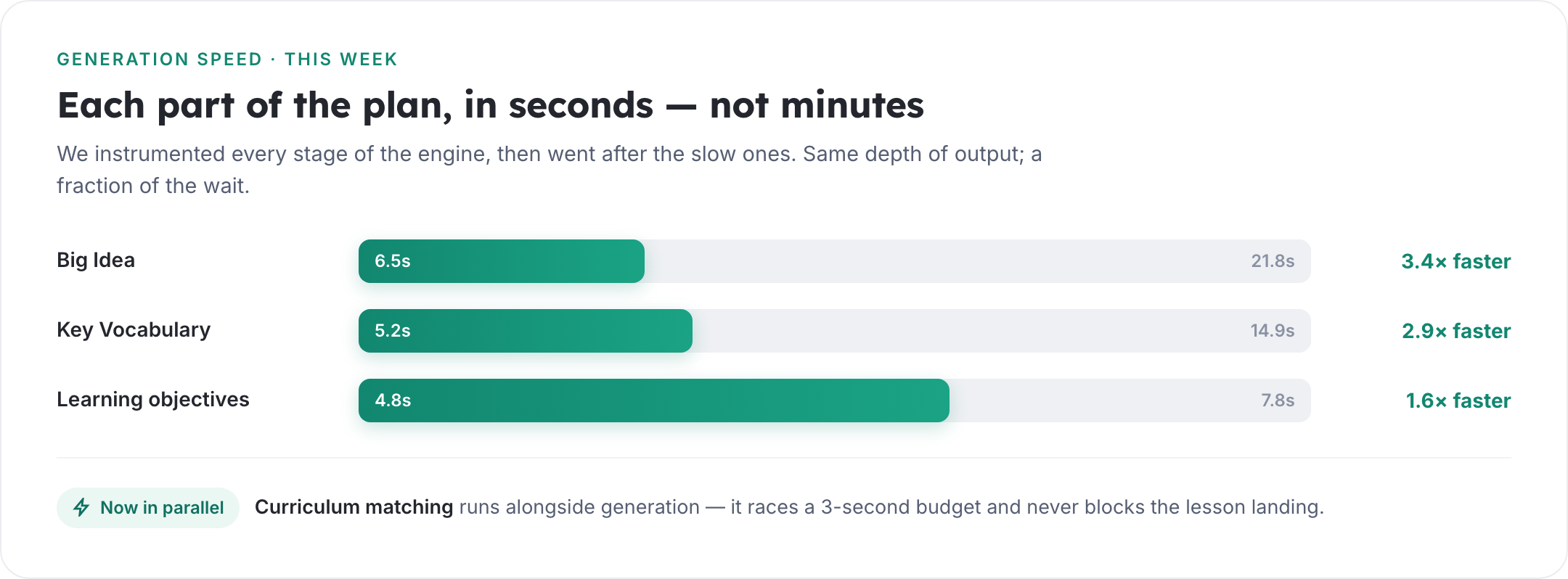
Generation is faster at every stage — the Big Idea step alone went from ~22 seconds to under 7.
Curriculum matching now runs in parallel, so finding the right statements never holds the lesson up.
Every learning objective is anchored to a curriculum statement, with the match shown.
Objectives are visualised as a journey up the Thinking Framework — from retrieval to higher-order thinking.
A redesigned panel tells you the prior knowledge a class needs before the lesson begins.
Generated in seconds, not minutes
This week was about speed. We instrumented every stage of the engine and rebuilt the slowest steps.
We consolidated the generators that produce the supporting parts of a lesson onto one shared, cached model, and let the curriculum match run alongside the rest of the work. The result: the same depth of output, in a fraction of the time.
Real timings from this week. Curriculum matching now races a three-second budget and never blocks the lesson landing.
It finds the curriculum, then matches every objective to it
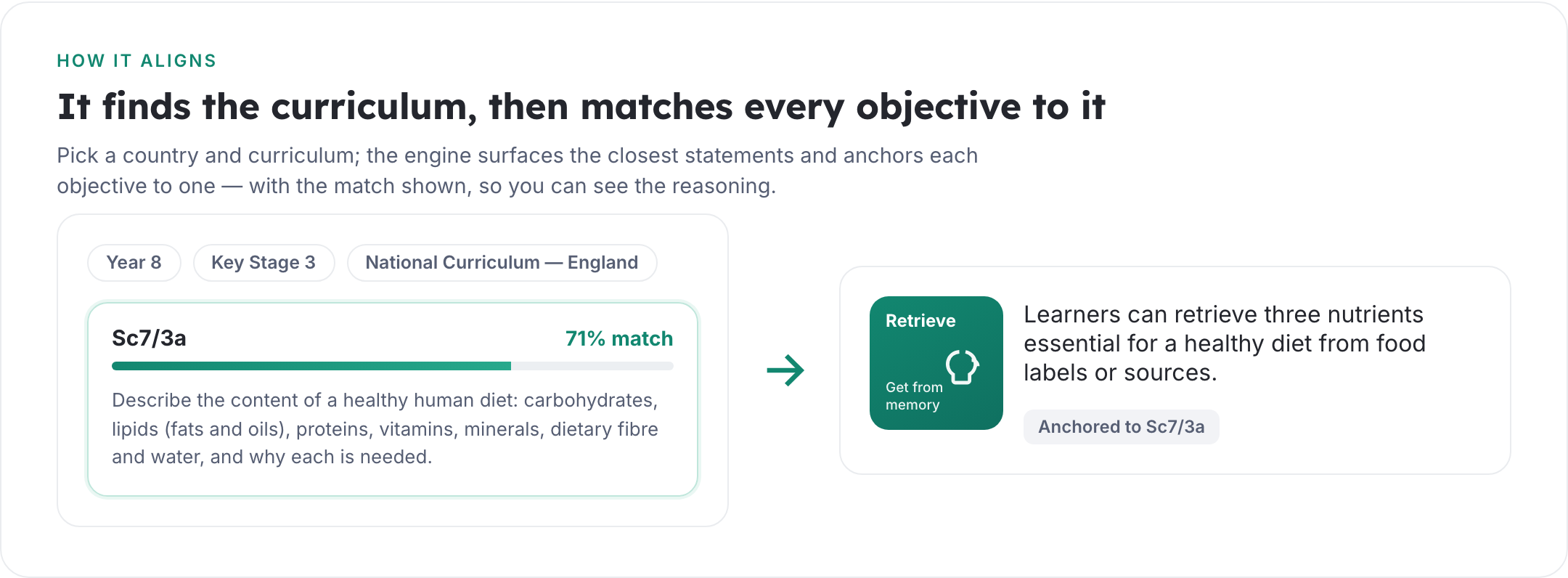
Choose your country and curriculum and the engine surfaces the statements that fit your topic, age phase and subject — the National Curriculum for England, Curriculum for Wales, Scotland's Curriculum for Excellence, the International Baccalaureate, Canadian curricula and more. It's the groundwork of sound curriculum design, done in seconds rather than an afternoon with the framework documents. Then it does the part that used to be invisible: it anchors each learning objective to a specific statement and shows you the match, so you can see the reasoning rather than take it on trust.
Each objective carries the curriculum code it's anchored to, with the strength of the match alongside it.
Objectives you can see — climbing the Thinking Framework
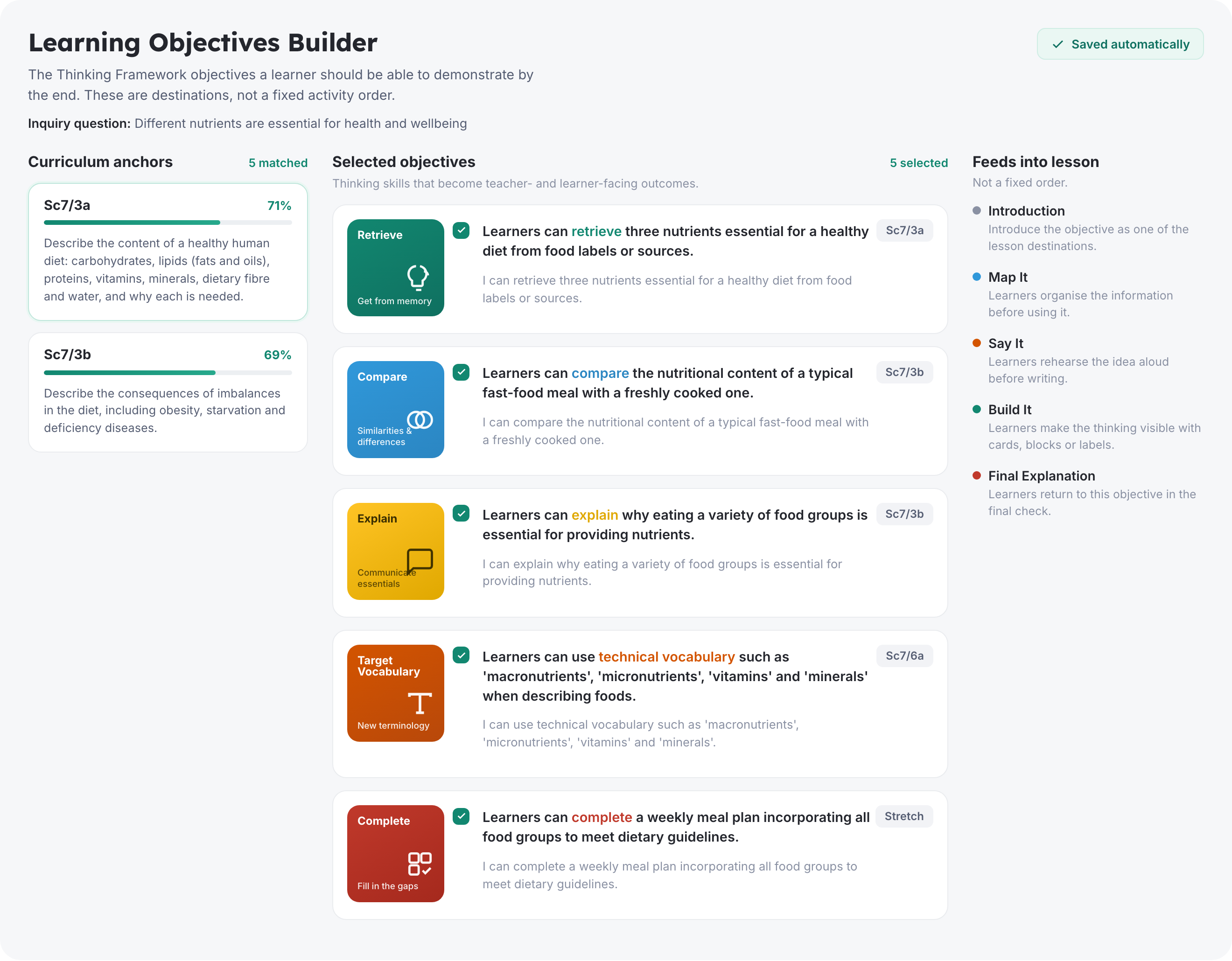
Instead of a flat list, the Learning Objectives Builder lays the lesson out as three connected columns: the curriculum anchors on the left, the objectives in the middle, and how each one feeds into the lesson on the right. The point is to make the reasoning visible — what you're teaching, where it comes from in the curriculum, and how it turns into classroom activity. (If you want the thinking behind what makes an objective work, our guide to writing effective learning objectives goes deeper.)
Each objective is a thinking skill that becomes a teacher- and learner-facing outcome — written once as "Learners can…" and once as the "I can…" statement you can put in front of a class. Read down the column and you'll see the lesson climb the Thinking Framework: a green Retrieve to get started, a blue Compare to organise ideas, a yellow Explain, the orange precision of Target Vocabulary, and a red Complete for stretch. The colours aren't decoration — they're the progression from foundational recall to higher-order thinking. The order matters: learners can't analyse or create with knowledge they haven't first recalled — the same principle behind cognitive load theory — so the objectives build from the ground up rather than starting at the top.
The Learning Objectives Builder. The objectives feed into the lesson through Map It, Say It and Build It — not a fixed order, but a set of destinations.
From here the objectives flow into the lesson through the three modes teachers work in, and each one is there for a reason. Map It organises information so it can be used. Say It rehearses ideas aloud so they're secure before anything is written down. Build It makes thinking visible with cards, blocks or labels, so learners arrange and generate their ideas before they commit them to the page — not as a craft activity, but because organising thinking first tends to produce better writing after. They're destinations, not a script; you stay in charge of the order.
Every step explains why it's there
A plan that only says what to do leaves the reasoning in someone's head. So each activity carries its rationale — why this task, why this mode, why at this point in the lesson — and when you print or export the lesson, that thinking comes with it. A teacher picking it up cold can see that Build It sits before the writing because learners need to organise and generate their ideas first, not because it adds variety. The intention is on the page: for the teacher planning, and where it helps, for the learners themselves.
A 30-second check before you begin
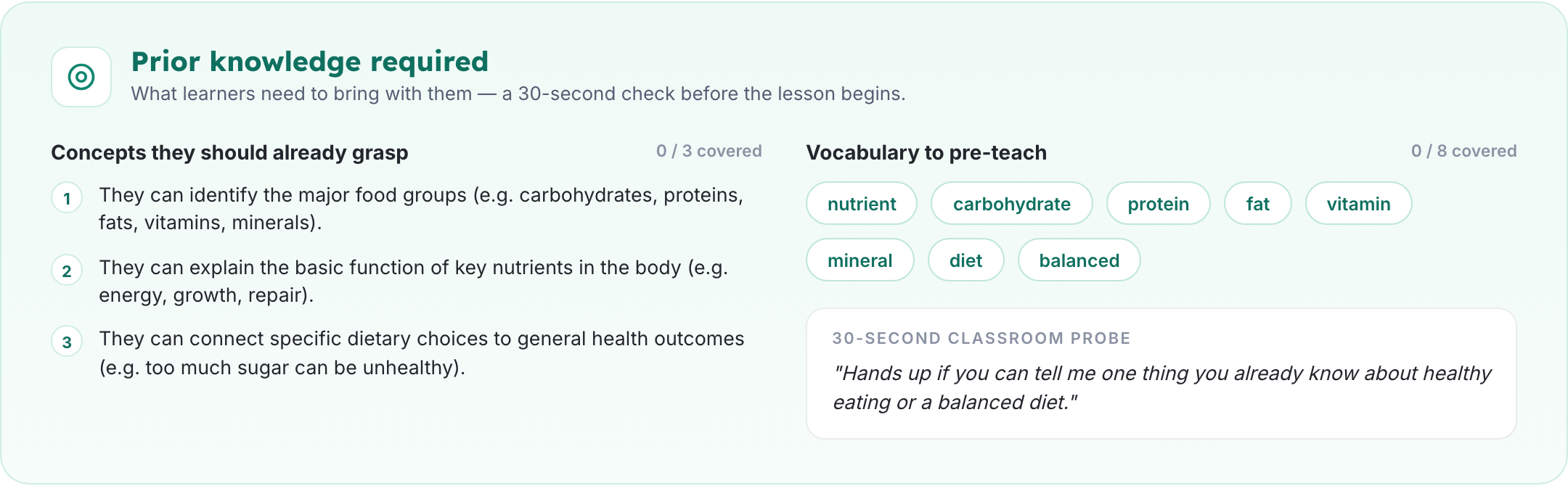
A plan is only as good as what learners bring to it. The redesigned prior-knowledge panel names the concepts a class should already grasp and the vocabulary worth pre-teaching, then hands you a single question to ask at the door — a 30-second probe to surface what's already there before you build on it.
Prior knowledge, surfaced automatically — concepts to check, vocabulary to pre-teach, and one question to open with.
What we're working on next
The roadmap hasn't changed, it's just getting shorter:
Imagery in lessons — diagrams, sketchnotes and visuals generated alongside the plan.
Cleaner exports — tidier printable packs and slide decks straight from the lesson.
A refinement loop — a "tweak this" step so you can shape the output after it lands.
Wider curriculum coverage — more curricula and finer-grained statement matching.
Try it on your next topic
Build a lesson and see it match the curriculum, lay out the objectives, and explain the reasoning behind each step. It's free to try, and we read every piece of feedback.