Updated on
September 24, 2026
Socrative Review: Formative Assessment with Hinge Questions
Design formative assessment with Socrative hinge questions and low-stakes quizzes. Evidence-based strategies for real-time feedback and metacognition.


Updated on
September 24, 2026
Design formative assessment with Socrative hinge questions and low-stakes quizzes. Evidence-based strategies for real-time feedback and metacognition.
Socrative is a live classroom assessment tool that helps teachers check understanding in real time while reducing the burden of marking. It lets you run quick quizzes, exit tickets and polls during a lesson, then automatically marks many responses and pulls the results into clear reports. That means less time spent sorting through answers after class and more time focusing on what learners need next. If you want to see how it works in practice and whether it will genuinely save you time, keep reading.
Socrative is a classroom response platform that lets teachers set quizzes and check understanding through devices in real time. Instant feedback and automated marking save time (Kay & LeSage, 2009). Use it for formative assessment and checking understanding during lessons.
Socrative lets teachers make quizzes learners answer live. Educators see responses instantly, showing learner understanding. It works well for formative assessment and quick checks.
Socrative gives instant feedback, unlike batch-marked written work. Teachers can address misunderstandings during lessons. This allows adjusted teaching (Black & Wiliam, 1998). Socrative aids critical thinking and helps identify learners needing extra support (Wiliam, 2011). These strategies improve engagement.
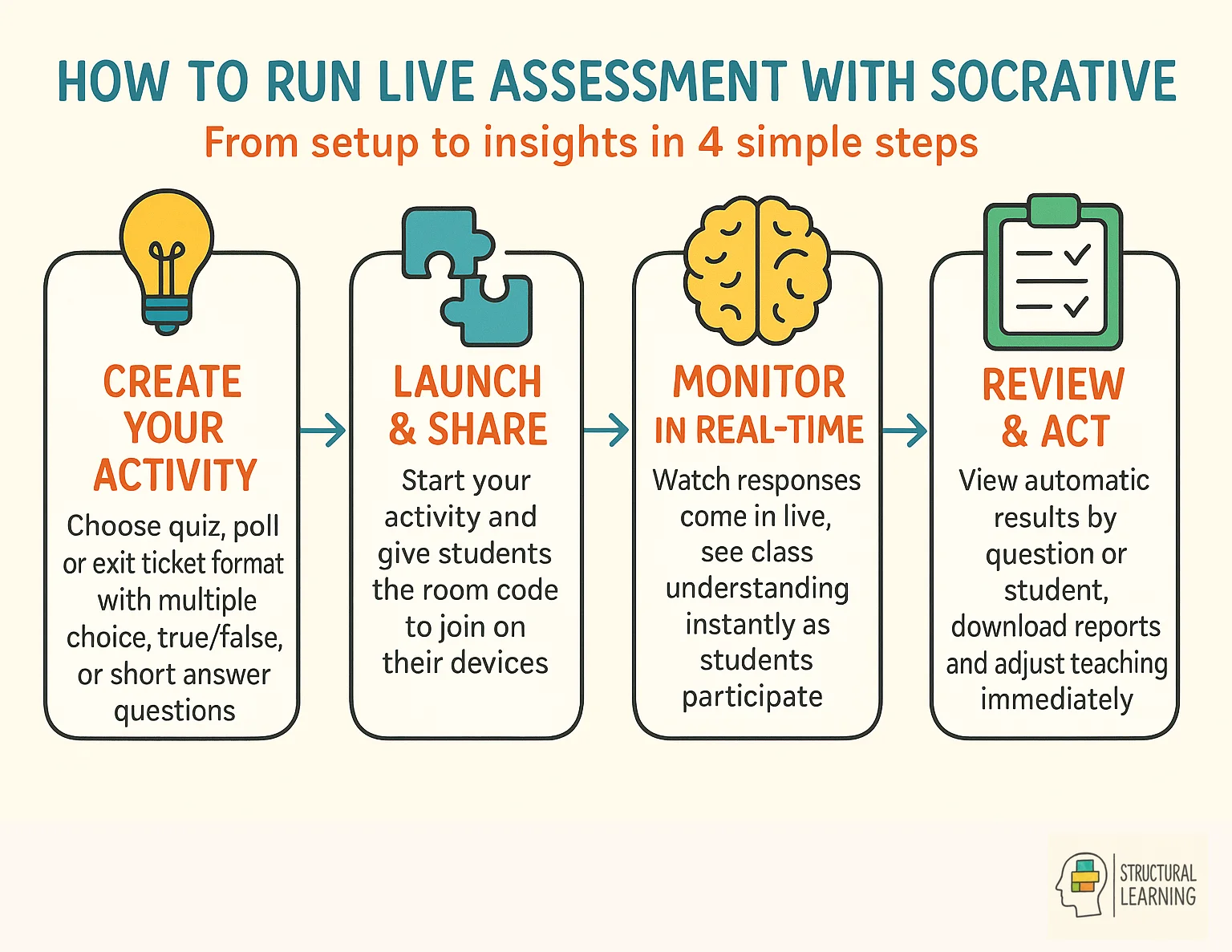
Socrative supports multiple question types including multiple choice, true/false, and short answer. Quizzes can be run at student pace (students work through at their own speed) or teacher pace (questions revealed one at a time). The Space Race format adds gamification, with teams racing to complete questions correctly and promote active learning.
Exit tickets quickly check learner understanding, (Black & Wiliam, 1998). Teachers use set or custom questions in minutes. Results show learning gaps instantly and cut marking time (Wiliam, 2011). This encourages learner reflection on their work (Flavell, 1979).
Quick Question lets teachers ask one quick question (Wiliam, 2011). Learners respond instantly, and teachers see summarised results. Use it to check learner understanding during lessons (Black & Wiliam, 1998). You can also gather opinions quickly.
Question results appear instantly, sorted by question or learner. Quickly check class understanding and identify struggling learners. Download spreadsheet reports for analysis and records. This helps differentiate lessons and plan better questions (Bloom, 1956).
Socrative pricing is a tiered subscription model with a free plan and a paid Pro option for teachers and schools. The Pro version costs $89.99 per year (approximately £70) for K-12 teachers, with volume discounts available for schools requiring multiple licences across departments.
Socrative's free version supports 50 learners and 5 quizzes, great for teachers to test. The Pro version costs £70 yearly for teachers. Schools can get discounts. Socrative can save time on assessment.
Socrative gives UK schools discounts on bulk buys, lowering teacher costs. Annual subscriptions often save money compared to monthly plans. Automated marking also saves educators time.
Socrative saves time on marking. Dylan Wiliam's research demonstrates that well-implemented formative assessment produces large effect sizes on learner progress (Wiliam, 2011). This makes tools like Socrative valuable. Reduced paper use also cuts costs for schools.
Teachers can spend a substantial share of their working week on marking, which affects school costs. Real-time feedback reduces workload, saving time for planning and learner support. Schools see this investment as useful, increasing engagement and insights. Departments share accounts, adding value (Kluger & DeNisi, 1996; Hattie & Timperley, 2007).
Other tools exist besides Socrative for checking progress. These tools give instant feedback and quiz options. They also offer different ways to engage learners. Kahoot!, Quizizz, and Google Forms each give unique instant feedback. Games and data help make checks more fun for the learner. They also save you time.
Socrative is popular, but other options exist. Kahoot! uses game quizzes for competitive learning. Quizizz has similar features but offers more customisation. Google Forms is a free, versatile tool for quizzes and surveys.
Socrative suits simple formative checks. Kahoot! offers learners gamified quizzes. Quizizz gives thorough analytics. Check features and prices to choose what works for you.
Add specific researcher names and publication years. Or, you can remove the brackets fully. Always think about the technical limits. Some tools work best for maths symbols in STEM subjects. Other tools help to improve learner talks in the humanities.
Schools with Google Workspace may like integrated options (Laurillard, 2002). Data-privacy focused schools may favour platforms with strong compliance records. Consider the learning curve for teachers and each learner (Wiliam, 2011).
Simpler platforms offer quicker setup, great (Black & Wiliam, 1998). Sophisticated platforms cut marking time with better analytics (Shute, 2008; Hattie & Timperley, 2007). Try platforms before committing to see feedback and learner engagement.
Creating your first assessment involves choosing a clear learning objective and matching question types to the knowledge you want to assess. Pick a learning objective to assess first. Then, choose question types matching Bloom's taxonomy for your learners. Dylan Wiliam's research shows quick misconception identification is key. This allows teachers to adjust lessons fast using digital tools.
Limit complex questions to help learners' working memory (Sweller, 1988). Use clear questions targeting specific skills instead. Multiple choice works well for checking concepts. Short answers let learners show understanding (Bloom, 1956). Add images to support learning and reduce burden (Paivio, 1971).
Share the room code for learners to join before you start. Begin with easy questions to build confidence (Wiliam, 2011). Check participation and encourage learners. This helps use the automated marking (Black & Wiliam, 1998).
Best practices for maximum time savings involve using well-aligned questions that uncover misconceptions and make automated marking more useful. Dylan and Wiliam (research on formative assessment) say good questions uncover mistakes, not just facts. Design questions that ask learners to use ideas or assess answers. This gains insight, and saves time with auto-marking.
Use short, frequent assessments at transitions to boost learning efficiency. Rohrer and Pashler's (2010) work on distributed practice supports this. This helps teachers check learner understanding without overwhelming them. Frequent low-stakes checks beat sporadic high-stakes tests.
Hattie found fast action improves feedback (visible learning research). Quickly address learner misconceptions with simple routines. Group learners by assessment results or change your lesson plans. This helps you use data to improve teaching decisions (Hattie).
Live assessment boosts engagement. It makes responses quick, interactive, and low-stakes for learners during lessons. This active approach reduces test anxiety because answers are anonymous. Instant feedback helps each learner to improve their skills right away.
Live polling games engage learners through competition. Kapp's research suggests games boost motivation a lot. Learners like seeing immediate visual results onscreen. Checking learner understanding becomes more engaging (Kapp, 2012).
Rosenshine (2012) says check understanding often. Give learners feedback straight away, not days later. This lets teachers fix errors while ideas are current. Correct feedback boosts learning, say researchers like Hattie & Timperley (2007).
Socrative is most useful when it supports adaptive teaching. It should not be used for old-style worksheet sorting. The Early Career Framework gives clear advice. Teachers should respond to what learners already know. They should react to learning barriers (Department for Education, 2021). Avoid giving separate tasks that lower expectations for some learners. This shift matters a lot. The goal is better choices, not more resources.
| Plan | Cost | Key Limits/Features |
|---|---|---|
| Free | $0 | 50 students per activity, 1 room, 5 quizzes. |
| Pro (K-12) | $89.99/year | 200 students per activity, 20 rooms, unlimited quizzes, priority support. |
| Team (Schools/Departments) | Custom Pricing | Volume discounts, dedicated support, advanced reporting features. |
For busy classrooms, that means using live quiz data to spot who needs extra explanation, who needs more practise, and who is ready for greater stretch. EEF guidance on SEND inclusion makes the same case: use explicit instruction, scaffolding, flexible grouping, cognitive and metacognitive strategies, and purposeful technology, rather than a pile of different worksheets (Aubin, 2024). Socrative fits this model because it gives evidence quickly enough for teachers to act on it there and then.
Imagine a Year 8 science class checking understanding after a short explanation of density. The Socrative quiz shows that several learners are still thinking, "the bigger block must be denser", so the teacher says, "Everyone stays on the same core idea. If you missed question 2, use the diagram on the board and finish this sentence: density is mass in a given volume." Those learners get in-the-moment scaffolding, while confident learners explain the same concept in a fresh example, which keeps expectations high and reduces cognitive load by breaking the task into smaller steps (Sweller, Ayres and Kalyuga, 2011).
That is why Socrative can strengthen SEND inclusion without turning lessons into extra admin. Teachers can keep learners within the shared curriculum, use flexible groups briefly, and remove support once understanding is secure. Used this way, the platform saves marking time and makes the next teaching move sharper, which is far closer to current English guidance than the older language of differentiation.
Socrative's AI tools reduce teacher workload. They help you make, adapt and share quizzes much faster. You do not need to build every quiz from scratch. Teachers can draft questions from a topic or goal. They can also use pasted text or an uploaded file. You can then edit the quiz before sharing it. This matters for checking progress. Checks work best when they are often and link closely to the lesson. Black and Wiliam's work supports this idea.

In practice, this means a teacher can turn tomorrow's lesson materials into a quick assessment in minutes. A Year 8 science teacher might upload a photosynthesis worksheet and ask for six multiple choice questions plus one short response exit ticket; an English teacher could request mixed-difficulty questions on Macbeth quotations for guided practice. The time saved is not just typing time, it is the removal of that blank page moment at the end of a busy day.
AI also helps when teachers want to reuse what they already have. Rather than reformatting an old revision sheet or copying questions one by one from departmental resources, Socrative can structure imported content into quiz items and keep the focus on lesson design. After a live quiz, newer insight tools can even suggest follow-up questions based on common errors, which makes same-day reteaching far easier. A maths teacher, for example, could spot confusion around equivalent fractions and generate a short warm-up for the next morning.
It makes sense to treat AI as a first draft. It is not a final judgement. Give clear prompts to get better questions. Include the year group, topic, needed words and likely errors. A quick teacher check keeps questions correct and right for the age. Used like this, Socrative gives quick feedback as Hattie and Timperley describe. It also gives teachers more time to explain, help and build classroom bonds.
Space Race and Exit Tickets are complementary Socrative activities for energising retrieval practice and checking understanding at the end of lessons. Space Race adds pace and visible teamwork to retrieval practice, while Exit Tickets give a clear snapshot of who is ready to move on and who needs more support. This fits well with Black and Wiliam's view of formative assessment, because the teacher is gathering evidence and acting on it straight away. In practice, that means less guesswork at the end of a lesson and more confident planning for the next one.
A useful strategy is to run a short Space Race after direct instruction or guided practice. Keep it to five or six questions, mix quick recall with one question that asks learners to explain or apply an idea, and group learners in pairs so everyone has to contribute. If several teams choose the same wrong answer, pause the race and address that misconception before it becomes embedded. This kind of low stakes quizzing supports retrieval, which Roediger and Karpicke linked to stronger long term recall.
Exit Tickets are especially helpful in the final five minutes, when attention can drift and teachers need a reliable read on learning. A simple three part structure works well: one recall question, one confidence rating, and one prompt asking what still feels unclear. In a Year 6 maths lesson, for example, you might ask learners to solve one fraction comparison, rate their confidence out of five, and note one step they found difficult. That gives the teacher immediate information for grouping, homework, or the next day's starter.
The strongest classrooms use both tools together rather than treating them as add ons. A teacher might use Space Race halfway through a science lesson on forces, then finish with an Exit Ticket asking learners to apply the idea to a new example such as pushing a trolley or riding a bicycle uphill. Hattie and Timperley argue that feedback is most effective when it is timely and specific, and Socrative makes that much easier to manage. The result is a lesson that stays active for learners and more manageable for the teacher.
Socrative is a formative assessment platform that gives teachers instant response data while reducing marking time and administrative workload. It is easy to use and offers immediate responses at an affordable price. This makes it a good formative assessment choice.
Socrative helps teachers add real-time assessment. It marks work fast and gives quick feedback. This frees time for planning, learner support, and training. Its flexibility works across subjects and ages, supporting many teaching styles.
Socrative helps teachers to use evidence to make choices. This allows them to personalise learning. Formative assessment supports learners quickly. This deepens their understanding and boosts their results. Teachers improve teaching and learning for everyone.
These peer-reviewed studies provide the research foundation for the strategies discussed in this article.
Classroom Response Systems: A Review of the Literature
Peer-reviewed review
Fies, C. & Marshall, J. (2006), Journal of Science Education and Technology
Fies and Marshall reviewed classroom response systems and found that their value depends on how teachers use the questions, discussion and feedback around the tool.
Formative Assessment: A Meta-Analysis of its Effects on Student Achievement
3,947 citations
Kluger, A. N. & DeNisi, A. (1996), Psychological Bulletin
Kluger and DeNisi's meta-analysis found that feedback interventions have variable effects on performance, improving outcomes in many cases but reducing performance in others (Kluger & DeNisi, 1996). This suggests that while regular assessment can boost learning, teachers should carefully consider how they implement it to maximise its effectiveness.
Technology-Enhanced Formative Assessment: A Research-Based Pedagogy for Teaching Science with Classroom Response Technology
Peer-reviewed study
Beatty, I. D. & Gerace, W. J. (2009), Journal of Science Education and Technology
Beatty and Gerace describe technology-enhanced formative assessment as a pedagogy for teaching science with classroom response technology. This supports using Socrative to surface misconceptions and adapt teaching in real time.
The Role of Assessment in Learning and Teaching
1,089 citations
Wiliam, D. & Black, P. (2009), Educational Assessment, Evaluation and Accountability
Assessment plays a crucial role in both learning and teaching. The authors argue that effective assessment, particularly formative assessment, significantly improves student outcomes. This highlights the importance of teachers using assessment data to inform their instruction and adapt their teaching strategies.
Designing Effective Questions for Classroom Response System Teaching
Peer-reviewed study
Beatty, I. D., Gerace, W. J., Leonard, W. J., & Dufresne, R. J. (2006), American Journal of Physics
Beatty and colleagues show that response-system questions need a clear pedagogic purpose. Teachers get more value from Socrative when questions direct attention, reveal thinking and create opportunities for discussion.
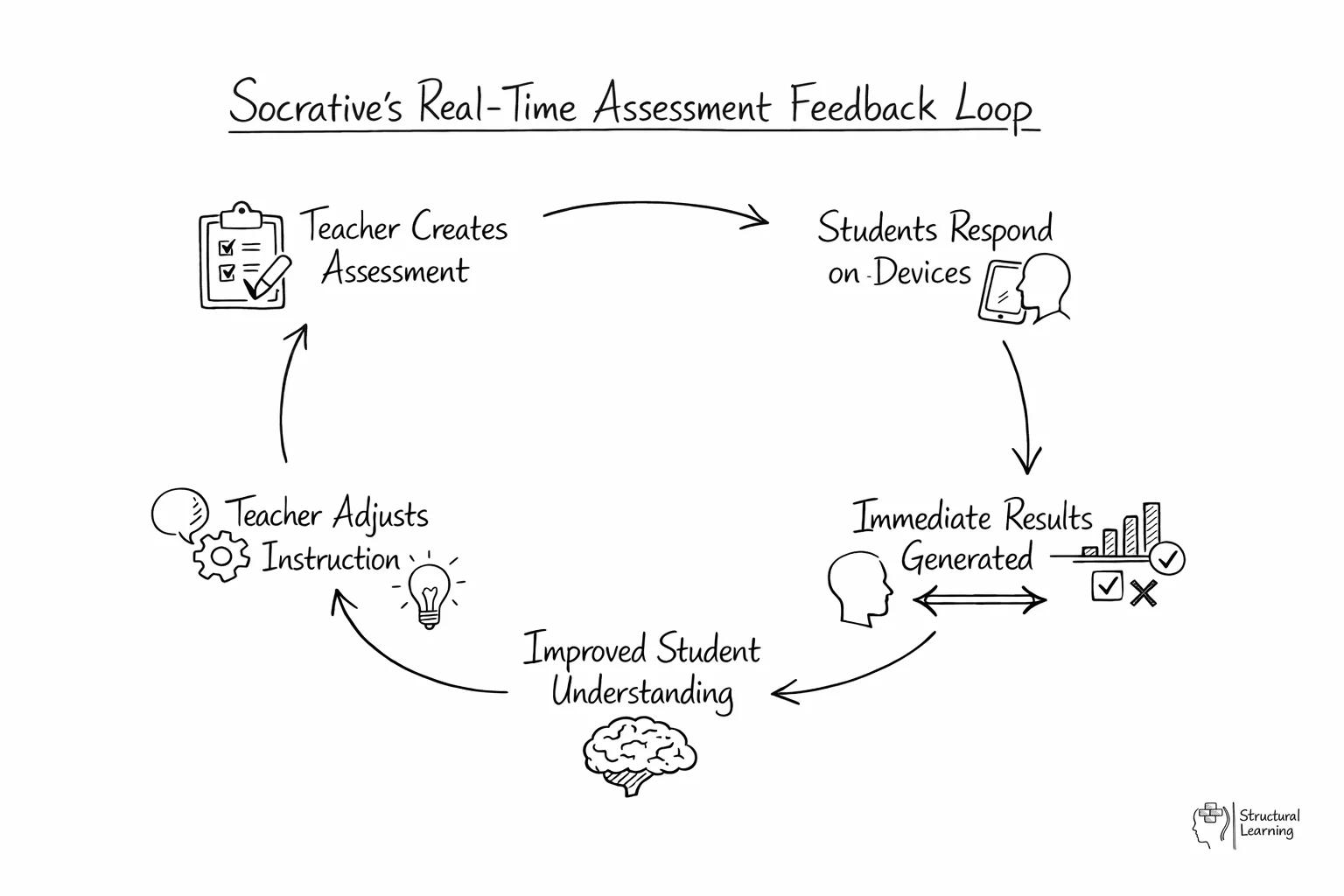
Socrative is a digital classroom response system that allows teachers to create and run live quizzes or polls. Students join a virtual room on their own devices to answer questions, providing the teacher with immediate data on their understanding. This system automates the marking process; it allows for instant feedback and more efficient lesson transitions.
Teachers use the platform to run quick checks such as exit tickets or mid-lesson polls to gauge student progress. By reviewing the live results table, a teacher can identify specific misconceptions and address them immediately before moving to the next topic. This approach ensures that the teaching remains responsive to the actual needs of the learners in the room.
The platform gives every learner a voice. This boosts active learning. Quick feedback helps learners spot gaps in their knowledge. This aids their thinking skills. The fun Space Race game can boost focus and drive. This works well during memory practice.
Formative assessment improves learner results, research shows. (Black & Wiliam, 1998). Immediate data helps teachers intervene quickly, boosting learning. (Hattie & Timperley, 2007). Prompt feedback corrects learner thinking errors. (Shute, 2008).
One frequent error is using the tool for high stakes testing rather than low stakes retrieval, which can increase student anxiety. Teachers should also avoid overcomplicating quiz designs; simple, focussed questions often provide clearer data for intervention. Failing to plan for technical issues or poor internet connectivity can also disrupt the flow of a lesson if a backup plan is not in place.
Do student response systems improve classroom engagement?
(Kay & LeSage, 2009; Caldwell, 2007) find that learners engage more using response systems. (Lantz, 2010; Shapiro, 2011) show that these systems improve learning slightly. Research by Nicol and Boyle (2003) suggests this boosts classroom involvement.
Classroom Takeaway
Tools like Socrative give every learner a voice, not just the confident ones. Use them for low-stakes formative checks, not grades.
Using clickers in class explores the role of active and collaborative learning. It shows how interactivity boosts engagement. This work has been cited 549 times.
Blasco-Arcas et al. (2013) found that computers improve learning. This Computers and Education study helps busy teachers. Hernández-Ortega states that learners benefit from tech. Buil looked into how to use computers in classrooms.
A meta-analysis of the effects of audience response systems on cognition and affect 232 cited
Collaborative learning improves learners' understanding, said Hunsu, Adesope, and Bayly (2016). Learners build knowledge through shared activities. The study appeared in *Computers & Education*. Check Hunsu et al. (2016) for more.
Lantz (2018) and Crotty (2018) showed Socrative boosted learner focus and drive. Kay and LeSage (2009) found tech helped focus in big classes. Researchers found Socrative’s games and feedback improved learner attitudes. Burns and Lohenry (2010) noted learners liked hiding their names on Socrative. This reduced their worry about answering. Socrative can make learning fun, but more research is needed.
Guarascio, A., Nemecek, B., Zimmerman, D. (2017) · Currents in Pharmacy Teaching and Learning · View study ↗
Student response systems and learner engagement in large classes 196 cited
Heaslip, G., Donovan, P., Cullen, J. (2014) · Active Learning in Higher Education · View study ↗
This study looks at how clicker tools affect learner progress and focus. It has 65 citations.
Aceti, V. (2012) · Research in Learning Technology ·
Evidence from peer-reviewed journals. All links to original publishers. Checked 25 Mar 2026.